TL;DR
Signal says its latest app versions block screenshots and recordings by default on iPhones running iOS 27, and turn on Android screen security when an AI assistant tries to read the app. The controls have gaps, including Mac computers, notifications, files and the other person’s phone.
Signal has added default screenshot blocking on newer iPhones and an Android setting that activates when an AI assistant tries to read the app’s screen, aiming to limit access to private chats by operating-system agents. The changes, announced November 20, apply to specified app and operating-system versions, and Signal says the protections remain incomplete.

Get privacy and security gear delivered free with Prime
- Fast, free delivery on millions of items
- Prime Video, Amazon Music and more included
- Member-only deals all year
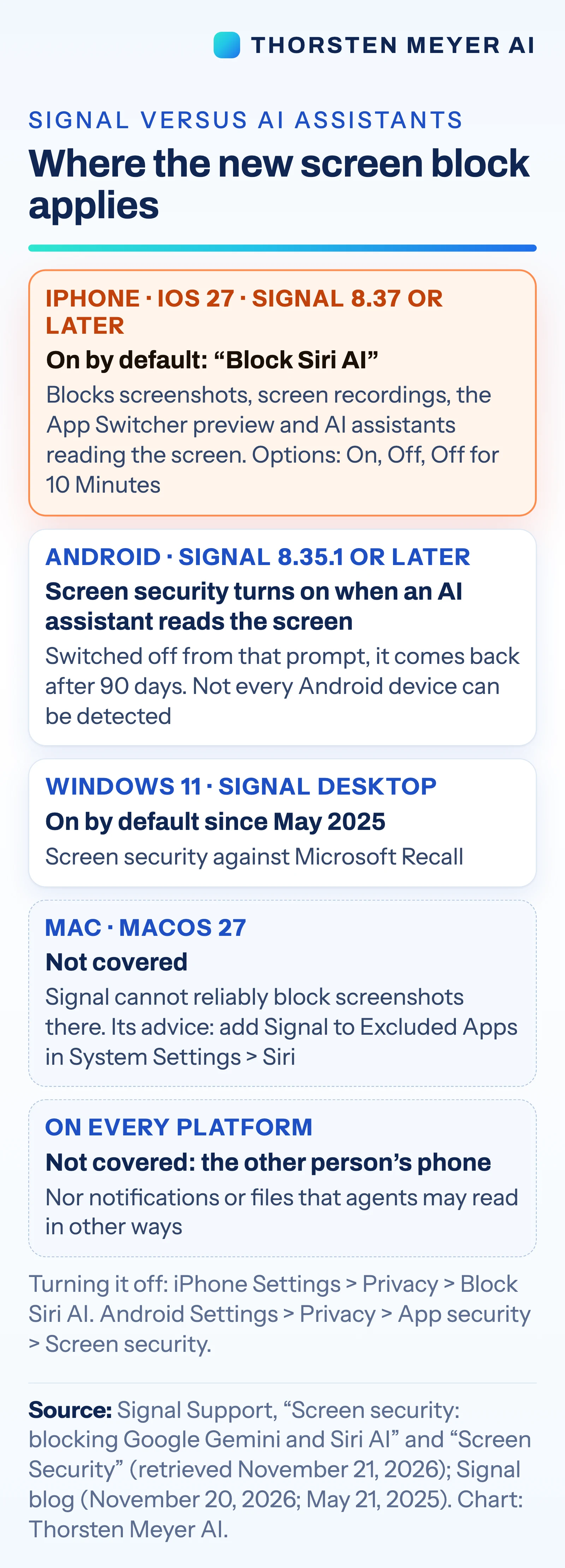
On iPhones running iOS 27, Signal 8.37 or later enables a setting called “Block Siri AI” by default, according to the company’s support page. Signal says it blocks screenshots and screen recordings in the app, hides chats in the App Switcher and stops on-device AI assistants from reading Signal’s screen. Users can change the setting under Settings → Privacy → Block Siri AI, choosing On, Off or “Off for 10 Minutes.”
On Android devices running Signal 8.35.1 or later, the “Screen security” setting turns on automatically the first time an AI assistant tries to read Signal’s screen. Users can find it under Settings → Privacy → App security → Screen security. Signal warns that turning the protection off may expose both a user’s chats and messages sent by their contacts to AI assistants.
The measures address a gap between message encryption and what appears on a device. Signal says its encryption protects messages as they travel between phones, but a device must display decrypted content for its owner to read. An assistant with screen access may then capture that content. Signal says captured data can leave its control and be stored in a local database or remote server used by the assistant.
Screen Access Tests Encryption’s Limits
The change highlights a limit of end-to-end encryption: it protects message contents in transit, but does not by itself prevent software with access to a recipient’s screen from seeing displayed text. Signal says the new settings restrict some such access, but its support material lists areas the controls do not cover. That distinction matters to people who use private messaging for sensitive conversations and may assume encryption protects content at every point.
For businesses deploying AI agents, the move signals that apps may restrict screen-reading features even when those agents are built into a phone’s operating system. Signal is asking Apple, Google and Microsoft for a simple, documented way for apps to opt out of AI data access. The source material does not describe a response from those companies.
Screen protections can also affect people who rely on accessibility tools, although the available material does not explain which tools may be affected or how users should manage that trade-off. Signal provides an option to switch the iPhone setting off temporarily or altogether, and a separate control on Android. Its warning makes clear that disabling protection could allow assistants to access chat content.
Products Worth Considering

Logitech MX Mechanical Mini for Mac Wireless Keyboard, Space Gray

Apple iPad 11-inch (A16), 128GB, Wi-Fi, Silver

Jackery Explorer 300 Portable Power Station, 292Wh
As an affiliate, we earn on qualifying purchases.
Signal’s Earlier Screen Protections
This is not Signal’s first effort to restrict screen capture. On May 21, 2025, the company enabled “Screen security” by default in Signal Desktop on Windows 11 to block Microsoft’s Recall feature from capturing chats. Signal’s footnote described Recall as taking screenshots every few seconds, extracting text with optical character recognition and storing it in a searchable on-device database.
The current update targets mobile operating-system assistants. Signal’s November 20 post, “Signal is Serious About Protecting Your Privacy,” says the company is restricting newer agents that may capture and store Signal data. Apple’s September 14, 2026, announcement described Siri AI as having “onscreen awareness” that can answer questions or take actions related to screen content. The supplied source material identifies Google’s Gemini Intelligence as another reason for the change but does not include details from Google’s announcement.
Reuters reported Signal’s move on November 20. The source material also says Reuters reported that Meta’s Muse agent read Signal messages through permissions granted during setup. That report is separate from Signal’s description of its own settings; the supplied material does not provide further details about the permissions or the reported access.
Protections Leave Several Gaps
Signal says it cannot reliably block screenshots on Mac computers. The listed limits also include Android devices where the company cannot detect the assistant, along with notifications and files. The protections operate on the user’s device; they do not apply to the phone belonging to the person receiving or sending the other end of a conversation.
The available material does not specify which Android assistants or device configurations Signal can detect, or how consistently the setting will activate across different phones. It also does not explain exactly how the new controls interact with accessibility tools. Signal’s support page and blog describe the intended behavior, but the supplied sources do not include independent testing of how well the protections work.
It is also unclear whether Apple, Google or Microsoft will provide the documented opt-out mechanism Signal is requesting, or whether other messaging apps will add similar controls. The source material gives no response from the companies and no details about planned changes to their assistants.
Signal Seeks Platform Opt-Outs
Signal says it is asking Apple, Google and Microsoft for a simple, documented way for apps to opt out of AI data access. The company has not set out a timeline for those discussions in the supplied material. For now, users can check the relevant privacy settings in Signal and decide whether to keep the protections enabled.
Further clarity will depend on platform responses and app behavior across supported devices. Signal’s current instructions describe the version requirements and settings, but do not establish how the protections perform on every phone or with every assistant. The company calls the approach incomplete, and its own list of exclusions identifies areas where screen capture or other access may still occur.
Key Questions
Which iPhones get Signal’s screenshot protection?
Signal says Signal 8.37 or later on iOS 27 or later enables “Block Siri AI” by default. The setting also hides chats in the App Switcher and blocks screen recordings, according to Signal’s support page.
How does the Android setting work?
On Signal 8.35.1 or later, “Screen security” turns on the first time an AI assistant tries to read Signal’s screen. Users can manage it under Settings → Privacy → App security → Screen security.
Can users turn the protections off?
Yes. On iPhone, users can choose On, Off or “Off for 10 Minutes” in the Block Siri AI setting. Android users can switch Screen security off in Signal’s App security settings. Signal warns that disabling it may expose chats to AI assistants.
What does the protection not cover?
Signal lists Mac computers, some Android devices, notifications and files among the gaps. The setting also protects only the device where it is enabled, not the other person’s phone.
Source: Thorsten Meyer AI