
Streaming setups get complicated quickly because you’re constantly balancing multiple technical components like encoding, audio mixing, and software integration. Making everything work smoothly requires fine-tuning settings, managing hardware limitations, and adjusting for internet stability. Adding new features or tools can also create conflicts and increase complexity. This interplay of elements makes maintaining a high-quality stream challenging. If you keep exploring, you’ll discover ways to simplify and optimize your workflow for better results.

Get privacy and security gear delivered free with Prime
- Fast, free delivery on millions of items
- Prime Video, Amazon Music and more included
- Member-only deals all year
Key Takeaways
- Adding new features and components increases setup complexity and interdependencies.
- Hardware limitations and performance bottlenecks make optimizing for quality and latency challenging.
- Multiple software tools and plugins often conflict, causing glitches and requiring extensive troubleshooting.
- Fine-tuning encoding, audio mixing, and scene transitions demands continuous experimentation.
- Evolving technology and updates necessitate frequent reconfiguration and learning.

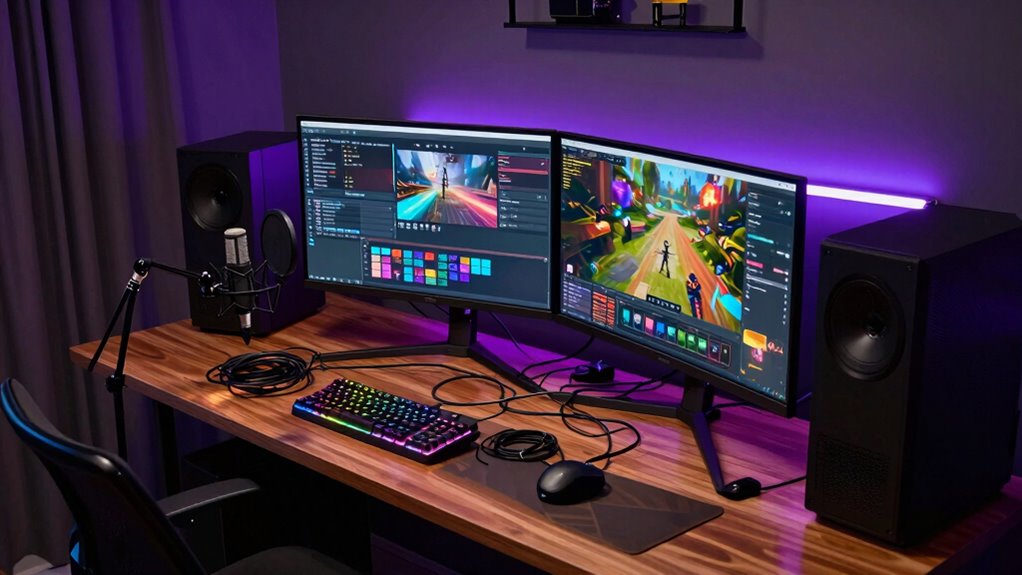
Streaming setups can become surprisingly intricate, especially as you try to improve quality and add new features. When you start, it seems straightforward: connect your camera, set up a microphone, and hit “go.” But as you dig deeper, you realize there’s a whole world of technical decisions involved. For example, video encoding is essential. You need to choose the right codec and bitrate to balance quality and performance. If you push the bitrate too high, your stream might lag or buffer; too low, and the picture quality suffers. Finding that sweet spot requires experimentation and understanding how your hardware and internet connection handle encoding. It’s not just about selecting a preset—it’s about tailoring settings to your specific setup, which can quickly become overwhelming.
Audio mixing adds another layer of complexity. You might start with a single microphone, but soon you find yourself juggling multiple audio sources—music, game sounds, chat overlays, and voiceovers. Proper audio mixing ensures each element sounds clear and balanced, so your viewers get an engaging experience. This involves adjusting volume levels, applying filters, and sometimes even routing audio through external hardware or software. If you don’t get the mix right, viewers might struggle to hear your voice or be annoyed by background noise. The more sources you add, the more complicated it becomes to keep everything sounding just right. Plus, if your streaming software has noise suppression or audio delay features, you need to configure these carefully to prevent audio lag or distortion. Additionally, understanding video encoding can help you optimize your stream’s quality and stability. Moreover, familiarity with software integration is crucial to ensure all your tools work together smoothly without conflicts or lag. To manage this effectively, having a good grasp of hardware capabilities helps prevent bottlenecks and maintain performance. As you expand your setup, you’ll encounter the challenge of managing multiple software tools. You might use OBS or Streamlabs for streaming, but also need dedicated programs for video encoding and audio mixing. Integrating these tools smoothly isn’t always simple, especially if you’re trying to optimize latency and quality simultaneously. Each additional feature you add—like overlays, alerts, or scene switches—requires configuration and testing to ensure everything runs seamlessly. Any misstep can lead to technical glitches or degraded stream quality, making your setup seem more complicated than it actually is. Navigating this web of interdependent components can be daunting, but gaining a solid understanding of system compatibility can help streamline the process. In the end, what makes streaming setups become complicated isn’t just the number of components but the interplay between them. Video encoding must work efficiently with your hardware, while audio mixing ensures a pleasant listening experience. Balancing these elements requires patience and a willingness to learn, but once you have everything dialed in, your stream can look and sound professional. Still, it’s easy to get lost in the technical details, which is why many streamers find their setups evolving into complex systems pretty quickly.
As an affiliate, we earn on qualifying purchases.
Frequently Asked Questions
How Do I Choose the Right Streaming Software for My Setup?
To choose the right streaming software, consider software compatibility with your existing hardware and operating system. Opt for a user interface that feels intuitive and easy to navigate, especially if you’re new to streaming. Test different options by trying free versions or demos. Focus on features you need, like multi-streaming or overlays, and make certain your setup can handle the software smoothly to avoid complications later.
What Are the Common Hardware Bottlenecks in Streaming Systems?
Did you know that over 60% of streamers encounter hardware bottlenecks? When you upgrade your hardware, you might face system compatibility issues, which can slow down your stream or cause crashes. Common bottlenecks include CPU and GPU limitations, insufficient RAM, or slow storage. To avoid these problems, make sure your hardware upgrades are compatible with your system, and regularly check for performance issues to keep your streaming smooth and reliable.
How Can I Optimize Internet Speed for Smooth Streaming?
To optimize your internet speed for smooth streaming, focus on bandwidth management by prioritizing streaming traffic and limiting background downloads. Guarantee your network has redundancy by using a dual-router setup or backup internet sources, which maintains stability during outages. Regularly test your connection speed, upgrade your plan if necessary, and connect your streaming device via Ethernet for a more reliable, faster connection, reducing buffering and improving stream quality.
What Safety Precautions Should I Take With Complex Streaming Gear?
Think of your streaming gear as a delicate dance, where every move counts. You should prioritize fire safety by keeping flammable materials away from hot equipment, and guarantee electrical safety by using surge protectors and avoiding overloaded outlets. Regularly inspect cables for wear and keep your setup organized to prevent accidental disconnections. Taking these precautions helps prevent accidents, protects your equipment, and keeps your streaming environment safe and reliable.
How Do I Troubleshoot Audio and Video Synchronization Issues?
To troubleshoot audio delay and video lag, start by checking your streaming software’s sync settings and make sure your hardware drivers are up to date. Test your connection and reduce background processes that may cause lag. If issues persist, try adjusting the audio delay in your software or re-encoding settings. Regularly monitor your stream’s performance, and consider using sync tools or external mixers for precise control.
professional microphone for streaming
As an affiliate, we earn on qualifying purchases.
As an affiliate, we earn on qualifying purchases.
Conclusion
As you plunge into streaming, remember that your setup can easily become a tangled web of gadgets and cables. It’s like trying to tame a wild garden—initially simple but quickly growing out of control. Stay patient, plan ahead, and keep everything organized. With time, what once seemed like chaos will turn into a well-oiled machine, letting you focus on creating great content instead of battling the technical jungle. Keep at it—you’re building your streaming empire, one step at a time.
As an affiliate, we earn on qualifying purchases.
As an affiliate, we earn on qualifying purchases.
Halloween Picks
halloween
As an affiliate, we earn on qualifying purchases.