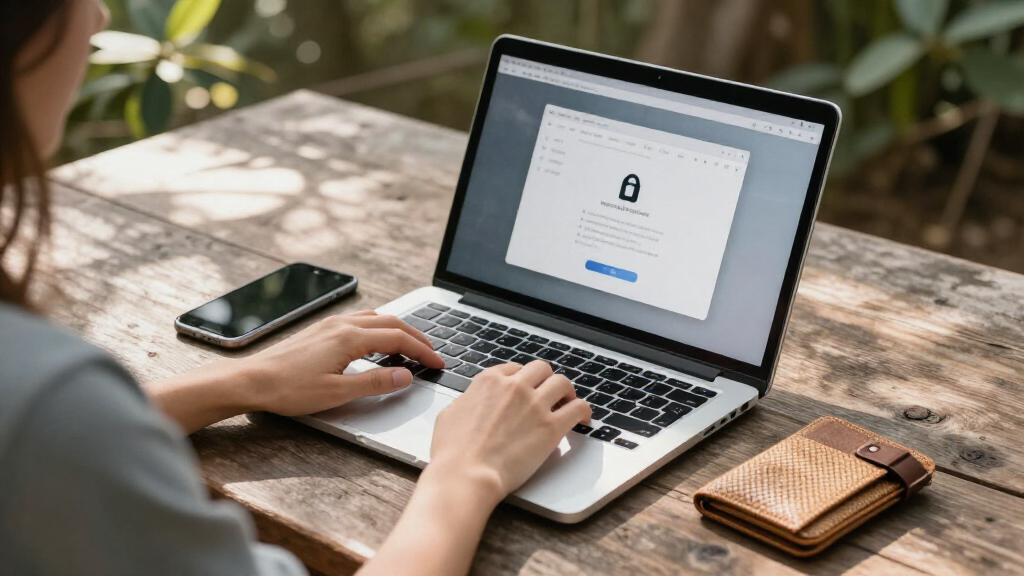

Privacy-focused laptop security comes in two forms here: physical privacy screens that block side-angle viewing, and software suites like Malwarebytes Premium that guard against digital threats. The Malwarebytes Standard plan stands out as the best overall pick because it’s the only option in this lineup that protects your data itself, not just your display, covering two devices across Windows, Mac, and mobile for a year. Among the physical filters, the Kensington MagPro 15.6-inch earns top honors for its premium magnetic attachment and trusted build, while the 2-Pack magnetic 15.6-inch filters deliver the best value if you outfit multiple machines or want a spare. The core tradeoff you’ll face is convenience versus coverage: magnetic filters pop on and off easily but cost more, while adhesive 360° filters from Peslv and F FORITO offer all-direction protection at lower prices with a permanent install. Read on for the full breakdown of all 13 options and which one fits your setup.

Get privacy and security gear delivered free with Prime
- Fast, free delivery on millions of items
- Prime Video, Amazon Music and more included
- Member-only deals all year
Key Takeaways
- Magnetic attachment (Kensington MagPro, SightPro, F FORITO magnetic) costs roughly 20-30% more than adhesive slides, but wins for shared or multi-user laptops where you’ll remove the filter often.
- Only one product in this roundup — Malwarebytes Standard — protects data rather than visibility; if your concern is hackers and malware rather than shoulder-surfers, software beats any screen filter.
- True 360° protection (Peslv 4-way, ZOEGAA) blocks viewing from all four sides but noticeably dims your own screen; standard 2-way filters from SightPro and Kensington are brighter for solo work.
- SightPro dominates variety with three size/feature configurations in this lineup, making it the easiest brand to match to a specific laptop model.
- Anti-glare and blue-light filtering come bundled on nearly every filter here, so the real differentiators are attachment method, viewing-angle coverage, and screen-size fit — not extras.
| Peslv 360° 4-Way Laptop Privacy Screen for 14 Inch Monitors |  | Best Privacy Coverage | Compatible Device: 14-inch laptops, 16:9 | Required Screen Width: 12 3/16 inches | Required Screen Height: 6 7/8 inches | VIEW LATEST PRICE | See Our Full Breakdown |
| F FORITO Magnetic Laptop Privacy Screen 15.6 inch 16:9 | 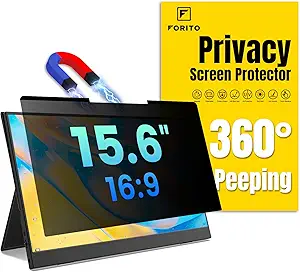 | Best for Convenience | Compatibility: 15.6-inch laptops, 16:9 | Width: 13 9/16 inches (345 mm) | Height: 7 5/8 inches (194 mm) | VIEW LATEST PRICE | See Our Full Breakdown |
| StarTech.com 14-inch 16:9 Laptop Privacy Screen with Reversible Gold Filter |  | Best Two-in-One Design | Compatibility: 14-inch laptops, 16:9 | Dimensions: 12.2 x 6.8 inches (31 x 17.4 cm) | Filter Technology: Microlouver | VIEW LATEST PRICE | See Our Full Breakdown |
| F FORITO 15.6 Inch Laptop Privacy Screen Protector, 360° Anti-Peeping and Anti-Glare Shield |  | Best Value Pick | Compatible Model: 15.6-inch laptops, 16:9 | Length: 13.6 inches | Width: 7.6 inches | VIEW LATEST PRICE | See Our Full Breakdown |
| 15.6 Inch Privacy Screen Filter for 16:9 Monitor 1920 x 1080 Resolution |  | Best Budget Option | Width: 13 9/16 inches (344 mm) | Height: 7 5/8 inches (194 mm) | Diagonal: 15.6 inches | VIEW LATEST PRICE | See Our Full Breakdown |
| SightPro Magnetic Laptop Privacy Screen 14 Inch 16:9 |  | Best Accessory Bundle | Diagonal Size: 14″ (355.6 mm) | Filter Dimensions: Width: 12 3/16″ (310 mm), Height: 6 7/8″ (175 mm) | Aspect Ratio: 16:9 | VIEW LATEST PRICE | See Our Full Breakdown |
| Peslv 15.6 Inch Laptop Privacy Screen for Computer Monitor |  | Best Eye Comfort | Dimensions: Width: 13 9/16″, Height: 7 5/8″, Diagonal: 15.6″ | Aspect Ratio: 16:9 | Blue Light Reduction: 92% | VIEW LATEST PRICE | See Our Full Breakdown |
| SightPro 15.6 Inch Laptop Privacy Screen Filter – Anti-Glare and Privacy Shield |  | Best Value | Filter Dimensions: Width: 13 9/16″ (345 mm), Height: 7 5/8″ (194 mm), Diagonal: 15.6″ | Installation Options: Adhesive strips, slide mount tabs | Features: Anti-glare, UV protection, blue light reduction, privacy filter | VIEW LATEST PRICE | See Our Full Breakdown |
| Malwarebytes Standard, Premium Security + VPN Software | 1 Year, 2 Devices |  | Best Digital Privacy Pick | Duration: 1 Year | Devices: 2 Devices | Platforms: Windows, Mac OS, Android, iOS, Chrome | VIEW LATEST PRICE | See Our Full Breakdown |
| Kensington MagPro™ Magnetic Laptop Privacy Screen 15.6 inch |  | Best Premium Build | Screen Size: 15.6 inch | Aspect Ratio: 16:9 | Width: 13.6 inch | VIEW LATEST PRICE | See Our Full Breakdown |
| SightPro Magnetic Laptop Privacy Screen 15.6 Inch 16:9 |  | Best Bundled Accessories | Diagonal Size: 15.6 inches (396.24 mm) | Filter Dimensions: 13 9/16″ W x 7 5/8″ H (345 x 194 mm) | Aspect Ratio: 16:9 | VIEW LATEST PRICE | See Our Full Breakdown |
| ZOEGAA 4-Way 360° Privacy Screen for 14-Inch Laptop, Anti-Glare and Blue Light Filter |  | Best All-Around Privacy Angle | Screen Size: 14 inches diagonal | Aspect Ratio: 16:9 | Width: 12 3/16 inches | VIEW LATEST PRICE | See Our Full Breakdown |
| 2-Pack Magnetic 15.6 Inch Laptop Privacy Screen, Anti-Blue/Glare Protector, Anti-Spy Filter for 16:9 Aspect Ratio |  | Best Value for Multi-Device Households | Size: 15.6 inches | Quantity: 2-pack | Aspect Ratio: 16:9 | VIEW LATEST PRICE | See Our Full Breakdown |
More Details on Our Top Picks
Peslv 360° 4-Way Laptop Privacy Screen for 14 Inch Monitors
This option stands out for its true 4-way privacy blocking, which obscures the screen from above and below as well as the sides — something most competitors in this roundup, including the F FORITO Magnetic 15.6-inch, only handle horizontally. That extra coverage makes the most sense for travelers working on planes or trains where neighbors sit at steep angles. Compared with the StarTech.com reversible filter, the Peslv also blocks blue light at a claimed 93% rather than roughly half that, a meaningful difference for long sessions. The tradeoff is fit discipline: the nano-silica adhesive layer demands exact screen measurements (12 3/16″ wide by 6 7/8″ tall), and a sloppy fit shows up as bubbles or visible edges. It also lacks the magnetic removability some rivals offer.
Pros:- True 4-way privacy blocking, including overhead angles
- Very high blue light reduction at a claimed 93%
- Bubble-free installation via nano-silica adsorption layer
- Scratch-resistant PET rated for 3 years of use
Cons:- Adhesive install is less convenient than magnetic options like F FORITO’s
- Strictly limited to one exact 14-inch screen size
Best for: Frequent travelers and commuters on planes or trains who need privacy from all angles, not just the sides
Not ideal for: Anyone unwilling to measure their screen precisely — the adhesive fit leaves no room for guesswork
- Compatible Device:14-inch laptops, 16:9
- Required Screen Width:12 3/16 inches
- Required Screen Height:6 7/8 inches
- Aspect Ratio:16:9
- Blue Light Blocking Rate:93%
- Privacy Coverage:360° 4-way
- Anti-Glare Layer:German imported
- Material:PET with nano-silica adsorption layer
- Durability Rating:3 years
Our verdict“If people look at your screen from odd angles more often than they should, this is the filter that covers what others miss.”
F FORITO Magnetic Laptop Privacy Screen 15.6 inch 16:9
The headline here is the magnetic attachment system, which lets you pop the filter on for a coffee-shop session and off at home in seconds. Compared with adhesive-based picks like the Peslv 4-way or F FORITO’s own adhesive 15.6-inch model, that flexibility is the whole point — no residue, no permanent dimming when you don’t need privacy. The 360° anti-peep layer and blue light filtering match the standard set by the rest of this lineup. The compromise? Because the filter sits on magnets, some laptops won’t close fully flat with it attached, and like most privacy film it does nothing against someone positioned directly behind you. Buyers who need privacy only occasionally get the most from this design; permanent-mount shoppers should look elsewhere in this guide.
Pros:- Tool-free magnetic installation and removal
- 360° privacy plus anti-glare and blue light filtering
- No adhesive residue when removed
- Scratch-resistant construction
Cons:- Laptop lid may not close completely with filter attached
- No protection against viewing from directly behind
Best for: Hybrid workers who want privacy on demand in cafés and airports but a bare screen at home
Not ideal for: Users who keep their laptop bagged or closed frequently — the magnetic frame can prevent full closure
- Compatibility:15.6-inch laptops, 16:9
- Width:13 9/16 inches (345 mm)
- Height:7 5/8 inches (194 mm)
- Diagonal:15.6 inches
- Installation:Magnetic, easy attach/remove
- Features:360° privacy, anti-glare, blue light filter, scratch-resistant
Our verdict“This is the pick when flexibility matters more than maximum blocking power.”
StarTech.com 14-inch 16:9 Laptop Privacy Screen with Reversible Gold Filter
Most filters in this roundup force a single choice between privacy strength and glare control. This one splits the difference with a reversible gold glossy side for maximum privacy and a matte side for bright-environment readability — flip it depending on where you’re working. Compared with the Peslv 4-way, the tradeoffs are honest: blue light reduction tops out near 51% rather than Peslv’s 93%, and 60% transmittance means the front view is dimmer than an unfiltered screen, so you may nudge up brightness and battery drain. Where StarTech pulls ahead is polish and support: it’s a dedicated accessory brand with clear documentation, and installation with the included adhesive strips is straightforward. Just note that extra mounting hardware is sold separately, which adds cost if the strips don’t suit your setup.
Pros:- Reversible glossy-gold and matte sides for different environments
- Microlouver technology obscures side viewing angles
- Blue light reduction up to 51%
- Simple installation with included adhesive strips
Cons:- Additional mounting parts sold separately
- Lower blue light blocking than Peslv’s 93%
- 60% transmittance noticeably dims the front-on view
Best for: Office workers who alternate between dim meeting rooms and bright open-plan desks and want one filter for both
Not ideal for: Buyers prioritizing maximum eye-strain relief — its blue light reduction trails cheaper rivals like Peslv
- Compatibility:14-inch laptops, 16:9
- Dimensions:12.2 x 6.8 inches (31 x 17.4 cm)
- Filter Technology:Microlouver
- Blue Light Reduction:Up to 51%
- Transmittance:60%
- Design:Reversible glossy gold / anti-glare matte
- Installation:Adhesive strips included
Our verdict“Two filters in one makes this the smart choice for people whose lighting changes more than their laptop does.”
F FORITO 15.6 Inch Laptop Privacy Screen Protector, 360° Anti-Peeping and Anti-Glare Shield
This is the workhorse option: the same 360° anti-peeping, anti-glare, and blue light filtering as F FORITO’s magnetic version, but at a lower price with an adhesive mount instead of magnets. Compared with its magnetic sibling, you give up tool-free removability and gain a slimmer, ultra-thin profile that sits closer to the glass. Against the 15.6-inch generic filter later in this roundup, it stacks up well on coverage and durability, though both share the same honest weakness: privacy film dims the panel, and some buyers notice slightly reduced brightness or front-view clarity. Fit is the other catch — it’s built for 15.6-inch 16:9 panels measuring 13.6 by 7.6 inches, so measure first. For a permanently protected work laptop on a budget, this pick makes the most sense.
Pros:- 360° anti-peeping coverage at a lower price than magnetic rivals
- Combines anti-glare and blue light filtering
- Scratch-resistant for long-term daily use
- Ultra-thin design sits close to the display
Cons:- Adhesive mount means no quick removal for shared screens
- May slightly reduce brightness or clarity viewed head-on
- Requires verified screen measurements before purchase
Best for: Budget-conscious office workers or students who want set-and-forget privacy on a 15.6-inch laptop
Not ideal for: Anyone who shares the laptop with media or design work where any front-view dimming is unacceptable
- Compatible Model:15.6-inch laptops, 16:9
- Length:13.6 inches
- Width:7.6 inches
- Diagonal:15.6 inches
- Material:Durable, scratch-resistant
- Features:360° anti-peeping, anti-glare, anti-blue light
- Design:Ultra-thin
Our verdict“The most sensible balance of price and protection if you don’t need removable magnetic convenience.”
15.6 Inch Privacy Screen Filter for 16:9 Monitor 1920 x 1080 Resolution
At the entry-level end of this guide, this filter covers the fundamentals — side-view privacy, blue light reduction, and screen protection — without the premium touches of the StarTech reversible model or the 4-way coverage of the Peslv. The blue light block sits at 30%, roughly a third of what Peslv claims, so eye-strain relief is modest rather than dramatic. Its real advantage is mounting choice: a slide-on/off design plus permanent mounting options give it more installation flexibility than adhesive-only rivals at similar prices. The compatibility list is strict, though — it won’t work with touchscreens or 16:10 panels, which rules out many modern laptops with taller displays. For an older 16:9 machine used mainly in public spaces, this pick gets the job done for less.
Pros:- Effective side-view privacy for 15.6-inch 16:9 screens
- Flexible slide-on/off or permanent mounting
- Also shields the screen from dust and scratches
- Lowest-cost entry point in this category
Cons:- Only 30% blue light blocking — the weakest in this roundup
- Incompatible with touchscreen laptops
- Does not fit 16:10 aspect ratio displays
Best for: Owners of older non-touch 15.6-inch laptops who want basic public-space privacy at the lowest possible cost
Not ideal for: Touchscreen or 16:10 laptop owners — the filter simply won’t work with either
- Width:13 9/16 inches (344 mm)
- Height:7 5/8 inches (194 mm)
- Diagonal:15.6 inches
- Aspect Ratio:16:9
- Resolution Fit:1920 x 1080
- Blue Light Block:30%
- Installation:Slide-on/off or mounted
Our verdict“A no-frills privacy shield that trades eye-comfort specs and compatibility breadth for a bottom-dollar price.”
SightPro Magnetic Laptop Privacy Screen 14 Inch 16:9
This option stands out for what comes in the box beyond the filter itself: a webcam cover, cleaning cloth, and storage folder, which makes it a smart pick for buyers building out a full privacy kit in one purchase. Compared with the StarTech.com 14-inch privacy screen, which focuses purely on the reversible filter, the SightPro package covers physical privacy holistically — screen and camera together. The magnetic attachment also means no adhesive residue, unlike the Peslv 15.6-inch model’s tape-based install. The tradeoff is modest: it’s not touchscreen-friendly, and skipping the dimension check before ordering is a common mistake since “14 inch” isn’t a universal fit across brands.
Pros:- Magnetic attachment installs and removes in seconds with no adhesive residue
- Strong side-view privacy plus UV and blue light reduction
- Includes webcam cover, cleaning cloth, and storage folder
- Easily shared between laptops of matching size
Cons:- Not optimized for touchscreen laptops
- Fit depends on exact screen dimensions, not just the 14-inch diagonal
Best for: Frequent travelers and remote workers at coffee shops or coworking spaces who want screen and webcam privacy covered in a single purchase
Not ideal for: Touchscreen laptop owners — the magnetic filter interferes with touch input and isn’t designed for it
- Diagonal Size:14″ (355.6 mm)
- Filter Dimensions:Width: 12 3/16″ (310 mm), Height: 6 7/8″ (175 mm)
- Aspect Ratio:16:9
- Attachment:Magnetic
- Compatibility:Lenovo, HP, Dell, Acer, Asus, Samsung, other 14-inch laptops
- Extras:Webcam cover, cleaning cloth, storage folder
Our verdict“This is the pick for anyone who wants a complete physical privacy bundle for a 14-inch laptop rather than just a filter.”
Peslv 15.6 Inch Laptop Privacy Screen for Computer Monitor
Where most filters in this roundup treat blue light reduction as an afterthought, the Peslv makes it a headline feature: 92% blue light and 98% UV reduction, the strongest optical-protection numbers here. That’s a meaningful difference for buyers whose eyes fatigue during long sessions in bright offices or airports — Kensington’s MagPro 15.6-inch, by comparison, cuts blue light by only up to 22%. The ±30° anti-peep angle matches the Kensington’s blackout zone, so privacy itself is comparable; what you give up is convenience. Installation relies on adhesive and mounting options rather than magnets, so swapping the filter between machines is fussier than with the SightPro 14-inch magnetic model. Buyers with non-standard screen frames should measure carefully before ordering.
Pros:- Industry-leading 92% blue light and 98% UV reduction
- Effective ±30° anti-peep blackout angle
- Multiple installation options for different setups
- Anti-glare surface suits bright environments
Cons:- Fit requires verifying exact screen dimensions before purchase
- Some users may prefer a true matte finish for glare control
- Adhesive-based install makes removal less clean than magnetic options
Best for: Students and office workers doing long hours in bright or public environments who care as much about eye strain as shoulder-surfing
Not ideal for: Laptops with unusual bezels or non-standard frames — the fit depends on exact dimensions matching
- Dimensions:Width: 13 9/16″, Height: 7 5/8″, Diagonal: 15.6″
- Aspect Ratio:16:9
- Blue Light Reduction:92%
- UV Light Reduction:98%
- Anti-Peep Angle:±30°
- Features:Anti-glare, blue light filter, anti-peep technology
Our verdict“The strongest choice in this lineup when eye comfort matters as much as visual privacy on a 15.6-inch screen.”
SightPro 15.6 Inch Laptop Privacy Screen Filter – Anti-Glare and Privacy Shield
This filter earns its spot by keeping the core promise — side-view blackout plus anti-glare — at a friendlier price than the Kensington MagPro while offering something Kensington doesn’t: two installation methods (adhesive strips or slide-mount tabs) so you can pick what suits your machine. The slide-mount route is handy if you frequently pop the filter off at home and reattach it in public, though it’s still less seamless than the pure magnetic approach of the SightPro 15.6-inch magnetic version. One honest limitation: like most filters here, it does nothing against someone directly behind you — for that, a 360° option like the ZOEGAA 4-Way is the better tool. It’s also a poor match for touchscreens.
Pros:- Two install options: adhesive strips or slide-mount tabs
- Reliable side-angle privacy plus UV and blue light reduction
- Effective anti-glare coating for varied lighting
- Lightweight and travel-friendly
Cons:- Does not block visibility from directly behind the user
- Not optimized for touchscreens
- Fit depends on careful measurement of screen size
Best for: Budget-conscious commuters and hybrid workers who want dependable screen privacy on a 15.6-inch laptop without paying premium prices
Not ideal for: Anyone needing rear-view privacy protection — this filter only blacks out side angles
- Filter Dimensions:Width: 13 9/16″ (345 mm), Height: 7 5/8″ (194 mm), Diagonal: 15.6″
- Installation Options:Adhesive strips, slide mount tabs
- Features:Anti-glare, UV protection, blue light reduction, privacy filter
- Compatibility:Lenovo, HP, Dell, Acer, Asus, Samsung, other laptops
- Use Case:Travel and open workspaces
Our verdict“A sensible, no-frills privacy filter that delivers the essentials for less, as long as side-angle protection is all you need.”
Malwarebytes Standard, Premium Security + VPN Software | 1 Year, 2 Devices
Every other product in this roundup guards your screen from physical eyes; this one guards your data from digital ones, and that distinction shapes where it belongs in a privacy toolkit. The bundle pairs real-time malware and scam protection with a no-log VPN using 256-bit AES encryption, plus ad and tracker blocking — effectively covering the online half of laptop privacy that no physical filter can touch. Compared with a screen filter like the Peslv or Kensington, the protection is broader but invisible: nothing to attach, but also nothing physically shielding your display in a café. Tradeoffs are real — the subscription can’t be merged with an existing Malwarebytes plan, features vary across platforms, and an always-on internet connection is required for full protection.
Pros:- Real-time protection against malware, viruses, and scam sites across Windows, Mac, Android, iOS, and Chrome
- No-log VPN with 256-bit AES encryption included
- Blocks ads, trackers, and malicious websites
- One license covers two devices across platforms
Cons:- Subscription cannot be combined with existing Malwarebytes plans
- Requires an active internet connection for full functionality
- Some features are limited on certain platforms
Best for: Privacy-minded professionals and small households wanting software-level protection — VPN, tracker blocking, and threat defense — for two devices across mixed platforms
Not ideal for: Buyers who already hold a Malwarebytes subscription, or anyone needing offline protection — the license can’t be combined and full features require constant internet
- Duration:1 Year
- Devices:2 Devices
- Platforms:Windows, Mac OS, Android, iOS, Chrome
- VPN Protocol:256-bit AES encryption
- VPN Logging:No-log policy
- Active Internet Required:Yes
Our verdict“The right choice for buyers who realize privacy means more than a dark screen — pair it with a physical filter for layered protection.”
Kensington MagPro™ Magnetic Laptop Privacy Screen 15.6 inch
Kensington is the brand most IT departments actually trust, and the MagPro reflects that pedigree with one standout design detail: the filter is thin enough that your laptop closes and sleeps without removing it — something adhesive-based options like the Peslv 15.6-inch or the SightPro anti-glare model can’t claim. That single feature removes the daily friction that makes many people abandon privacy filters within weeks. The magnetic attachment matches the convenience of the SightPro 14-inch magnetic pick but at the larger 15.6-inch size. The honest weakness is optics: blue light reduction tops out around 22%, far below the Peslv’s 92%, and the ±30° viewing angle can feel restrictive when sharing your screen legitimately. Measuring before buying is non-negotiable, as Kensington itself warns against choosing by diagonal alone.
Pros:- Laptop closes and sleeps with the filter attached
- Tool-free magnetic attachment and removal
- Trusted brand with strong enterprise track record
- Reduces glare and some blue light for eye comfort
Cons:- Blue light reduction of up to 22% is low compared with competing filters
- Restricted ±30° viewing angle limits legitimate screen sharing
- Must match exact dimensions — diagonal size alone isn’t a reliable guide
Best for: Daily commuters and open-plan office workers who want a set-and-forget filter that lives on the laptop permanently
Not ideal for: Buyers prioritizing eye-strain relief — its blue light reduction is modest compared with competitors like Peslv
- Screen Size:15.6 inch
- Aspect Ratio:16:9
- Width:13.6 inch
- Height:7.65 inch
- Viewing Angle:+/- 30 degrees
- Blue Light Reduction:Up to 22%
- Attachment:Magnetic
Our verdict“The premium pick for people who will actually keep a privacy filter on their laptop every day thanks to its zero-friction magnetic design.”
SightPro Magnetic Laptop Privacy Screen 15.6 Inch 16:9
What sets the SightPro Magnetic Privacy Screen apart from nearly every rival here isn’t the filter itself — it’s the complete kit. Alongside the screen, buyers get a webcam cover and cleaning cloth, which turns this into a one-stop physical privacy upgrade rather than a single-purpose purchase. Compared with the F FORITO Magnetic 15.6-inch screen, the magnetic snap-on attachment feels equally effortless, but SightPro adds UV protection on top of standard blue light filtering — a small but real bonus for anyone working near windows. The tradeoff is that this option skips the 360-degree, four-way privacy of the ZOEGAA 14-inch filter, blocking side views in the traditional two-way pattern instead. It’s also not optimized for touchscreens, so convertible laptop owners should look elsewhere.
Pros:- Tool-free magnetic snap-on attachment that detaches in seconds when privacy isn’t needed
- Bundled webcam cover and cleaning cloth add genuine value most competitors omit
- Blocks both UV and blue light, going beyond the standard eye-comfort filter
- Fits a wide range of 15.6-inch brands including Lenovo, HP, Dell, Acer, Asus, and Samsung
Cons:- Not optimized for touchscreens, ruling out convertible and touch-panel laptops
- Requires careful measurement of your screen before purchase — a wrong size means a wasted filter
Best for: Professionals with 15.6-inch non-touch laptops who want a bundled privacy kit including a webcam cover for a complete desk-to-café security setup
Not ideal for: Touchscreen or 2-in-1 laptop users — the filter interferes with touch input and isn’t designed for it
- Diagonal Size:15.6 inches (396.24 mm)
- Filter Dimensions:13 9/16″ W x 7 5/8″ H (345 x 194 mm)
- Aspect Ratio:16:9
- Attachment:Magnetic
- Eye Protection:UV and blue light filtering
- Compatibility:Lenovo, HP, Dell, Acer, Asus, Samsung, and other 15.6-inch laptops
- Touchscreen Support:Not optimized for touchscreens
- Included Accessories:Webcam cover, cleaning cloth
Our verdict“This pick makes the most sense for 15.6-inch laptop owners who value a bundled physical-privacy kit over four-way filtering.”
ZOEGAA 4-Way 360° Privacy Screen for 14-Inch Laptop, Anti-Glare and Blue Light Filter
Most privacy filters here — including the SightPro Magnetic and the 2-Pack Magnetic 15.6-inch option — only black out the screen from left and right side angles. The ZOEGAA 4-Way filter goes further with 360-degree protection, concealing your display from above and below too. That difference matters most in crowded spaces: on a packed train or in an open-plan office, the person standing behind you sees nothing. Compared with the Peslv 360° 4-Way 14-inch screen, ZOEGAA matches the four-way coverage but adds flexible installation — choose a slide mount or adhesive depending on whether you want permanence or removability. The catch: that adhesive can leave residue on your bezel, and MacBook and Surface owners are out of luck entirely, since compatibility stops at Windows-focused brands like HP, Dell, Lenovo, and ThinkPad.
Pros:- True 360-degree, four-way privacy that blocks views from above and behind, not just the sides
- Anti-glare and blue light blocking reduce eye fatigue during long working sessions
- Two installation methods let you choose between a removable slide mount or a fixed adhesive fit
Cons:- Not compatible with MacBook or Surface series laptops
- Adhesive installation can leave residue on the screen bezel
- Demands precise measurement before ordering — a slight mismatch breaks the edge-to-edge privacy seal
Best for: Frequent travelers and commuters with 14-inch Windows laptops who need privacy from every angle, not just the sides
Not ideal for: MacBook and Surface owners — the filter is not compatible with those laptop lines at all
- Screen Size:14 inches diagonal
- Aspect Ratio:16:9
- Width:12 3/16 inches
- Height:6 7/8 inches
- Privacy Coverage:4-way, 360 degrees
- Filter Type:Anti-glare, blue light filter
- Installation Methods:Slide mount or double-sided adhesive
- Compatibility:HP, Dell, Lenovo, Asus, Samsung, Acer, ThinkPad
Our verdict“The strongest choice for 14-inch Windows laptop users who want full-perimeter privacy in high-traffic environments.”
2-Pack Magnetic 15.6 Inch Laptop Privacy Screen, Anti-Blue/Glare Protector, Anti-Spy Filter for 16:9 Aspect Ratio
Buying one privacy filter usually means protecting one machine. This 2-pack changes the math: for roughly the cost of a single Kensington MagPro 15.6-inch screen, you cover two laptops at once — ideal for couples, households with a work and personal machine, or anyone keeping a spare. The filter itself holds its own against pricier rivals, claiming a 98% blue light block with an anti-reflective, anti-scratch coating, and the magnetic attachment matches the tool-free convenience of the SightPro Magnetic model without any adhesive residue risk. Where it falls short is confidence: unlike SightPro’s explicit brand compatibility list, this option doesn’t clearly name supported manufacturers, and the magnetic strips may not seat properly on every chassis. Measuring first isn’t optional here — it’s the difference between edge-to-edge coverage and a filter that gaps at the corners.
Pros:- Two filters in one box, halving the per-device cost compared with single-pack rivals
- 98% blue light block plus anti-glare and anti-scratch coatings for extended-use comfort
- Magnetic attachment avoids adhesive residue entirely and allows quick removal for shared screens
Cons:- No explicit brand compatibility list, so fitment confidence rests entirely on your own measurements
- Magnetic attachment may not hold securely on all laptop models or chassis materials
Best for: Households or remote workers with two 15.6-inch laptops who want per-screen privacy protection at a lower per-unit cost
Not ideal for: Buyers who want guaranteed brand compatibility — the vague fitment details demand extra measuring and carry real return risk
- Size:15.6 inches
- Quantity:2-pack
- Aspect Ratio:16:9
- Dimensions:13.58 x 7.87 inches
- Blue Light Block:98%
- Material:High-transparency, anti-reflective coating
- Attachment:Magnetic, adhesive-free
- Protection:Anti-spy side-view blocking, anti-glare, anti-scratch
Our verdict“The smartest pick for anyone outfitting two 15.6-inch laptops at once, provided they measure carefully before ordering.”
How We Picked
I evaluated each product against what actually matters to a privacy-conscious buyer: attachment reliability, viewing-angle coverage, screen brightness impact, and value per dollar. Magnetic filters had to hold securely through normal laptop use without shifting, while adhesive options were judged on how cleanly they install and whether they leave residue. I also weighed whether extras like anti-glare coatings and blue-light filtering genuinely improved daily use or just padded the spec sheet.
The ranking logic favors products that solve the most common real-world problems first. A filter that fits standard 16:9 laptops perfectly and darkens reliably at off-angles ranks above one with marginal feature differences. Malwarebytes earns its overall position because it addresses the threat no screen filter can — data theft and malware — while the physical filters are ordered by a blend of build quality, fit accuracy, and price-to-performance within their attachment style.
Factors to Consider When Choosing Privacy-focused Laptop Security Software
Before you pick a privacy product, it helps to understand what you’re actually protecting against and where the common missteps are. These are the factors that separate a smart purchase from a regrettable one.Know Which Threat You’re Actually Blocking
The single biggest mistake buyers make is conflating two different privacy problems. A privacy screen filter protects against shoulder-surfing — someone physically reading your display in a café, airport, or open office. It does absolutely nothing against malware, phishing, or data breaches. Security software like Malwarebytes addresses the digital side but can’t stop the person sitting next to you from glancing at your screen. Many buyers purchase one expecting the other’s protection and end up disappointed. If you handle sensitive work in public spaces, the honest answer may be that you need both layers. Start by identifying where your actual risk lives before spending a dollar.
Measure Your Screen Before You Buy
Screen size and aspect ratio mismatches are the number one reason privacy filters get returned. A 15.6-inch filter on a 15.6-inch laptop sounds foolproof, but manufacturers measure diagonal inches differently, and a 16:10 laptop will show ugly borders with a 16:9 filter. Measure the diagonal width and height in inches, confirm the aspect ratio in your laptop’s specs, and only then match it to the filter. The 14-inch options in this lineup (Peslv, StarTech, SightPro, ZOEGAA) will not stretch to fit a 14.2-inch display cleanly. Ten minutes with a tape measure prevents a week of return-shipping hassle.
Magnetic vs. Adhesive: The Convenience Tradeoff
Attachment method shapes your daily experience more than any other spec. Magnetic filters (Kensington, SightPro magnetic, F FORITO magnetic) snap on for travel days and pop off at home when you want full brightness — but they require a metal-rimmed screen or included adhesive strips, and they can shift in a crowded bag. Adhesive slide-mount filters stay put permanently and cost less, but leaving one on all the time means living with a dimmer display and reduced color accuracy. If you share your laptop with family or only need privacy occasionally, magnetic wins. If the laptop is yours alone and privacy is constant, adhesive saves money and hassle.
Expect Brightness and Color Loss — Plan For It
Every privacy filter darkens your screen; that’s how the technology works. Micro-louver material that blacks out side angles also cuts light reaching your own eyes, typically reducing brightness by 30-40%. 360° filters cut even more because they restrict four directions instead of two. Buyers who do photo editing, design work, or color-sensitive tasks often regret filters for this reason — the privacy gain isn’t worth the washed-out display. If your work is documents, email, and spreadsheets, the tradeoff is barely noticeable. Budget for the possibility of bumping your screen brightness, which will cost you some battery life on the road.
When Multi-Packs and Subscriptions Change the Math
Value calculations differ sharply between hardware and software in this category. The 2-pack magnetic filters make sense the moment you own two laptops or want a backup, effectively halving the per-unit price. Software works differently: Malwarebytes’ one-year, two-device license is cheaper per device than single-device plans elsewhere, but subscriptions recur — a $40 first year becomes $40 every year. Compare that to a filter’s one-time $30-60 cost that lasts the life of your laptop. Neither is automatically cheaper; it depends on whether you’re buying a physical object once or a service indefinitely.
Don’t Overpay for Bundled Extras
Blue-light filtering and anti-glare coatings appear on nearly every filter in this roundup, which means they’re no longer differentiators — they’re table stakes. Some listings charge a premium for these labels when the underlying filter is identical to a cheaper competitor’s. Anti-glare genuinely helps if you work near windows, but the effect varies more by brand quality than by marketing claims. Rather than paying extra for a feature bundle, put your money toward better attachment hardware or a more reputable manufacturer. The filter that stays correctly positioned beats the one with the longest feature list.
Frequently Asked Questions
Do I need a privacy screen filter, security software, or both?
It depends entirely on your threat model. If you work with sensitive documents in public spaces — client data, medical records, financial information — a privacy filter stops the person beside you from reading your screen, which no software can do. If your concern is malware, phishing, or identity theft, only a security suite like Malwarebytes addresses that, and a filter is irrelevant. People who travel frequently for work with confidential material genuinely benefit from running both layers simultaneously. For a home laptop used for browsing and streaming, neither is strictly necessary, though basic antivirus is always cheap insurance.
Will a privacy filter damage my laptop screen or leave residue?
Magnetic filters are the safest for your display because they attach without touching the screen surface, though they do rely on either a magnetic bezel or thin adhesive strips along the frame. Adhesive slide-mount filters use removable tape along the edges rather than the viewing area, and quality brands like Peslv and F FORITO use low-tack adhesive that comes off cleanly. The real risk comes from cheap no-name filters with aggressive glue or from pulling adhesive tabs off carelessly. If you rent, lease, or plan to resell your laptop, magnetic is the worry-free choice. Otherwise, follow the installation instructions slowly and residue is rarely an issue.
How much does a privacy filter actually darken my own view?
Expect a 30-40% brightness reduction with standard two-way filters, and more with 360° models like the Peslv 4-way and ZOEGAA, since they restrict viewing from four directions at once. You’ll also notice muted colors and slightly reduced contrast, which matters for photo or video work. Most people adapt within a few days for everyday tasks like email, documents, and browsing. You can compensate by raising screen brightness, but that will drain your battery faster when unplugged. If you split time between private and solo work, a magnetic filter you can remove at home solves the problem entirely.
Is the Malwarebytes 2-device license enough for my household?
Two devices covers one laptop plus a phone, or two laptops, which suits most individuals and couples who mainly need protection on their primary machines. Families with three or more active devices, or households where kids share computers, will find the limit restrictive and should look at Malwarebytes’ higher-tier plans instead. One advantage of this license is cross-platform coverage — Windows, Mac, Android, and iOS all count, so you’re not locked into matching device types. The included VPN also works on both devices, which effectively adds a third privacy tool. Count your active devices honestly before committing, because exceeding the limit means upgrading mid-year.
Are 360° privacy filters worth the extra cost over standard ones?
Only if people realistically sit above or below your screen. Standard two-way filters block left and right viewing, which covers the overwhelming majority of real-world shoulder-surfing on a laptop — the person beside you on a train or plane. 360° models earn their premium in specific situations: standing-height desks where people loom over you, open-plan offices with tiered seating, or presentation rooms. The cost isn’t just financial, though — 360° filters darken your own view more aggressively, so you trade daily screen quality for coverage you may never need. Most buyers are better served by a quality two-way filter and the savings.
Conclusion
For best overall, the Malwarebytes Standard plan wins because it protects your data itself across two devices and every major platform — something no physical filter can claim. For best premium hardware, the Kensington MagPro 15.6-inch justifies its price with rock-solid magnetic attachment and trusted build quality. The 2-pack magnetic 15.6-inch filters take best value, halving the per-unit cost for multi-laptop households. For beginners who want simple, reliable protection without installation fuss, the F FORITO magnetic 15.6-inch is the most forgiving entry point. And for specific needs: the Peslv 360° 4-way 14-inch for overhead visibility concerns, SightPro’s 14-inch magnetic for smaller laptops, and the StarTech reversible gold filter if you want to flip between privacy and clarity modes on demand. Match the pick to your actual threat — physical snooping or digital attack — and the right choice becomes obvious.
Halloween Picks
halloween
As an affiliate, we earn on qualifying purchases.