The best privacy screen protector for most laptop owners in this roundup is the Peslv 360° Privacy Screen for 14-inch laptops, a distinctive pick for people who want privacy from more than just side angles. For a magnetic option, the SightPro Magnetic Privacy Screen for MacBook Air stands out for its model-specific fit, while the PYS 14-inch 16:10 Magnetic Screen suits buyers seeking a magnetic filter for a taller display format. The main tradeoffs are privacy coverage versus screen brightness, and convenient magnetic attachment versus broader fit flexibility. Matching the screen’s dimensions and aspect ratio to your exact laptop matters as much as choosing a brand. Read on for the full breakdown and practical help choosing the right fit.

Get privacy and security gear delivered free with Prime
- Fast, free delivery on millions of items
- Prime Video, Amazon Music and more included
- Member-only deals all year
Key Takeaways
- Fit is the first sorting rule: This lineup includes 14-inch screens in both 16:9 and 16:10 formats, so diagonal size alone cannot identify a compatible filter.
- Magnetic models serve a different need than universal filters: SightPro and PYS magnetic options are aimed at supported laptop designs, while several standard filters offer a less model-specific approach.
- MacBook owners have the most targeted choices: SightPro has dedicated options for MacBook Air models, the 14-inch MacBook Pro, and a 16-inch 16:10 display.
- Large-screen buyers can choose among more general filters: Several 15.6-inch 16:9 options appear in the lineup, making exact panel dimensions and attachment preferences useful tie-breakers.
- The standout feature is not always the best fit: Peslv’s 360° privacy angle makes it distinct, but buyers who mainly need side-view privacy may prefer a simpler screen matched precisely to their laptop.
| Peslv 360° Privacy Screen for 14-Inch Laptop, 16:9 |  | Best for Four-Way Privacy | Compatible display: 14-inch laptop, 16:9 aspect ratio | Viewing area: 12.2 × 6.9 in (310 × 175 mm) | Privacy coverage: Four-way; blocks views beyond 30° | VIEW LATEST PRICE | See Our Full Breakdown |
| SightPro Magnetic Privacy Screen for MacBook Air 13-inch and 13.6-inch (2022–2026) |  | Best for MacBook Air Owners | Compatible devices: MacBook Air 13-inch or 13.6-inch (2022–2026) | Compatible model numbers: A2681, A3113, A3240 | Screen size: 13.6 inches | VIEW LATEST PRICE | See Our Full Breakdown |
| PYS 14-Inch 16:10 Magnetic Laptop Privacy Screen |  | Best Removable Matte Pick | Compatible screen: 14 inches, 16:10 aspect ratio | Display area: 12 × 7.5 in (304 × 190 mm) | Finish: Matte | VIEW LATEST PRICE | See Our Full Breakdown |
| F FORITO 15.6-Inch Laptop Privacy Screen Protector |  | Best for Larger 16:9 Displays | Screen size: 15.6 inches | Aspect ratio: 16:9 | Screen dimensions: 13.6 × 7.6 in (345 × 194 mm) | VIEW LATEST PRICE | See Our Full Breakdown |
| SightPro Magnetic Laptop Privacy Screen Filter, 14.1-Inch, 16:10 |  | Best Accessory Bundle | Compatible screen size: 14 inches, 16:10 aspect ratio | Filter dimensions: 11 15/16 in wide × 7 1/2 in high (304 × 190 mm) | Diagonal: 14.1 in (358.14 mm) | VIEW LATEST PRICE | See Our Full Breakdown |
| SightPro Magnetic Privacy Screen for MacBook Air 15-inch |  | Best for MacBook Air Owners | Compatible models: MacBook Air 15-inch (2023–2026), A2941, A3114, A3241 | Compatible chips: M2, M3, M4, M5 | Screen size: 15.3 inches | VIEW LATEST PRICE | See Our Full Breakdown |
| 14-Inch Laptop Privacy Screen Filter, 16:9 | 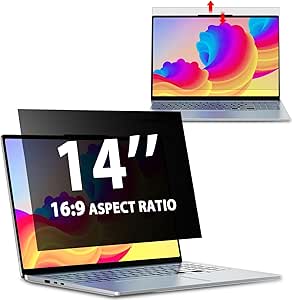 | Best for Flexible Installation | Compatible screen size: 14 inches | Aspect ratio: 16:9 | Filter dimensions: 12.2 × 6.9 inches (310 × 175 mm) | VIEW LATEST PRICE | See Our Full Breakdown |
| 15.6-Inch Laptop Privacy Screen Filter, 16:9 |  | Best for Reversible Glare Control | Compatible device: Laptop; not compatible with MacBook screens | Screen size: 15.6 inches | Aspect ratio: 16:9 | VIEW LATEST PRICE | See Our Full Breakdown |
| SightPro 14-Inch 16:10 Laptop Privacy Screen Filter |  | Best for 16:10 Displays | Screen size: 14 inches | Aspect ratio: 16:10 | Filter dimensions: 11 15/16 inches wide × 7 1/2 inches high | VIEW LATEST PRICE | See Our Full Breakdown |
| BSPROTE 15.6-Inch Laptop Privacy Screen, 16:9 |  | Best for Matte, Smudge-Resistant Use | Screen size: 15.6 inches | Aspect ratio: 16:9 | Dimensions: 13.5 × 7.6 inches (345 × 194 mm) | VIEW LATEST PRICE | See Our Full Breakdown |
| SightPro Magnetic Privacy Screen for 14-Inch MacBook Pro |  | Best for 14-Inch MacBook Pro Owners | Screen size: 14.2 inches | Compatible models: A2442, A2779, A2918, A2992, A3112, A3185, A3401, A3434, A3426, A3427 | Material: Microlouver film | VIEW LATEST PRICE | See Our Full Breakdown |
| Protescreen 14-Inch Laptop Privacy Screen Filter, 16:10 Aspect Ratio |  | Best for Installation Flexibility | Compatible screen size: 14 inches | Aspect ratio: 16:10 | Dimensions: 11.89 × 7.40 inches (302 × 188 mm) | VIEW LATEST PRICE | See Our Full Breakdown |
| SightPro Magnetic Laptop Privacy Screen, 14-inch, 16:9 |  | Best 14-Inch Magnetic Pick for 16:9 Screens | Compatible device: 14-inch laptop, 16:9 | Filter dimensions: 12 3/16 × 6 7/8 inches (310 × 175 mm) | Diagonal: 14 inches (355.6 mm) | VIEW LATEST PRICE | See Our Full Breakdown |
| SightPro Magnetic Laptop Privacy Screen Filter, 16-inch 16:10 |  | Best for Larger 16:10 Laptops | Compatible device: 16-inch 16:10 laptop | Filter dimensions: 13.56 × 8.49 inches (344.5 × 215.6 mm) | Material: Microlouver film | VIEW LATEST PRICE | See Our Full Breakdown |
| 15.6-Inch Privacy Screen Filter for 16:9 Laptops |  | Best for Standard 15.6-Inch 16:9 Displays | Screen size: 15.6 inches diagonal | Aspect ratio: 16:9 | Compatible screen dimensions: 344 × 194 mm (13.54 × 7.64 inches) | VIEW LATEST PRICE | See Our Full Breakdown |
| privacy screen protectors for laptop | Hardness | Material | Finish | Screen size |
|---|---|---|---|---|
| Peslv 360° Privacy Screen for | 3H | PET | Matte | — |
| SightPro Magnetic Privacy Scre | 2H | Microlouver film | Glossy and matte | 13.6 inches |
| PYS 14-Inch 16:10 Magnetic Lap | 3H | — | Matte | — |
| F FORITO 15.6-Inch Laptop Priv | 5H | — | Matte | 15.6 inches |
| SightPro Magnetic Laptop Priva | 2H | Microlouver film | — | — |
| SightPro Magnetic Privacy Scre | 2H | Microlouver film | Glossy and matte | 15.3 inches |
| 14-Inch Laptop Privacy Screen | — | Polyethylene terephthalate (PET) | — | — |
| 15.6-Inch Laptop Privacy Scree | 3H | — | — | 15.6 inches |
| SightPro 14-Inch 16:10 Laptop | 8H | — | — | 14 inches |
| BSPROTE 15.6-Inch Laptop Priva | 5H | Polyethylene terephthalate (PET) | Matte | 15.6 inches |
| SightPro Magnetic Privacy Scre | 2H | Microlouver film | Glossy and matte | 14.2 inches |
| Protescreen 14-Inch Laptop Pri | 5H | — | Reversible matte and glossy | — |
| SightPro Magnetic Laptop Priva | 2H | Microlouver film | Glossy and matte | — |
| SightPro Magnetic Laptop Priva | 2H | Microlouver film | — | — |
| 15.6-Inch Privacy Screen Filte | 3H | — | — | 15.6 inches diagonal |
More Details on Our Top Picks
Peslv 360° Privacy Screen for 14-Inch Laptop, 16:9
The Peslv stands apart from the magnetic options here because its four-way privacy is designed to limit views from the sides and behind, not just from side angles. That makes it a stronger fit for people working in shared spaces where someone may be seated behind them. Its matte finish also cuts reflected light, while blue-light filtering and 3H scratch resistance add everyday screen protection. The tradeoff is a fixed fit: the viewing area is 12.2 × 6.9 inches, so a laptop labeled 14-inch is not enough to confirm compatibility. Compared with the removable PYS 14-Inch 16:10, this Peslv model covers a different aspect ratio and is less convenient to take off and store. Choose it for rear-view privacy, but measure carefully first.
Pros:- Four-way privacy limits views beyond a 30-degree angle, including from behind.
- Matte surface helps reduce glare and reflected light.
- Adds blue-light filtering and 3H scratch resistance.
- Nano-silica adsorption layer is designed to reduce bubbles during installation.
Cons:- The fixed 12.2 × 6.9-inch viewing area requires careful measurement before purchase.
- The privacy filter can restrict visibility for anyone viewing from outside its permitted angle.
- Only one screen is included, with no storage or cleaning accessories listed.
Best for: 14-inch 16:9 laptop owners who work in public or shared spaces and need privacy from both side and rear angles.
Not ideal for: People who want to remove the filter regularly, or whose laptop display does not match the 12.2 × 6.9-inch viewing area.
- Compatible display:14-inch laptop, 16:9 aspect ratio
- Viewing area:12.2 × 6.9 in (310 × 175 mm)
- Privacy coverage:Four-way; blocks views beyond 30°
- Material:PET
- Finish:Matte
- Hardness:3H
- Blue-light blocking:Up to 93%
- Reflected-light interception:Up to 95%
Our verdict“Choose the Peslv if rear as well as side privacy matters more than easy removal and your display measurements match.”
SightPro Magnetic Privacy Screen for MacBook Air 13-inch and 13.6-inch (2022–2026)
For a compatible MacBook Air, the SightPro’s clearest advantage is magnetic, adhesive-free attachment: it can come off when you want an unobstructed display, then go back on without tape. Its microlouver film limits side viewing and pairs privacy with UV and blue-light reduction and scratch protection. Unlike the Peslv 360° screen, this model is specified for side privacy and does not block a view from directly behind, so it is less suited to a seat with people all around you. Compatibility is also narrow: check the listed MacBook Air generations and model numbers rather than relying on screen size alone. The included storage folder and cleaning cloth are useful for a filter that gets removed, though the glossy-and-matte finish and 2H hardness offer a different surface profile from the matte 3H PYS filter.
Pros:- Attaches and removes magnetically without tape or adhesive.
- Microlouver film limits side-angle viewing.
- Includes scratch protection and UV and blue-light reduction.
- Storage folder and cleaning cloth support regular removal and storage.
Cons:- Does not block visibility from directly behind the user.
- Compatible only with specified MacBook Air models and model numbers.
- 2H hardness is lower than the 3H rating listed for the Peslv and PYS filters.
Best for: Owners of listed 13-inch or 13.6-inch MacBook Air models who want a removable filter for commuting, shared offices, or occasional private work.
Not ideal for: People using other laptop models, or anyone who needs protection from viewers directly behind them.
- Compatible devices:MacBook Air 13-inch or 13.6-inch (2022–2026)
- Compatible model numbers:A2681, A3113, A3240
- Screen size:13.6 inches
- Attachment:Magnetic, removable
- Material:Microlouver film
- Hardness:2H
- Finish:Glossy and matte
- Included accessories:Storage folder and cleaning cloth
Our verdict“Pick this SightPro for a supported MacBook Air if easy removal matters more than rear-view privacy.”
PYS 14-Inch 16:10 Magnetic Laptop Privacy Screen
The PYS is a practical middle ground for owners of compatible 14-inch 16:10 laptops: it attaches magnetically for removal, but its matte surface gives glare control a more prominent role than the glossy-and-matte SightPro filters. Its 3H hardness and listed 99.9% screen clarity make it a compelling choice for someone who wants privacy without treating the filter as a permanent screen cover. The cleaning kit, installation kit, and storage folder also make handling and stowing it less improvised. Compatibility is the main constraint: it is listed for Lenovo, HP, and Dell laptops, not MacBooks, and it is not optimized for touchscreens. Compared with the Peslv, it is easier to remove but only covers side-angle viewing; compared with the SightPro MacBook Air option, it targets a different screen shape and computer family.
Pros:- Magnetic attachment makes the filter removable without adhesive.
- Matte finish helps reduce glare.
- 3H hardness and listed 99.9% clarity balance surface protection with screen visibility.
- Includes cleaning, installation, and storage accessories.
Cons:- Not compatible with MacBooks according to the listed compatibility information.
- Not optimized for touchscreen laptops.
- Requires a compatible 14-inch 16:10 display and matching display area.
Best for: Lenovo, HP, or Dell laptop owners with a 14-inch 16:10 display who want a removable matte filter and included handling accessories.
Not ideal for: MacBook users, touchscreen users, or anyone whose 14-inch display has a different aspect ratio or screen area.
- Compatible screen:14 inches, 16:10 aspect ratio
- Display area:12 × 7.5 in (304 × 190 mm)
- Finish:Matte
- Hardness:3H
- Screen clarity:99.9%
- Weight:0.19 kg
- Compatibility:Lenovo, HP, and Dell; not compatible with MacBooks
- Warranty:3 years
Our verdict“Choose the PYS if you have a listed 14-inch 16:10 laptop and want a removable matte filter with useful storage and cleaning accessories.”
F FORITO 15.6-Inch Laptop Privacy Screen Protector
Among these five, the F FORITO is the largest-format option, aimed at 15.6-inch 16:9 laptops rather than the compact 14-inch screens served by Peslv and PYS. Its listed 360° privacy, matte anti-glare surface, and blue-light filtering make it a broad-feature choice for people who want more than a side-view filter. The 5H hardness is also higher than the 2H ratings on both SightPro magnetic models. But the bigger format makes measurement just as important: the listed screen dimensions are 13.6 × 7.6 inches, and a 15.6-inch diagonal alone does not confirm a fit. Product details also provide little installation guidance, unlike the PYS kit, so buyers should be comfortable checking dimensions and handling setup themselves. It is the pick here for larger screens, not for easy removal.
Pros:- Designed for larger 15.6-inch 16:9 displays.
- Listed 360° privacy limits side and rear viewing.
- Matte finish combines anti-glare and anti-reflection features.
- 5H hardness and touch-sensitive functionality are listed.
Cons:- Fit depends on matching the 13.6 × 7.6-inch screen dimensions as well as the aspect ratio.
- Installation details are not provided in the product information.
- No removable magnetic attachment or storage accessories are listed.
Best for: Owners of compatible 15.6-inch 16:9 HP, Lenovo, Dell, Acer, ASUS, or ThinkPad laptops who want privacy and glare control on a larger display.
Not ideal for: People who need a removable magnetic filter, have a touchscreen-first setup, or cannot verify the screen dimensions before ordering.
- Screen size:15.6 inches
- Aspect ratio:16:9
- Screen dimensions:13.6 × 7.6 in (345 × 194 mm)
- Compatible devices:15.6-inch HP, Lenovo, Dell, Acer, ASUS, and ThinkPad laptops
- Privacy coverage:360° privacy
- Finish:Matte
- Clarity:99
- Hardness:5H
Our verdict“Choose the F FORITO if your 15.6-inch 16:9 display matches its measurements and you want broader privacy coverage in a matte screen.”
SightPro Magnetic Laptop Privacy Screen Filter, 14.1-Inch, 16:10
This SightPro is a useful 16:10 alternative to the PYS: both target roughly 14-inch screens and offer removable magnetic fitting, but this one adds a webcam cover and magnetic stickers alongside its storage folder and cleaning cloth. Its microlouver film limits side-angle viewing and provides UV and blue-light reduction plus scratch protection. That makes it a sensible package for people who regularly move between private and shared work, though it does not block views from directly behind. Compared with the PYS, its 2H hardness is lower than the PYS’s 3H, and its touchscreen limitation is explicit. Fit is another point to verify: the filter is listed as 14.1 inches diagonally, with a 304 × 190 mm face, so check width and height rather than relying on the diagonal label.
Pros:- Magnetic attachment allows removal and reattachment without adhesive.
- Microlouver film limits side-angle viewing and includes UV and blue-light reduction.
- Package includes a webcam cover, storage folder, and cleaning cloth.
- Glossy-and-matte finish offers two surface treatments.
Cons:- Not recommended for touchscreen laptops.
- Does not block visibility from directly behind the user.
- 2H hardness is lower than the PYS 14-Inch 16:10 filter’s 3H rating.
Best for: Laptop owners with a compatible 14-inch 16:10 display who want a removable privacy filter plus a webcam cover and storage accessories.
Not ideal for: Touchscreen users, buyers who need rear-view privacy, or anyone unable to confirm the filter’s width and height match their screen.
- Compatible screen size:14 inches, 16:10 aspect ratio
- Filter dimensions:11 15/16 in wide × 7 1/2 in high (304 × 190 mm)
- Diagonal:14.1 in (358.14 mm)
- Material:Microlouver film
- Attachment:Magnetic
- Hardness:2H
- Screen finish:Glossy and matte
- Included accessories:Magnetic stickers, webcam cover, storage folder, and cleaning cloth
Our verdict“Choose this SightPro over the PYS if the webcam cover and accessory bundle matter more to you than a higher listed hardness rating.”
SightPro Magnetic Privacy Screen for MacBook Air 15-inch
For a compatible 15.3-inch MacBook Air, the magnetic, removable fit is the main advantage: I can take the filter off when sharing work or watching from a wider angle, without leaving adhesive on the display. Its microlouver film restricts side viewing, and the included storage folder gives the screen somewhere to go when it is removed. Compared with the 14-Inch Laptop Privacy Screen Filter, 16:9, this is the more tailored choice for owners of a specified MacBook Air, while that filter serves a broader screen format and includes multiple mounting options. The tradeoff is narrow compatibility: it fits only listed MacBook Air models, and it does not prevent someone directly behind me from seeing the screen. The glossy-and-matte finish options and light-reduction claims add flexibility, but precise model matching matters most.
Pros:- Magnetic attachment allows removal without adhesive.
- Designed for specified 15.3-inch MacBook Air models.
- Limits viewing from side angles.
- Includes a storage folder and cleaning cloth.
Cons:- Compatibility is limited to specified MacBook Air models.
- Does not block the screen from someone directly behind the user.
Best for: Owners of a listed 15-inch MacBook Air who want a privacy filter they can remove quickly without adhesive.
Not ideal for: People with other laptop models, or users who need privacy from someone seated directly behind them.
- Compatible models:MacBook Air 15-inch (2023–2026), A2941, A3114, A3241
- Compatible chips:M2, M3, M4, M5
- Screen size:15.3 inches
- Attachment:Magnetic and removable
- Material:Microlouver film
- Hardness:2H
- Finish:Glossy and matte
- Dimensions:8.66 × 13.19 inches
- Included:Privacy screen, storage folder, cleaning cloth
Our verdict“Choose this if you own a compatible 15-inch MacBook Air and value easy, adhesive-free removal over broad device compatibility.”
14-Inch Laptop Privacy Screen Filter, 16:9
This filter suits buyers who want a choice about how the screen stays in place: it comes with both adhesive strips and slide-mount tabs, so the installation can match the laptop’s bezel. Its reversible surface also lets me switch between a glossy privacy side and a matte side for reduced glare. Compared with the SightPro 14-Inch 16:10 Laptop Privacy Screen Filter, this model targets a 16:9 display rather than a taller 16:10 panel, making exact aspect ratio and measurements decisive. The listed privacy angle blocks side views beyond ±30°, and the product claims blue-light and UV reduction. Those claims do not replace fit checking: the 12.2 × 6.9-inch filter must match the usable screen area, and the right mounting method depends on whether the display is flush with or raised from its frame. Buyers seeking a magnetic, quick-removal design should look elsewhere.
Pros:- Includes adhesive strips and slide-mount tabs.
- Reversible glossy and matte surfaces offer privacy or glare-reduction use.
- Designed to limit side viewing beyond ±30°.
- Includes a screen-cleaning kit and nano-fiber cloth.
Cons:- Requires checking the screen’s width and height, not just its diagonal measurement.
- Mounting choice depends on the screen’s frame design.
- The supplied installation options are less convenient to remove than a magnetic fit.
Best for: Owners of 14-inch, 16:9 laptops who want a choice between bezel-mounted tabs and adhesive installation.
Not ideal for: Anyone with a 16:10 screen or a laptop whose display dimensions do not match the filter.
- Compatible screen size:14 inches
- Aspect ratio:16:9
- Filter dimensions:12.2 × 6.9 inches (310 × 175 mm)
- Privacy viewing angle:Beyond ±30°
- Blue-light reduction:Up to 95%
- UV-light reduction:Up to 92%
- Material:Polyethylene terephthalate (PET)
- Surface:Glossy and matte
- Included:Filter, two sets of adhesive strips, two sets of slide-mount tabs, cleaning kit, nano-fiber cloth
Our verdict“Pick this for a measured 14-inch, 16:9 laptop when you want two mounting methods and reversible surface finishes.”
15.6-Inch Laptop Privacy Screen Filter, 16:9
This 15.6-inch filter combines side-view privacy with a reversible matte/glossy surface, giving buyers a way to choose between a less reflective finish and the alternative glossy side. Its 3H hardness and scratch-resistant design add a layer of protection for a laptop that travels, while adhesive strips and slide-in tabs provide two mounting approaches. Compared with the BSPROTE 15.6-Inch Laptop Privacy Screen, 16:9, this model offers a reversible surface, whereas BSPROTE emphasizes a matte finish and electrostatic adsorption. The big limitation here is compatibility: the listing explicitly excludes MacBook screens, and the 13.58 × 7.64-inch dimensions still need to match the laptop’s display. Side views beyond 30° are obscured while a straight-on view remains clear, but this is a fixed privacy direction rather than protection against someone directly behind the user.
Pros:- Reversible matte and glossy surfaces.
- Obscures side views beyond 30° while remaining visible from the front.
- Offers adhesive-strip and slide-in-tab installation.
- 3H hardness and scratch-resistant design add screen protection.
Cons:- Not compatible with MacBook screens.
- Screen dimensions must be checked before ordering.
- Does not prevent viewing by someone directly behind the user.
Best for: Windows laptop owners with a 15.6-inch 16:9 screen who want both privacy and a choice of surface finish.
Not ideal for: MacBook owners or buyers who cannot verify that their laptop’s screen dimensions match the filter.
- Compatible device:Laptop; not compatible with MacBook screens
- Screen size:15.6 inches
- Aspect ratio:16:9
- Dimensions:13.58 × 7.64 inches
- Hardness:3H
- Surface:Reversible matte and glossy
- Privacy angle:Obscures side views beyond 30°
- Installation:Adhesive strips or slide-in tabs
- Light reduction claims:Up to 95% blue light and up to 92% UV
Our verdict“Choose this for a compatible 15.6-inch, 16:9 non-MacBook laptop when a reversible finish matters as much as side privacy.”
SightPro 14-Inch 16:10 Laptop Privacy Screen Filter
The standout reason to choose this SightPro filter is its 14-inch, 16:10 format, which suits screens that need more vertical coverage than the 16:9 14-Inch Laptop Privacy Screen Filter. Its listed 11 15/16 × 7 1/2-inch dimensions help narrow the fit check, while adhesive strips and slide-mount tabs provide two ways to attach it. The filter keeps the display clear from straight on and limits side-angle viewing; its matte and glossy surfaces also give buyers some choice in how the screen handles reflections. An 8H hardness rating is a listed durability feature, but the product is not optimized for touchscreens, so touch-first laptop users may find it a poor match. Like the 16:9 alternative, it requires careful measurement, and neither mounting option offers the quick removal of the magnetic SightPro MacBook Air screen.
Pros:- Designed for a 14-inch 16:10 display.
- Limits side-angle visibility while preserving a straight-on view.
- Includes adhesive strips and slide-mount tabs.
- Matte and glossy surfaces plus anti-glare functionality.
Cons:- Not optimized for touchscreen use.
- Requires matching both screen dimensions and aspect ratio.
- Does not block visibility from someone directly behind the user.
Best for: People with a 14-inch, 16:10 laptop who need side-angle privacy and do not rely on touchscreen input.
Not ideal for: Touchscreen users, or owners who have not confirmed the display’s aspect ratio and active screen dimensions.
- Screen size:14 inches
- Aspect ratio:16:10
- Filter dimensions:11 15/16 inches wide × 7 1/2 inches high
- Screen surface:Glossy and matte
- Hardness:8H
- Attachment options:Adhesive strips or slide-mount tabs
- Special feature:Anti-glare
- Touchscreen compatibility:Not optimized for touchscreens
- Package contents:Privacy filter, two sets of adhesive strips, two sets of slide-mount tabs, microfiber cloth
Our verdict“Choose this over a 16:9 filter when your 14-inch laptop has a 16:10 screen and touchscreen compatibility is not a priority.”
BSPROTE 15.6-Inch Laptop Privacy Screen, 16:9
BSPROTE takes a different route from the reversible 15.6-Inch Laptop Privacy Screen Filter: it uses a matte-only surface and electrostatic adsorption rather than offering glossy and matte sides with adhesive strips or tabs. That makes it a better fit for buyers who prefer a consistent, low-glare finish and want to reduce visible fingerprints and smudges. Its listed ±25° privacy angle, 5H hardness, and light-reduction claims add to the feature set, while touchscreen compatibility is a useful distinction from the SightPro 14-Inch 16:10 filter, which is not optimized for touch. The tradeoff is a narrow fit range: this is for compatible 15.6-inch, 16:9 laptops and is not for MacBooks. I would measure the active screen carefully before ordering, since the diagonal size alone cannot confirm that the 13.5 × 7.6-inch panel will fit.
Pros:- Matte finish reduces glare, fingerprints, and smudges.
- Electrostatic adsorption avoids the listed adhesive-strip and slide-tab approach.
- Compatible with touchscreens.
- Lists 5H hardness and blue-light and UV-light reduction.
Cons:- Not compatible with MacBooks.
- Fits only compatible 15.6-inch, 16:9 displays, so dimensions need checking.
- Matte-only finish does not offer a reversible glossy option.
Best for: Users of compatible 15.6-inch, 16:9 non-MacBook laptops who prefer a matte, low-glare surface and want touchscreen compatibility.
Not ideal for: MacBook owners, people with another screen size or aspect ratio, or anyone needing privacy from behind the laptop.
- Screen size:15.6 inches
- Aspect ratio:16:9
- Dimensions:13.5 × 7.6 inches (345 × 194 mm)
- Material:Polyethylene terephthalate (PET)
- Finish:Matte
- Hardness:5H
- Privacy angle:±25°
- Installation:Electrostatic adsorption
- Compatibility:Compatible 15.6-inch, 16:9 laptops; not for MacBooks
Our verdict“Pick BSPROTE for a correctly sized 15.6-inch, 16:9 laptop if matte viewing and touchscreen support matter more than a reversible finish.”
SightPro Magnetic Privacy Screen for 14-Inch MacBook Pro
This is the most model-specific pick in this group: its magnetic fit is made for the 14.2-inch MacBook Pro and listed compatible models, so it avoids adhesive and is easy to remove when privacy filtering is not needed. The microlouver filter limits side-angle viewing while keeping a direct view clear, and its glossy and matte finishes offer some choice in screen feel. Compared with the broader-fit Protescreen 14-inch 16:10 filter, this option prioritizes a matched MacBook fit over flexible mounting methods. The tradeoff is narrow compatibility: it is not a general-purpose 14-inch filter, and it does not block views from directly behind. Its 2H hardness and included storage folder are useful extras, but buyers should confirm their exact MacBook model before ordering.
Pros:- Magnetic attachment removes the need for adhesive
- Designed for specified 14.2-inch MacBook Pro models
- Limits side-angle viewing and reduces UV and blue light
- Includes a storage folder and cleaning cloth
Cons:- Compatibility is limited to listed MacBook Pro models
- Does not conceal the screen from someone directly behind the user
- 2H hardness is modest compared with the 5H Protescreen 14-inch filter
Best for: Owners of a listed 14.2-inch MacBook Pro who want a removable magnetic filter rather than adhesive installation.
Not ideal for: People using other laptop models, or anyone who needs protection from someone seated directly behind them.
- Screen size:14.2 inches
- Compatible models:A2442, A2779, A2918, A2992, A3112, A3185, A3401, A3434, A3426, A3427
- Material:Microlouver film
- Attachment:Magnetic, removable
- Hardness:2H
- Clarity:95
- Finish:Glossy and matte
- Features:Anti-spy, scratch protection, UV and blue light reduction
- Package contents:Privacy screen, storage folder, cleaning cloth
Our verdict“Choose this if you own a listed 14.2-inch MacBook Pro and value quick magnetic removal over broad laptop compatibility.”
Protescreen 14-Inch Laptop Privacy Screen Filter, 16:10 Aspect Ratio
For buyers who want a choice between a more fixed fit and removable mounting, this 14-inch 16:10 filter supplies adhesive strips and slide mount tabs. Its reversible matte and glossy surfaces also let users choose between a less reflective finish and a clearer-looking screen. Compared with the magnetic SightPro 14-inch MacBook Pro filter, Protescreen has broader installation options and a stated 5H hardness, but it takes more care to match the screen dimensions. The listed measurements are 11.89 × 7.40 inches, and the product information says permanent adhesive installation is described for 16:9 screens even though this model is listed as 16:10. That mismatch makes checking fit and mounting instructions especially important. Its ±30° viewing limit and light-reduction figures are useful on paper, but this is not the simplest pick for anyone seeking a model-specific magnetic attachment.
Pros:- Includes both adhesive strips and slide mount tabs
- Reversible matte and glossy finishes
- Lists 5H hardness and a ±30° viewing angle
- Includes cleaning supplies and a lifetime support policy
Cons:- Compatibility depends on matching the stated screen dimensions
- Installation guidance for permanent adhesive is described for 16:9 screens, creating uncertainty for this 16:10 model
- Adhesive mounting is less convenient to remove than the magnetic SightPro filters
Best for: Laptop owners with a verified 14-inch 16:10 screen who want both adhesive and slide-tab mounting choices.
Not ideal for: Buyers who want a simple magnetic fit or cannot confirm that their visible screen dimensions match the filter.
- Compatible screen size:14 inches
- Aspect ratio:16:10
- Dimensions:11.89 × 7.40 inches (302 × 188 mm)
- Viewing angle:±30°
- Blue light reduction:92%
- UV light reduction:98%
- Hardness:5H
- Finish:Reversible matte and glossy
- Included mounting items:2 adhesive strips and 2 slide mount tabs
Our verdict“Pick this when mounting flexibility matters and you have verified both the 16:10 fit and the installation method.”
SightPro Magnetic Laptop Privacy Screen, 14-inch, 16:9
This SightPro is aimed at a different 14-inch fit than the MacBook Pro-specific model: it is sized for a 16:9 laptop screen, with filter dimensions of 12 3/16 × 6 7/8 inches. Its magnetic attachment makes it easy to lift off and reattach, while the microlouver layer keeps the front view clear and restricts side views. Compared with the 15.6-inch 16:9 filter in this lineup, this one suits a smaller display and adds a webcam cover and storage folder. It also brings the same practical limitation as the other magnetic filters here: someone directly behind you may still see the screen. SightPro says it is not optimized for touchscreens, and a diagonal-size match alone is not enough—measure width and height before buying. The magnetic convenience is compelling only when the screen proportions match.
Pros:- Magnetic attachment supports quick removal and reattachment
- Sized for 14-inch 16:9 screens rather than 16:10 displays
- Limits side viewing while preserving a clear direct view
- Includes magnetic stickers, webcam cover, storage folder, and cleaning cloth
Cons:- Not optimized for touchscreen use
- Requires checking screen width and height, not just diagonal size
- Does not block visibility from directly behind the user
Best for: People with a non-touch 14-inch 16:9 laptop who want a removable privacy filter and an included webcam cover.
Not ideal for: Touchscreen laptop users or buyers whose visible display dimensions do not match the listed filter size.
- Compatible device:14-inch laptop, 16:9
- Filter dimensions:12 3/16 × 6 7/8 inches (310 × 175 mm)
- Diagonal:14 inches (355.6 mm)
- Attachment:Magnetic, removable
- Material:Microlouver film
- Hardness:2H
- Finish:Glossy and matte
- Touchscreen compatibility:Not optimized for touchscreens
- Included items:Magnetic stickers, webcam cover, storage folder, cleaning cloth
Our verdict“Choose this for a dimension-matched, non-touch 14-inch 16:9 laptop when easy removal and a webcam cover are priorities.”
SightPro Magnetic Laptop Privacy Screen Filter, 16-inch 16:10
This is the large-screen counterpart to SightPro’s 14-inch 16:9 magnetic filter, built for compatible 16-inch 16:10 laptops. The magnetic attachment lets users remove the filter without adhesive, a useful advantage for people who switch between private work and shared viewing. Its microlouver construction restricts side views, and the package includes a webcam cover, storage folder, and cleaning cloth. Compared with the Protescreen 14-inch filter, this model is easier to detach but does not list the same 5H hardness or detailed viewing-angle and light-reduction figures. Its 2H hardness is a lighter scratch-resistance claim, and touchscreen use is not optimized. Exact width and height matter more than the advertised diagonal: the filter measures 13.56 × 8.49 inches, so a nominal 16-inch label alone cannot confirm a fit.
Pros:- Magnetic mounting allows removal and reattachment without adhesive
- Designed for compatible 16-inch 16:10 screens
- Limits side viewing and includes UV and blue light reduction
- Comes with a webcam cover, storage folder, and cleaning cloth
Cons:- Not optimized for touchscreen use
- 2H hardness is lower than the 5H listed for the Protescreen 14-inch filter
- Does not block visibility from directly behind the user
Best for: Owners of a compatible 16-inch 16:10 laptop who want a removable magnetic privacy filter for work in shared spaces.
Not ideal for: Touchscreen users, or anyone unable to verify that the screen dimensions match the filter.
- Compatible device:16-inch 16:10 laptop
- Filter dimensions:13.56 × 8.49 inches (344.5 × 215.6 mm)
- Material:Microlouver film
- Attachment:Magnetic
- Hardness:2H
- Screen finish:Glossy and matte
- Touchscreen compatibility:Not optimized for touchscreens
- Features:Side-view privacy, UV and blue light reduction, scratch protection
- Included accessories:Magnetic stickers, webcam privacy cover, storage folder, cleaning cloth
Our verdict“This is the fitting choice for a dimension-matched 16-inch 16:10 laptop when magnetic removal matters more than touchscreen use.”
15.6-Inch Privacy Screen Filter for 16:9 Laptops
For a conventional 15.6-inch, 16:9 laptop, this filter offers a choice between adhesive strips and sliding mount tabs, avoiding the magnetic fit used by the larger SightPro 16-inch 16:10 option. It limits side viewing beyond a 60-degree angle and blocks 30% of blue light, while the 3H surface helps guard against dust and scratches. The mounting choice is practical, though neither method offers the quick, adhesive-free removal of SightPro’s magnetic screens. Fit is the main hurdle: the specified visible area is 344 × 194 mm, and the filter is not compatible with touchscreens. Its privacy angle also leaves visibility within the stated 60-degree range, so it suits routine side-angle exposure better than situations requiring broader concealment. Measure the visible screen area before choosing it.
Pros:- Fits the specified 15.6-inch 16:9 screen dimensions
- Offers adhesive strips or sliding mount tabs
- Blocks 30% of blue light
- 3H hardness helps protect against dust and scratches
Cons:- Not compatible with touchscreen displays
- Visibility is not blocked within the stated 60-degree viewing angle
- Mounting options are less quick to remove than the magnetic SightPro filters
Best for: Owners of a non-touch 15.6-inch 16:9 laptop with a visible screen area matching 344 × 194 mm.
Not ideal for: Touchscreen users, or buyers who need stronger side blocking or easy magnetic removal.
- Screen size:15.6 inches diagonal
- Aspect ratio:16:9
- Compatible screen dimensions:344 × 194 mm (13.54 × 7.64 inches)
- Resolution:1920 × 1080
- Viewing angle:60 degrees
- Blue light reduction:30%
- Hardness:3H
- Surface:Glossy or matte
- Installation:Adhesive strips or sliding mount tabs
Our verdict“Choose this for a dimension-matched, non-touch 15.6-inch 16:9 laptop if you want two mounting methods and modest blue-light reduction.”

How We Picked
I ranked these 15 privacy screen protectors around the factors that most affect whether a filter will work for a laptop: screen dimensions, aspect ratio, attachment style, and intended device compatibility. A correct fit comes first because a filter that is too wide, too short, or made for a different display shape can leave gaps or interfere with the usable screen area. I also separated model-specific magnetic products from more broadly described laptop filters, since convenience and compatibility are different priorities.
The ranking gives added weight to clear use-case differentiation, including the Peslv screen’s 360° privacy claim, magnetic options for named MacBook models, and alternatives across common 14-inch and 15.6-inch formats. Products with a distinct fit or attachment advantage rank ahead when that advantage serves a clear buyer need; general filters remain useful when their stated size and aspect ratio match the laptop. I do not treat a larger privacy angle or a magnetic mount as an automatic win: buyers should weigh those features against their device, routine, and willingness to verify fit before ordering.
| privacy screen protectors for laptop | Material | Finish |
|---|---|---|
| Peslv 360° Privacy Screen for | PET | Matte |
| SightPro Magnetic Privacy Scre | Microlouver film | Glossy and matte |
| PYS 14-Inch 16:10 Magnetic Lap | — | Matte |
| F FORITO 15.6-Inch Laptop Priv | — | Matte |
| SightPro Magnetic Laptop Priva | Microlouver film | — |
| SightPro Magnetic Privacy Scre | Microlouver film | Glossy and matte |
| 14-Inch Laptop Privacy Screen | Polyethylene terephthalate (PET) | — |
| 15.6-Inch Laptop Privacy Scree | — | — |
| SightPro 14-Inch 16:10 Laptop | — | — |
| BSPROTE 15.6-Inch Laptop Priva | Polyethylene terephthalate (PET) | Matte |
| SightPro Magnetic Privacy Scre | Microlouver film | Glossy and matte |
| Protescreen 14-Inch Laptop Pri | — | Reversible matte and glossy |
| SightPro Magnetic Laptop Priva | Microlouver film | Glossy and matte |
| SightPro Magnetic Laptop Priva | Microlouver film | — |
| 15.6-Inch Privacy Screen Filte | — | — |
Factors to Consider When Choosing Privacy Screen Protectors For Laptops
Before choosing a privacy screen, I would identify the laptop’s display shape and how the filter will attach. Those checks prevent the most common mismatch, while a few everyday-use questions help decide whether convenience, broad compatibility, or viewing privacy matters most.
Match the Display’s Width, Height, and Aspect Ratio
Screen size is measured diagonally, so two laptops with the same diagonal measurement can have different panel proportions. A 14-inch 16:9 filter is not interchangeable with a 14-inch 16:10 model: the latter is taller relative to its width. Check your laptop’s exact screen dimensions or manufacturer specifications, then compare them with the filter’s listed dimensions. Also check whether your display has a raised bezel, rounded corners, or an unusually narrow border that changes how a filter sits. A close match helps prevent uncovered edges and keeps the filter from obstructing the active screen. When the product listing gives only a diagonal size, treat that as a reason to verify fit rather than assume compatibility.
Choose Magnetic Attachment or a More General Filter
Magnetic screens can be convenient if your laptop is explicitly supported: they are designed for quick placement and removal, which helps when you switch between private work and sharing your screen. That convenience comes with a narrower compatibility window, since magnets and top-edge placement need to align with the intended device. A filter described by size and aspect ratio may suit more laptop types, but its mounting method can involve more setup and may be less convenient to remove. Check how the product attaches before buying, not just whether the word “magnetic” appears in the name. If you often close the laptop with the screen in place, confirm that the attachment method and screen clearance suit your device. Buyers who rarely remove the filter may care more about a stable fit than quick removal.
Decide Which Viewing Angles You Need to Block
Most buyers want to limit side views in shared offices, on public transport, or in cafés, but some situations call for a wider privacy angle. A 360° claim, like the one attached to the Peslv option in this lineup, signals a different use case from a conventional side-view privacy filter. Wider coverage may matter when people can approach from behind or move around your workspace. It can be unnecessary if you mainly sit with your laptop facing a wall or have a consistent desk setup. Think about where nearby viewers sit and whether you need protection from one direction or several. Match the privacy coverage to your surroundings instead of assuming the broadest claim is automatically the best choice.
Account for Screen Brightness and Shared Viewing
Privacy filters limit off-angle visibility by changing how light leaves the display, so the image can appear dimmer or less clear from a straight-on position. This tradeoff is more noticeable when you work at low brightness, use your laptop outdoors, or have content that depends on accurate colors. If those conditions describe your routine, check whether the filter can be removed easily or whether you can raise brightness without hurting battery life too much. A screen that protects sensitive work may also make it harder to show a presentation to someone seated beside you. Consider whether you will need to share your display often, and choose an attachment style that makes switching practical. Privacy and convenient collaboration can pull in opposite directions.
Check Laptop Features Around the Display
Webcams, microphones, thin bezels, and top-edge sensors can affect how a screen filter fits or whether it covers part of the display hardware. Before ordering, compare the filter’s cutouts and attachment points with the laptop’s upper bezel. A product made for a named MacBook model may offer a clearer compatibility target than a generic listing, but model names and generations still matter. Look for the exact year or display size in the product title or compatibility details, especially when a laptop has been redesigned. Also consider whether your laptop uses a touchscreen: some filters can change touch response or add a surface that feels different. These checks are easier before purchase than after a filter has been attached.
Weigh Reusability Against Setup and Care
A removable filter can be useful if you alternate between private work and group viewing, but repeated handling raises the chance of fingerprints, dust, and scratches. Store a detached screen flat in a sleeve or protective cover rather than loose in a bag. If you expect to keep the filter on the laptop, a stable fit and easy cleaning may matter more than fast removal. Avoid cleaning with rough cloths or strong household chemicals unless the product instructions specifically allow them. Ask how often you will take the screen on and off, and choose the simpler routine if the difference between two models is otherwise small. A maintenance habit that fits your workday is more useful than a feature you rarely use.
Frequently Asked Questions
Can I use a 14-inch privacy screen on any 14-inch laptop?
No. The diagonal measurement does not tell you the full shape of the display, and this roundup includes 14-inch options in both 16:9 and 16:10 formats. Compare the filter’s width and height with your laptop’s active display area, then check whether the product is made for a specific model or uses a more general attachment approach. Be careful with listings that name only a screen size. If you cannot confirm the aspect ratio or dimensions, verify them with the laptop manufacturer’s specifications before ordering.
Should I choose a magnetic privacy screen or a standard filter?
Choose magnetic attachment when the screen is listed for your exact laptop and you expect to remove it regularly. It can make switching between private work and shared viewing simpler, but model-specific compatibility is a real limit. A standard filter may suit a wider range of laptops when the dimensions and aspect ratio match, though attachment and removal may be less convenient. The roundup’s SightPro and PYS magnetic options illustrate the model-focused route, while its general 14-inch and 15.6-inch filters offer alternatives for buyers checking by format. Decide based on both fit and how often you need the screen off.
Will a privacy screen make my laptop harder to use outdoors?
It can, because privacy filters may reduce perceived brightness when viewed straight on as well as restrict off-angle visibility. The effect matters most in bright surroundings, at low brightness settings, or when battery conservation is a priority. If outdoor use is frequent, compare the privacy benefit with your laptop’s screen brightness and consider whether raising brightness is an acceptable tradeoff. A removable design may let you take the filter off when privacy is less important. The best choice depends on whether outdoor legibility or blocking nearby views matters more in your routine.
Is a 360° privacy filter worth choosing over a side-view filter?
It depends on where other people can see your screen. Broader coverage may make sense in a shared workspace where people can approach from several directions, which is the distinct appeal of the Peslv pick in this lineup. If you mainly need to block someone seated beside you, a conventional side-view filter may meet that need without prioritizing wider coverage. Think through your usual seating arrangement, not just the most crowded place you visit occasionally. Also confirm the screen’s dimensions and attachment method, since coverage claims do not replace fit checks.
What should I check before buying a privacy filter for a MacBook?
Start with the exact MacBook model, screen size, and year, then confirm that the filter is intended for that specific display. This lineup includes separate SightPro options for MacBook Air sizes, the 14-inch MacBook Pro, and a 16-inch 16:10 screen, so similar names do not mean the products are interchangeable. Check whether the model attaches magnetically and whether that method fits your MacBook’s bezel and camera area. If you use a case or close the laptop with the filter attached, check for any fit or clearance guidance from the maker. When the model year or display generation is unclear, verify compatibility before purchasing.
Conclusion
For the best overall balance of a distinct privacy angle and a clear 14-inch use case, I would start with the Peslv 360° Privacy Screen, provided its 16:9 dimensions match your laptop. For best value, compare the general 14-inch or 15.6-inch filters with your exact display dimensions and choose the correctly sized option rather than paying for a feature you will not use. The best premium-style choice for a supported MacBook is a model-specific SightPro magnetic screen, while the best pick for beginners is whichever filter has the clearest match to their laptop’s exact size and aspect ratio. For a 16:10 screen, the PYS 14-inch magnetic filter and the 16:10 SightPro or Protescreen options give buyers format-specific paths. My final rule: verify fit first, then choose privacy coverage and attachment style around where and how you work.
Halloween Picks
halloween
As an affiliate, we earn on qualifying purchases.