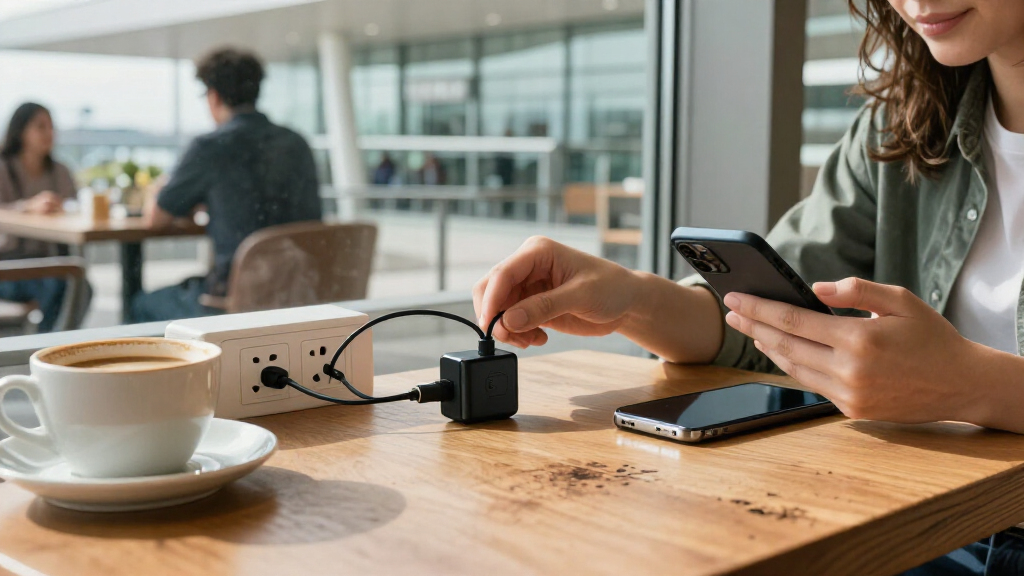
For public charging, a USB data blocker lets power pass while blocking the data connection between your device and a charging port. My best overall pick is the USB-A and USB-C Data Blocker Adapter Set, 4-Piece, because its mixed connectors suit more devices than an USB-A-only pack. The Afterplug USB-C to USB-C 240W 2-Pack stands out for USB-C users who need a high stated power ceiling, while the StarTech.com Micro-USB charge-only cable serves older devices without a separate adapter. The main tradeoffs are connector compatibility, charging speed, and whether a multipack offers useful variety or just duplicates. Read on for the full breakdown and guidance on matching a blocker to your device and charging habits.

Get privacy and security gear delivered free with Prime
- Fast, free delivery on millions of items
- Prime Video, Amazon Music and more included
- Member-only deals all year
Key Takeaways
- Connector variety separates the strongest all-purpose options. The four-piece USB-A/USB-C set and six-piece BUISAMG set cover more combinations than the USB-A-only multipacks, though buyers should check the exact connector arrangement before ordering.
- USB-C-to-USB-C blockers are a distinct choice, not a universal upgrade. Afterplug’s stated 240W capability makes it the standout for compatible USB-C equipment, but it will not solve a USB-A or Micro-USB connection mismatch.
- Multipack size matters less than useful mix. A two-pack can be more practical than a larger pack if it matches the ports and cables a household actually uses; extra adapters do not help when their connector type is wrong.
- Charge-only cables and plug-in blockers suit different routines. StarTech.com’s integrated Micro-USB cable avoids a loose adapter, while most other picks can be paired with a cable the buyer already owns.
- A data blocker cannot fix every public-charging limitation. Charging speed still depends on the power source, cable, device, and compatibility; a blocker also cannot make a damaged or untrusted charging station safe in every respect.
| USB-A and USB-C Data Blocker Adapter Set, 4-Piece | 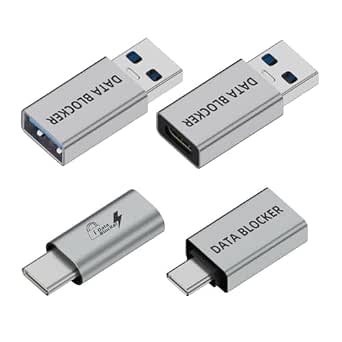 | Best Overall for Mixed USB Ports | Quantity: 4 adapters | Connectors: USB-A and USB-C | Included adapters: USB-A male to USB-A female; USB-A male to USB-C female; USB-C male to USB-C female; USB-C male to USB-A female | VIEW LATEST PRICE | See Our Full Breakdown |
| JSAUX USB-A Charge-Only Data Blocker, 4-Pack, Red |  | Best Value Multi-Pack for USB-A | Brand and model: JSAUX DC0001 | Connector: USB Type-A | Function: Charge-only; blocks data transmission | VIEW LATEST PRICE | See Our Full Breakdown |
| Ansumg USB-A Data Blocker for Charge-Only USB Connections, 5-Pack, Red |  | Best for Stocking Multiple USB-A Kits | Brand: Ansumg | Connector configuration: USB-A to USB-C data blocker | Function: Charging only; blocks data transfer and syncing | VIEW LATEST PRICE | See Our Full Breakdown |
| Plugable USB Data Blocker, 1A Charge-Only Adapter |  | Best for Simple, Low-Power Charging | Brand and model: Plugable USB-MC1 | Connector: USB | Ports: 1 | VIEW LATEST PRICE | See Our Full Breakdown |
| Rixmie USB-A Data Blocker, Charge-Only Adapter, 2-Pack |  | Best for Existing USB-A Cable Setups | Brand and model: Rixmie DB001 | Quantity: 2 | Connector: USB Type-A | VIEW LATEST PRICE | See Our Full Breakdown |
| Afterplug USB-C to USB-C Charge-Only Data Blocker, 240W, 2-Pack |  | Best for High-Power USB-C Charging | Connector: USB-C male to USB-C female | Function: Charge-only; blocks data transfer | Maximum charging power: 240 W | VIEW LATEST PRICE | See Our Full Breakdown |
| JSAUX USB-C to USB-C Charge-Only Data Blocker, Grey, 2-Pack |  | Best for Everyday USB-C Travel | Connector: USB-C | Function: Charging only; blocks data transfer and syncing | Maximum charging power: 100 W (20 V/5 A) | VIEW LATEST PRICE | See Our Full Breakdown |
| 4-Pack USB-A Data Blockers for Safe Charging |  | Best Value for Multiple USB-A Ports | Connector: USB-A | Function: Passes power and blocks data transfer | Maximum charging power: 15 W | VIEW LATEST PRICE | See Our Full Breakdown |
| BUISAMG USB Data Blocker Set, 6-Piece, USB-A and USB-C |  | Best for Mixed-Connector Coverage | Connector types: USB-A and USB-C | Function: Allows charging while blocking USB data connections | Maximum charging current: 2.4 A | VIEW LATEST PRICE | See Our Full Breakdown |
| Duttek USB 3.0 Data Blocker Adapter, 2-Pack |  | Best Compact USB-A Pair | Connector: USB-A male to USB-A female adapter, as described | Function: Blocks data transfer while allowing charging | Maximum current: 2.4 A | VIEW LATEST PRICE | See Our Full Breakdown |
| StarTech.com 3 ft (1 m) USB-A to Micro-USB Charge-Only Data Blocker Cable |  | Best for Micro-USB Devices | Brand: StarTech.com | Model: USBSCHAU1M | Cable length: 3 ft (1 m) | VIEW LATEST PRICE | See Our Full Breakdown |
| JSAUX USB and USB-C Charge-Only Data Blockers, 4-Pack, Grey |  | Best for Mixed USB-A and USB-C Travel Kits | Brand: JSAUX | Model number: DC0008DC0010 | Pack quantity: 4: two USB-A and two USB-C blockers | VIEW LATEST PRICE | See Our Full Breakdown |
| JSAUX USB and USB-C Charge-Only Data Blockers, Grey, 6-Pack |  | Best for Multi-Device Households | Brand: JSAUX | Model number: DC0008DC0009DC0010 | Quantity: 6 | VIEW LATEST PRICE | See Our Full Breakdown |
| MMOBIEL USB-C to USB-A Data Blocker, 2-Pack, Black |  | Best Simple USB-C-to-USB-A Pair | Brand: MMOBIEL | Pack size: 2 | Interface: USB-C male to USB-A female | VIEW LATEST PRICE | See Our Full Breakdown |
| PortaPow USB-A Data Blocker, 2-Pack |  | Best for Basic USB-A Charging Stations | Brand: PortaPow | Model number: PPSCA02 | Connector type: USB Type-A | VIEW LATEST PRICE | See Our Full Breakdown |
| USB data blockers for public charging | Function | Dimensions |
|---|---|---|
| USB-A and USB-C Data Blocker A | — | — |
| JSAUX USB-A Charge-Only Data B | Charge-only; blocks data transmission | 1.18 x 0.39 x 0.39 inches |
| Ansumg USB-A Data Blocker for | Charging only; blocks data transfer and syncing | 1.6 x 0.6 x 0.3 inches |
| Plugable USB Data Blocker | — | 1.75 x 0.5 x 0.75 inches |
| Rixmie USB-A Data Blocker | Charge only; blocks USB data transfer | — |
| Afterplug USB-C to USB-C Charg | Charge-only; blocks data transfer | 0.9 × 0.44 × 0.24 inches |
| JSAUX USB-C to USB-C Charge-On | Charging only; blocks data transfer and syncing | 1.2 × 0.39 × 0.28 inches |
| 4-Pack USB-A Data Blockers for | Passes power and blocks data transfer | — |
| BUISAMG USB Data Blocker Set | Allows charging while blocking USB data connections | — |
| Duttek USB 3.0 Data Blocker Ad | Blocks data transfer while allowing charging | 1.33 × 0.57 × 0.23 inches |
| StarTech.com 3 ft | — | — |
| JSAUX USB and USB-C Charge-Onl | Charging only; blocks data transfer and syncing | 1.18 x 0.39 x 0.2 inches |
| JSAUX USB and USB-C Charge-Onl | Charging only; blocks data transfer and syncing | 1.2 x 0.39 x 0.28 inches |
| MMOBIEL USB-C to USB-A Data Bl | Charge-only; blocks data transfer | — |
| PortaPow USB-A Data Blocker | — | — |
More Details on Our Top Picks
USB-A and USB-C Data Blocker Adapter Set, 4-Piece
For public charging across a mix of older USB-A ports and newer USB-C devices, this set offers the broadest connector coverage in this group. Its four adapters handle USB-A and USB-C in both male-to-female directions, so I can match the blocker to the port and cable I actually have rather than carry a separate solution for each. The USB-C-to-USB-C adapter supports up to 100W, a useful advantage over the USB-A-only JSAUX 4-Pack, whose stated limit is 2.4A. The tradeoff is that the included USB-A adapters are limited to 10W, and none of the adapters pass data, video, or audio. I’d choose this set for connector flexibility, not for syncing or data-dependent accessories.
Pros:- Four adapters cover USB-A and USB-C connections in both male-to-female combinations.
- USB-C-to-USB-C charging supports up to 100W.
- Physically blocks data connections while allowing charging.
- Reversible USB-C connectors simplify plugging in.
Cons:- USB-A adapters support up to 10W, which is modest for devices that need more power.
- Cannot pass data, video, or audio.
- The four-piece variety may be unnecessary for someone who only uses USB-A.
Best for: Travelers carrying both USB-A and USB-C devices or cables who want one charge-only set for varied public charging ports.
Not ideal for: People who need USB data, video, audio, or higher-wattage charging through USB-A; those functions are blocked or limited by the adapter specifications.
- Quantity:4 adapters
- Connectors:USB-A and USB-C
- Included adapters:USB-A male to USB-A female; USB-A male to USB-C female; USB-C male to USB-C female; USB-C male to USB-A female
- Data transfer:Blocked
- USB-C charging:Up to 100W, 20V/5A
- USB-A charging:Up to 10W, 5V/2A
- Color:Black
- Compatible devices:USB-A and USB-C devices, including cameras, laptops, phones, and tablets
Our verdict“Choose this set if you need a single charge-only kit for mixed USB-A and USB-C charging, and skip it if data access or stronger USB-A charging matters.”
JSAUX USB-A Charge-Only Data Blocker, 4-Pack, Red
When my charging routine is firmly USB-A, the JSAUX 4-Pack is a straightforward way to keep a blocker in several bags or travel kits. Each adapter allows charging while blocking data, and its 2.4A maximum current gives it a clearer charging specification than the Plugable USB-MC1, which is listed at 1A or more. The aluminum shell and non-slip design also suit frequent packing and handling. Its limits are just as clear: this is USB-A only, so it will not solve a USB-C-only charging setup, unlike the four-connector USB-A and USB-C Adapter Set. It also cannot sync data, and the listed current does not promise compatibility with newer fast-charging modes.
Pros:- Four adapters make it practical to keep blockers in multiple locations.
- Supports charging up to 2.4A.
- Aluminum shell with a non-slip design.
- Compact dimensions and lightweight construction suit travel.
Cons:- USB-A connector limits use to compatible USB-A ports and cables.
- Charge-only operation prevents data syncing.
- No support for USB-C connections or specified fast-charging modes.
Best for: USB-A users who want several compact blockers to leave in luggage, work bags, or shared travel kits.
Not ideal for: People whose devices and charging cables are USB-C only, or anyone who needs data syncing or a confirmed fast-charging protocol.
- Brand and model:JSAUX DC0001
- Connector:USB Type-A
- Function:Charge-only; blocks data transmission
- Maximum current:2.4A
- Pack quantity:4
- Material:Aluminum shell
- Dimensions:1.18 x 0.39 x 0.39 inches
- Warranty:18 months
Our verdict“Pick the JSAUX 4-Pack for several everyday USB-A charging setups, but choose a mixed-connector set if your travel kit includes USB-C.”
Ansumg USB-A Data Blocker for Charge-Only USB Connections, 5-Pack, Red
The Ansumg set is aimed at buyers who want a blocker within reach in several places: its five-piece pack can be split between bags, desks, and family travel kits. It blocks data transfer and syncing while allowing charging at up to 2.4A, matching the stated current of the JSAUX USB-A 4-Pack while supplying one more adapter. The aluminum-alloy body is compact, but the product data describes a USB-A-to-USB-C configuration, so I would not treat it as a universal USB-A blocker for every cable arrangement. Compared with the mixed-connector 4-Piece Adapter Set, it gives up connector variety and high-wattage USB-C charging. Its appeal is quantity for compatible USB-A-to-USB-C charging, not broad device coverage.
Pros:- Five blockers can be distributed among multiple bags or charging locations.
- Blocks data transfer and syncing while permitting charging.
- Supports charging up to 2.4A.
- Compact aluminum-alloy body is suited to portable use.
Cons:- The described USB-A-to-USB-C configuration limits connector compatibility.
- Charge-only operation cannot support syncing or other data functions.
- Does not provide the mixed USB-A and USB-C adapter choices of the 4-Piece Adapter Set.
Best for: Households or frequent travelers with several USB-A charging points and USB-C devices who want a blocker in each kit.
Not ideal for: People needing a blocker for USB-C ports, USB-A-to-Lightning setups, or varied connector combinations; the described configuration is narrower.
- Brand:Ansumg
- Connector configuration:USB-A to USB-C data blocker
- Function:Charging only; blocks data transfer and syncing
- Maximum current:2.4A
- Number of items:5
- Material:Aluminum alloy
- Color:Red
- Dimensions:1.6 x 0.6 x 0.3 inches
Our verdict“Choose Ansumg when you need several blockers for compatible USB-A-to-USB-C charging, not when you need flexible connector coverage.”
Plugable USB Data Blocker, 1A Charge-Only Adapter
The Plugable USB-MC1 suits buyers who want a basic, compact blocker for routine phone or tablet charging rather than a multi-adapter kit. It blocks USB data while allowing charging at 1A or more, and its 14g weight makes it easy to leave attached to a travel cable. That stated charging level is more modest than the 2.4A JSAUX and Ansumg USB-A options, so I would not choose it when charging speed is a priority. It also has only one port and offers no data passthrough; the four-piece USB-A and USB-C set is a better fit for varied connectors or higher-powered USB-C charging. The Plugable’s advantage is simplicity, backed by a listed two-year limited parts-and-labor warranty.
Pros:- Blocks USB data while allowing charge-only use.
- Compact 14g design is easy to carry.
- Compatible with Android and Apple iOS devices.
- Includes a two-year limited parts-and-labor warranty.
Cons:- Charging is specified at 1A or more, below the stated 2.4A options from JSAUX and Ansumg.
- Single-port adapter offers no multi-connector coverage.
- Cannot pass data or support syncing.
Best for: Travelers who want one lightweight, simple blocker for compatible Android or Apple mobile-device charging.
Not ideal for: People who need faster charging, multiple adapters, USB-C connector flexibility, or data-dependent features.
- Brand and model:Plugable USB-MC1
- Connector:USB
- Ports:1
- Charging:1A or more
- Input voltage:5V
- Nominal power:5W
- Dimensions:1.75 x 0.5 x 0.75 inches
- Weight:14g
- Warranty:2-year limited parts and labor
Our verdict“Choose the Plugable for a minimal, lightweight charge-only setup, but select a higher-current or multi-connector option for broader travel needs.”
Rixmie USB-A Data Blocker, Charge-Only Adapter, 2-Pack
Rixmie makes the most sense for someone who already carries USB-A cables and wants two blockers for a phone, tablet, or smaller travel device. Its aluminum adapter supports standard charging up to 3A, a higher stated current than the 2.4A JSAUX and Ansumg USB-A blockers. That does not make it a fast-charging pick: the product explicitly excludes modes such as Quick Charge, and data-dependent features such as CarPlay and Android Auto will not work. Unlike the broad 4-Piece Adapter Set, Rixmie is limited to USB-A and comes only as a two-pack. I’d favor it for straightforward charging from compatible USB-A ports, while buyers who need multiple connector types or specific fast-charge protocols should choose another option.
Pros:- Two adapters provide a spare or allow use with separate charging kits.
- Supports standard charging up to 3A.
- Aluminum construction suits compact everyday carry.
- Works with existing USB-A charging cables and a range of device types.
Cons:- Fast-charging modes such as Quick Charge are not supported.
- USB-A-only design does not cover USB-C ports.
- Blocks data-dependent functions, including CarPlay and Android Auto.
Best for: People with existing USB-A cables who want two compact blockers for charging phones, tablets, earbuds, or other listed devices.
Not ideal for: USB-C-only users, drivers relying on CarPlay or Android Auto, and anyone who needs Quick Charge or data transfer.
- Brand and model:Rixmie DB001
- Quantity:2
- Connector:USB Type-A
- Function:Charge only; blocks USB data transfer
- Maximum standard charging current:Up to 3A
- Material:Aluminum
- Color:Black
- Compatible devices:Smartphones, tablets, earbuds, smartwatches, and power banks
- Charging limitation:Fast-charging modes such as Quick Charge are not supported
Our verdict“Pick Rixmie for standard charging through existing USB-A cables, but skip it if fast-charge protocols or data-dependent features are part of your setup.”
Afterplug USB-C to USB-C Charge-Only Data Blocker, 240W, 2-Pack
For a public charging setup built around USB-C, the Afterplug stands out for pairing charge-only protection with support for up to 240W. That ceiling gives it more headroom than the JSAUX USB-C blocker’s 100W limit, though actual charging speed still depends on the device and power source. The small, lightweight adapter is suited to phones, tablets, and computers, and the two-pack lets me keep one in a travel bag and another at home. Its biggest limitation is connection type: it works best between USB-C ports, while USB-A-to-USB-C arrangements may charge slowly or fail to charge. Compared with the USB-A-focused 4-Pack USB-A Data Blockers, this is a better fit for newer USB-C charging gear, but less useful for older USB-A outlets.
Pros:- Blocks data transfer while allowing charging
- Supports charging up to 240W
- Compact, case-friendly form factor
- Two blockers included
Cons:- Works best with a USB-C-to-USB-C connection
- USB-A-to-USB-C setups may charge slowly or fail to charge
Best for: Travelers and laptop users whose devices and charging cables use USB-C and who want a compact blocker with high power headroom.
Not ideal for: People relying on public USB-A ports or USB-A-to-USB-C cables, since those setups may charge slowly or not at all.
- Connector:USB-C male to USB-C female
- Function:Charge-only; blocks data transfer
- Maximum charging power:240 W
- Pack quantity:2
- Dimensions:0.9 × 0.44 × 0.24 inches
- Weight:6 g
- Color and finish:Red, metallic
- Warranty:1 year
Our verdict“Choose the Afterplug if your charging kit is USB-C and you want more power headroom than the JSAUX 100W option.”
JSAUX USB-C to USB-C Charge-Only Data Blocker, Grey, 2-Pack
The JSAUX is a straightforward pick for travelers who want USB-C charge-only protection without carrying a bulky adapter. It supports up to 100W PD charging, enough for many phones, tablets, and compatible laptops, although the Afterplug offers a higher stated ceiling for more power-hungry setups. Two compact blockers make it practical to leave one in a travel kit and keep another nearby. The tradeoff is that this connection is strictly for charging: syncing and data transfer are unavailable, so I would not use it when I need a cable connection for file access. Charging speed also depends on the device and wall charger. Compared with the BUISAMG six-piece set, the JSAUX is a simpler USB-C-only choice, but it does not offer that set’s mix of connector types.
Pros:- Blocks data transfer and syncing while allowing charging
- Supports up to 100W PD charging
- Compact and lightweight for travel
- Includes two USB-C blockers
Cons:- Cannot be used for data transfer or device syncing
- Actual charging speed depends on the device and power source
- USB-C-only connector type limits use with USB-A charging ports
Best for: Frequent travelers with USB-C phones, tablets, or laptops who want a compact pair of blockers for public charging.
Not ideal for: Buyers who need to sync devices over USB or want one kit covering both USB-A and USB-C connections.
- Connector:USB-C
- Function:Charging only; blocks data transfer and syncing
- Maximum charging power:100 W (20 V/5 A)
- Pack quantity:2
- Dimensions:1.2 × 0.39 × 0.28 inches
- Color:Grey
- Compatible devices:USB-C devices, including iPhone, Samsung Galaxy, iPad, MacBook, LG, Sony, and OnePlus
Our verdict“Pick the JSAUX for a compact USB-C travel pair, but choose the Afterplug if you need a higher stated power limit.”
4-Pack USB-A Data Blockers for Safe Charging
This four-pack makes the most sense when I need several USB-A blockers distributed across bags, desks, or family devices. Each metal-shelled adapter passes power while blocking data, with a stated limit of 15W; that is a practical match for many basic phone-charging situations, but well below the Afterplug’s 240W USB-C capability. Plug-and-play operation keeps setup simple at an unfamiliar public USB-A port. The main compromise is connector age: USB-C-only chargers and devices may need an adapter, adding another part to carry and potentially complicating the connection. The BUISAMG six-piece set covers both USB-A and USB-C and includes more pieces, while this option gives a clear USB-A focus and a stated power rating. Skip it if your travel kit has moved entirely to USB-C.
Pros:- Four blockers cover multiple devices or locations
- Passes charging power while blocking data transfer
- Metal shell and compact, lightweight design
- Plug-and-play with no software setup
Cons:- USB-A connection may require an adapter for newer USB-C equipment
- Maximum stated charging power is 15W
- Charging-only design cannot support syncing or data transfer
Best for: Families or frequent travelers who want multiple simple blockers for USB-A charging ports and older USB-A devices.
Not ideal for: USB-C-only device owners who want a direct connection without carrying a separate adapter.
- Connector:USB-A
- Function:Passes power and blocks data transfer
- Maximum charging power:15 W
- Pack size:4
- Material:Metal shell
- Dimensions per unit:1.4 inches long × 0.6 inches diameter
- Weight per unit:5 g
- Input voltage:5 V DC
Our verdict“Choose this pack for broad coverage of USB-A charging points; the BUISAMG set is a better match if you also need USB-C options.”
BUISAMG USB Data Blocker Set, 6-Piece, USB-A and USB-C
The BUISAMG set is the most flexible choice here for someone carrying both USB-A and USB-C gear. Six pieces provide a wider mix for different charging setups than the USB-A-only Duttek adapter, and the metal shell is described as supporting heat dissipation. Charging is listed at up to 2.4 A, which offers a useful current limit but is not a wattage guarantee; results depend on the connected equipment and source. The product data also lists a single port, so buyers should check the included connector arrangement rather than assume one unit covers every scenario. Compared with the Afterplug, this set prioritizes connector variety and quantity over a high USB-C power ceiling. It suits mixed-device travel better than a laptop-focused kit where high-power USB-C charging is the priority.
Pros:- Includes USB-A and USB-C connection options
- Six-piece set supports multiple devices and locations
- Blocks data connections while allowing charging
- Metal shell is described as supporting heat dissipation
Cons:- Charging is specified in amps rather than a maximum wattage
- Product data lists a single port, so connector arrangements may need checking
- Compatibility details may not cover every device or charging setup
Best for: Travelers and households with a mix of USB-A and USB-C devices who want several charge-only blockers in one set.
Not ideal for: Laptop users who need a clearly stated high-wattage USB-C charging limit or buyers who require verified compatibility with a specific charging arrangement.
- Connector types:USB-A and USB-C
- Function:Allows charging while blocking USB data connections
- Maximum charging current:2.4 A
- Quantity:6
- Number of ports:1
- Shell material:Metal
- Item weight:0.03 kg
- Warranty:12 months
Our verdict“Choose BUISAMG for mixed USB-A and USB-C coverage, not for a clearly specified high-power laptop charging solution like the Afterplug.”
Duttek USB 3.0 Data Blocker Adapter, 2-Pack
The Duttek is a compact option for people whose public charging routine still uses USB-A ports. Its male-to-female adapter blocks data pins while passing power, with support for up to 2.4 A. That makes it a simple plug-in safeguard without software or setup, and the two-pack offers a spare for another bag or device. It is less versatile than the BUISAMG set, which includes both USB-A and USB-C options, and it does not provide the high-wattage USB-C headroom stated for the Afterplug. The listed connector information also names both USB-A and USB-C, while the description specifies a USB-A male-to-female adapter; buyers should confirm the exact connection they need. This is a practical fit for USB-A charging, not a universal blocker for every modern setup.
Pros:- Blocks data transmission while allowing power through
- Supports charging up to 2.4 A
- Plug-and-play operation needs no software or configuration
- Compact two-pack is easy to carry
Cons:- Charging-only design does not support data transfer
- USB-A connection limits use with some newer charging setups
- Connector details list USB-A and USB-C despite the described USB-A adapter
Best for: USB-A device owners who want a small, two-piece charge-only pair for public charging ports.
Not ideal for: People who need direct USB-C connections, data syncing, or a clearly stated high-wattage charging solution.
- Connector:USB-A male to USB-A female adapter, as described
- Function:Blocks data transfer while allowing charging
- Maximum current:2.4 A
- Input voltage:5 V DC
- Pack quantity:2
- Dimensions:1.33 × 0.57 × 0.23 inches
- Item weight:10 g
- Color:Silver
Our verdict“Pick the Duttek for a compact USB-A pair, but choose BUISAMG if you want more connector variety in one set.”
StarTech.com 3 ft (1 m) USB-A to Micro-USB Charge-Only Data Blocker Cable
For a Micro-USB phone, camera, or accessory, this charge-only cable removes the need to bring a separate cable and blocker: its data pins are absent, so it supplies power without enabling syncing through a public USB-A port. Its 3 ft length offers more reach than the short plug-in adapters from JSAUX or MMOBIEL, while the TPE jacket and foil-and-braided shielding are a sturdier cable build than a small travel dongle. The tradeoff is narrow compatibility: it connects only USB-A power to Micro-USB devices, unlike the JSAUX four-pack, which covers USB-A and USB-C options. Output is limited to 12 W, and charge-only construction means it cannot transfer files. Choose it for older Micro-USB gear, not as a universal blocker for a mixed-device household.
Pros:- Data pins are absent, blocking data transfer while charging.
- Three-foot cable provides useful reach without a separate adapter.
- Supports up to 5 V, 2.4 A, or 12 W through USB-A.
- TPE jacket with foil and braided shielding is designed to resist wear and electrical interference.
Cons:- Works only with USB-A power sources and Micro-USB devices.
- Charge-only construction prevents syncing and file transfers.
- Its 12 W ceiling is less suited to newer, higher-power charging needs.
Best for: Travelers who still charge a Micro-USB phone, camera, or accessory from USB-A ports and want one cable with data blocking built in.
Not ideal for: People carrying USB-C-only devices or anyone who needs a cable for syncing and file transfers.
- Brand:StarTech.com
- Model:USBSCHAU1M
- Cable length:3 ft (1 m)
- Connectors:USB-A to Micro-USB
- Maximum output:5 V, 2.4 A (12 W)
- Cable construction:TPE jacket with foil and braided shielding
- Weight:13.61 g
- Warranty:Lifetime
Our verdict“Choose this cable if your public-charging routine still relies on Micro-USB; for mixed USB-A and USB-C gear, the JSAUX four-pack is more adaptable.”
JSAUX USB and USB-C Charge-Only Data Blockers, 4-Pack, Grey
The main advantage here is connector flexibility in one compact set: two USB-A blockers and two USB-C blockers cover more public-port and device combinations than the single-connector MMOBIEL two-pack. Each blocks data transfer and syncing while allowing charging, so a traveler can keep separate adapters for different bags or devices. The USB-C models are rated up to 100 W, which gives them more charging headroom than the StarTech.com Micro-USB cable, though actual speed still depends on the device, cable, and charger. Their small, transparent-cased format is easy to carry, but these are adapters rather than cables, so you still need a suitable charging cable. Since they are charge-only, they cannot serve as everyday syncing connectors; choose this set for portability and coverage rather than data connectivity.
Pros:- Includes two USB-A and two USB-C blockers for varied charging setups.
- USB-C models support up to 100 W, subject to the connected equipment.
- Compact, lightweight format suits a travel pouch or spare-device kit.
- Blocks data transfer and syncing while allowing charging.
Cons:- Adapters require compatible cables; they are not standalone charging cables.
- Charging speed depends on the device and charger, so the stated ceiling is not a guaranteed rate.
- Charge-only design rules out syncing and file transfers.
Best for: Travelers with both USB-A and USB-C devices who want a small set of blockers for shared charging ports.
Not ideal for: Buyers who want an all-in-one cable, need to sync through the same connection, or need a blocker for Micro-USB gear.
- Brand:JSAUX
- Model number:DC0008DC0010
- Pack quantity:4: two USB-A and two USB-C blockers
- Connector types:USB Type-A and USB Type-C
- Function:Charging only; blocks data transfer and syncing
- Maximum charging current:2.4 A
- USB-C maximum power:100 W
- Dimensions:1.18 x 0.39 x 0.2 inches
Our verdict“Pick this four-pack for compact USB-A and USB-C coverage; choose the six-pack JSAUX set if you also need USB-A-to-USB-C and USB-C-to-USB-C adapter types.”
JSAUX USB and USB-C Charge-Only Data Blockers, Grey, 6-Pack
This set earns its place for the range of connections it covers: six blockers across three adapter types, including USB-A, USB-A to USB-C, and USB-C to USB-C. That makes it more flexible than the JSAUX four-pack, which includes USB-A and USB-C blockers but fewer connector combinations. The USB-C options support up to 100 W with PD 3.0/2.0, while USB-A models are limited to 2.4 A; actual charging speed depends on the rest of the setup. For a household sharing blockers among phones, tablets, and laptops, the extra formats can reduce the chance of arriving at a public port without the right connection. The cost of that coverage is a larger set to keep track of, and every adapter blocks syncing. It is better for broad device coverage than for someone who only needs one simple blocker.
Pros:- Six adapters cover USB-A, USB-A-to-USB-C, and USB-C-to-USB-C connections.
- USB-C models support up to 100 W and PD 3.0/2.0.
- Compact adapters are easy to distribute across bags or devices.
- Blocks data transfer and syncing while allowing charging.
Cons:- More pieces to organize than the JSAUX four-pack or MMOBIEL two-pack.
- USB-A blockers support up to 2.4 A, below the USB-C power ceiling.
- Charging performance depends on the device, cable, and power source.
Best for: Households or frequent travelers carrying a mix of USB-A and USB-C devices, especially when multiple people may need blockers.
Not ideal for: Solo users with one connector type who want the smallest possible kit, or anyone who needs data transfer through the adapter.
- Brand:JSAUX
- Model number:DC0008DC0009DC0010
- Quantity:6
- Included types:Two USB-A, two USB-A-to-USB-C, and two USB-C-to-USB-C
- Function:Charging only; blocks data transfer and syncing
- USB-C fast charging:Up to 100 W (20 V/5 A); PD 3.0/2.0
- USB-A charging limit:Up to 2.4 A
- Dimensions:1.2 x 0.39 x 0.28 inches
Our verdict“Choose this set when several people or devices need different USB connection types; for a smaller mixed-port kit, the JSAUX four-pack is simpler to carry.”
MMOBIEL USB-C to USB-A Data Blocker, 2-Pack, Black
MMOBIEL keeps the setup straightforward: each small adapter has a USB-C male connector and USB-A female port, letting a USB-C device use a USB-A charging cable or port while blocking data transfer. The two-pack is a more focused choice than the JSAUX four-pack, which offers both USB-A and USB-C blocker formats, but MMOBIEL may suit buyers who specifically need this direction of connection and do not want extra adapter types. Its 5 V/2 A, 10 W rating is modest beside the JSAUX USB-C models rated up to 100 W, so it is best treated as a basic public-port charging option rather than a fast-charging solution. The charge-only design also prevents syncing, and its USB-C-to-USB-A format does not cover every cable arrangement.
Pros:- Two adapters provide a spare for another bag or device.
- USB-C male to USB-A female format bridges a USB-C device to USB-A charging setups.
- Blocks data transfer while permitting charging.
- Compact adapter form is convenient to carry.
Cons:- Rated for only 5 V/2 A, or 10 W.
- Does not support data exchange or syncing.
- Covers a specific USB-C-to-USB-A arrangement rather than the broader connector range in the JSAUX six-pack.
Best for: USB-C phone or tablet owners who regularly encounter USB-A charging ports and want two basic blockers for travel or backup.
Not ideal for: Laptop users seeking high-power USB-C charging, people needing USB-C-to-USB-C support, or anyone who uses the connection for syncing.
- Brand:MMOBIEL
- Pack size:2
- Interface:USB-C male to USB-A female
- Function:Charge-only; blocks data transfer
- Input voltage:5 V
- Nominal power:10 W
- Color and finish:Black, matte
- Compatible devices:Digital camera, gaming console, laptop, smartphone, and tablet
Our verdict“Choose MMOBIEL for a simple, low-power USB-C-to-USB-A pair; for higher-power charging and more connection types, the JSAUX six-pack is the stronger fit.”
PortaPow USB-A Data Blocker, 2-Pack
PortaPow is a stripped-back option for people whose cables and devices already use USB-A connections. The two small blockers sit between a USB-A cable and a charger or shared port, interrupting data transfer and syncing while still allowing charging. That makes them a focused alternative to the JSAUX four-pack: PortaPow supplies two units for a basic USB-A setup, while JSAUX adds USB-C formats for more varied devices. The supplied details do not state a charging-power rating, so I would not choose this over a model with a specified high-power ceiling when charging speed is a priority. Its USB-A-only compatibility also limits its usefulness with newer USB-C-only gear unless the rest of the connection supports USB-A. For airport, car, or public USB-A ports, the simple two-pack is the point.
Pros:- Blocks data transfer and syncing while allowing charging.
- Two blockers can be kept in separate bags or charging kits.
- Designed for use with USB-A chargers and ports, including shared locations such as cars and airports.
- Lightweight at 9 g.
Cons:- USB-A-only format limits compatibility with newer USB-C-only setups.
- The provided product data does not specify a charging-power rating.
- Charge-only function prevents syncing and other data connections.
Best for: People who carry USB-A charging cables for compatible Android or iPhone devices and want a pair of blockers for shared ports.
Not ideal for: USB-C-only device owners or buyers who need a stated power rating, high-power USB-C charging, or data connectivity.
- Brand:PortaPow
- Model number:PPSCA02
- Connector type:USB Type-A
- Pack quantity:2
- Compatible devices:Android and iPhone
- Weight:9 g
- Color:Red
- Warranty:2 years
Our verdict“Pick PortaPow for a simple pair of USB-A blockers; choose the JSAUX four-pack if your charging kit also needs USB-C coverage.”
How We Picked
I ranked these options by how well their stated connector formats and charge-only purpose fit real public-charging setups. I gave priority to practical compatibility: whether a product supports USB-A, USB-C, Micro-USB, or more than one of those, and whether it is an adapter or a complete cable. Pack size and variety mattered when they could help cover multiple devices, but I did not treat a larger count as automatically better. For USB-C models, stated power capability was relevant only as a product specification, not a promise that every phone or charging port will charge at that rate.
The ranking favors products with a clear use case and a useful balance of versatility and simplicity. That puts the mixed-connector sets ahead for households with varied devices, while focused USB-C or USB-A picks rank higher for buyers who know their setup. I also account for the tradeoffs: a specialized adapter may be easier to match to one device, while a broad set can add pieces a buyer never uses. Product names and supplied specifications are the basis for this comparison; no unprovided performance claims are assumed.
Factors to Consider When Choosing USB Data Blockers For Public Charging
Choosing a USB data blocker is less about collecting the most adapters and more about matching the blocker to the complete charging path. I would start with the port on the charger, the cable or connector your device accepts, and the charging capability your device can use. These checks help prevent a common mistake: buying a charge-only adapter that cannot connect to the cable or charging station at hand.
Map the full connector chain before choosing
List the charging source port, cable ends, and device port before selecting a blocker. USB-A and USB-C are not interchangeable, and USB-C-to-USB-C models differ from blockers designed to sit between a USB-A port and a cable. Older devices may need Micro-USB, where an integrated cable can be simpler than stacking adapters. A mixed-connector set helps when devices vary, but only if its individual pieces match the connections you use. Avoid assuming that a product labeled USB-C supports every USB-C charging arrangement. The safest purchase decision starts with a quick check of each port and cable you plan to bring.
Treat power ratings as compatibility information
A stated wattage ceiling can help narrow choices, but it does not mean a blocker will make a public port deliver that output. Actual charging speed depends on the charging station, cable, device, and their supported charging protocols. A high-rated USB-C blocker may make sense for compatible equipment, yet it will not improve a weak or limited power source. For a basic phone top-up, connector fit and charge-only function may matter more than a large wattage figure. Check the specifications of the full chain rather than judging the blocker alone. If a product does not state a power limit, do not infer one from its connector shape.
Choose between a standalone adapter and a charge-only cable
A plug-in blocker is compact and can work with a cable you already carry, which helps when you use different cables for different devices. Its drawback is that it adds another small item to keep track of and can be left behind or misplaced. An integrated charge-only cable reduces the number of separate parts, but its fixed connector and length may not suit every device or setting. Buyers with one older Micro-USB device may prefer the cable format, while people with newer devices often gain more flexibility from an adapter. Avoid stacking multiple adapters unless their fit and function are clear. Simpler connections are easier to check before plugging into a public station.
Buy a pack for the devices you actually carry
Multipacks can be handy for a travel bag, family, or backup locations, but count alone is a poor measure of value. A larger set is useful when it includes the connector types your devices need; duplicate USB-A adapters add little for a USB-C-only household. A two-pack may cover a phone and a spare, while a mixed four- or six-piece set can reduce the need to buy separate formats. Think about where each piece will live so that one remains with your travel cable and another stays at home. Keep the product packaging or label if several similar adapters look alike. This small bit of organization can prevent a connector mix-up when you need to charge quickly.
Understand what charge-only protection does not cover
A data blocker is intended to interrupt data connections while allowing charging, but it is not a general-purpose security device. It does not verify that a charging station is well maintained, protect against every electrical fault, or replace care with cables and accessories. If a port looks damaged or behaves unexpectedly, use a trusted wall adapter and outlet instead. A blocker also may not support data transfer, accessory functions, or other features that rely on the data pins. That limitation is usually the point for public charging, but it can surprise someone who later uses the same setup at a computer. Keep a separate data-capable cable for syncing and troubleshooting.
Frequently Asked Questions
Will a USB data blocker work with any public charging port?
No; the blocker must match the charging port and cable connection, and the charging station still needs to provide power. A USB-A blocker is not the same as a USB-C-to-USB-C blocker, so check both ends of the connection. Some stations also use built-in cables or unusual arrangements that may not accept a separate adapter. If the connector path is unclear, a personal wall adapter plugged into a standard outlet may be a more predictable alternative. Check the blocker’s listed connector type before relying on it for travel.
Can I use a data blocker and still get fast charging?
Possibly, but the blocker alone does not determine charging speed. The power source, cable, device, and blocker must all support a compatible charging arrangement. The Afterplug model’s stated 240W capability is a specification for that USB-C option, not a guarantee that a public port or phone will deliver that level. For a particular device, compare its charging requirements with the blocker and cable specifications. If the details are not stated, plan for charging performance to vary rather than assuming the highest possible rate.
Should I choose a mixed USB-A and USB-C set or a single connector type?
Choose a mixed set if you regularly charge devices or use stations with different connector formats. The four-piece mixed set and BUISAMG six-piece set are more adaptable than USB-A-only packs, though the exact pieces in each set should match your needs. A focused pack can be the cleaner choice when all your charging uses the same connector and you want fewer unused adapters. Make the decision by checking the ports on your devices and cables, not by assuming newer devices make every older connection irrelevant. If you travel with family or shared equipment, connector variety is more likely to pay off.
Does a charge-only data blocker support syncing or wired accessories?
Generally, a charge-only blocker is meant to pass power while blocking data, so syncing and many wired accessory functions will not work through it. That can include uses that depend on a data connection, even when the same cable and device work normally without the blocker. This is a feature for public charging but a limitation for everyday connections to a computer or accessory. Keep a separate data-capable cable for transfers and device setup. If a product’s listing does not spell out its functions, do not assume it can switch between charge-only and data modes.
Is an integrated charge-only cable better than a separate adapter?
It depends on whether convenience or cable flexibility matters more to you. StarTech.com’s Micro-USB cable combines the blocker function with the cable, which can suit a device that consistently uses that connector. Separate adapters are easier to pair with cables you already own and can cover more than one device when you choose a mixed set. A fixed cable may be the wrong length or connector for another device, while a small adapter can be easier to misplace. Match the format to your routine: a dedicated older device favors a cable, and a varied travel kit favors adaptable pieces.
Conclusion
For the broadest starting point, I would choose the USB-A and USB-C Data Blocker Adapter Set, 4-Piece as best overall because its mixed formats suit more varied charging kits. The 4-Pack USB-A Data Blockers for Safe Charging is my best-value style of pick for someone who knows they need several USB-A units, while the Afterplug USB-C to USB-C 240W 2-Pack is the best premium-oriented choice for compatible USB-C equipment where its stated power capability matters. For beginners, the JSAUX USB-A Charge-Only Data Blocker, 4-Pack offers a straightforward format when their devices and charging sources use USB-A. For Micro-USB devices, the StarTech.com charge-only cable is the specific-fit option; for a varied household, consider the mixed BUISAMG six-piece set. Before choosing, match the connector chain and charging needs—those details matter more than pack size alone.