
For those seeking high-quality 3D printing over the $500 mark, this category offers models with advanced features, greater precision, and faster speeds. The FlashForge AD5M Pro stands out for its high-speed capabilities and built-in camera, making it ideal for professionals needing monitoring and reliability. The FLASHFORGE Creator 5 Pro excels with multiple toolheads for versatile printing, perfect for complex projects. However, buyers face tradeoffs between speed, multi-material options, and ease of use. Continue reading for a detailed breakdown of these top-rated models and what makes each unique.

Get privacy and security gear delivered free with Prime
- Fast, free delivery on millions of items
- Prime Video, Amazon Music and more included
- Member-only deals all year
Complete the kit


Key Takeaways
- High-speed printing and auto-calibration are common features among the top options, enhancing productivity and ease of setup.
- Multi-toolhead and multi-material capabilities significantly increase versatility, appealing to advanced users and professionals.
- Build quality and noise levels vary, with some models prioritizing quiet operation and robust frames for precision work.
- Pricing differences often reflect the complexity of features—more toolheads and multi-material support generally mean higher costs.
- Ease of use remains crucial, with auto-leveling and user-friendly interfaces helping newcomers avoid common setup frustrations.
| FlashForge AD5M Pro 3D Printer with High-Speed CoreXY and Built-in Camera |  | Best Overall for Speed and Precision | Product Dimensions: 15.75 x 17.83 x 14.96 inches | Item Weight: 33 pounds | Build Volume: 220 x 220 x 220mm | VIEW LATEST PRICE | See Our Full Breakdown |
| FLASHFORGE Creator 5 Pro 3D Printer with 4 Toolheads and Multi-Material Printing |  | Best for Multi-Material and Industrial-Grade Projects | Product Dimensions: 16 x 14 x 18 inches | Item Weight: 39 pounds | Active Heated Chamber: 65°C | VIEW LATEST PRICE | See Our Full Breakdown |
| Snapmaker U1 3D Printer, 4-Toolhead with 5s Toolchanger, Multi-Color Printing |  | Best for Colorful and Multi-Material Prototypes | Product Dimensions: 22.6 x 13 x 14.2 inches | Item Weight: 59 pounds | Build Volume: 270 x 270 x 270 mm | VIEW LATEST PRICE | See Our Full Breakdown |
| FLASHFORGE Adventurer 5M 3D Printer with Auto Leveling and High-Speed Printing |  | Best for Ease of Use and Speed | Print Size: 220x220x220mm | Max Speed: 600mm/s | Extruder Temperature: 280°C | VIEW LATEST PRICE | See Our Full Breakdown |
| Bambu Lab P2S Combo, P2S 3D Printer & AMS 2 Pro |  | Best for Multi-Color, Multi-Material Professional Use | Product Dimensions: 18 x 22 x 18 inches | Item Weight: 46.3 pounds | ASIN: B0FT818HCH | VIEW LATEST PRICE | See Our Full Breakdown |
| FlashForge AD5M Pro 3D Printer – High Speed & Precision, Auto Calibration, CoreXY Structure, Quiet Operation |  | Best for High-Speed, Precise Printing in a Quiet, Enclosed Design | Product Dimensions: 15.75 x 17.83 x 14.96 inches | Item Weight: 33 pounds | Nozzle Sizes: 0.25/0.4/0.6/0.8mm | VIEW LATEST PRICE | See Our Full Breakdown |
| Bambu Lab P1S Combo 3D Printer with Multi-Color Printing and Auto Bed Leveling |  | Best for Multi-Color, Multi-Material Creativity with Fast Setup | Product Dimensions: 15.31 x 18.03 x 15.31 inches | Item Weight: 47.5 pounds | Maximum Printing Speed: 500mm/s | VIEW LATEST PRICE | See Our Full Breakdown |
| top rated 3D printers over $500 | Item Weight | Product Dimensions |
|---|---|---|
| FlashForge AD5M Pro 3D Printer | 33 pounds | 15.75 x 17.83 x 14.96 inches |
| FLASHFORGE Creator 5 Pro 3D Pr | 39 pounds | 16 x 14 x 18 inches |
| Snapmaker U1 3D Printer | 59 pounds | 22.6 x 13 x 14.2 inches |
| FLASHFORGE Adventurer 5M 3D Pr | 22 pounds | — |
| Bambu Lab P2S Combo | 46.3 pounds | 18 x 22 x 18 inches |
| FlashForge AD5M Pro 3D Printer | 33 pounds | 15.75 x 17.83 x 14.96 inches |
| Bambu Lab P1S Combo 3D Printer | 47.5 pounds | 15.31 x 18.03 x 15.31 inches |
More Details on Our Top Picks
FlashForge AD5M Pro 3D Printer with High-Speed CoreXY and Built-in Camera
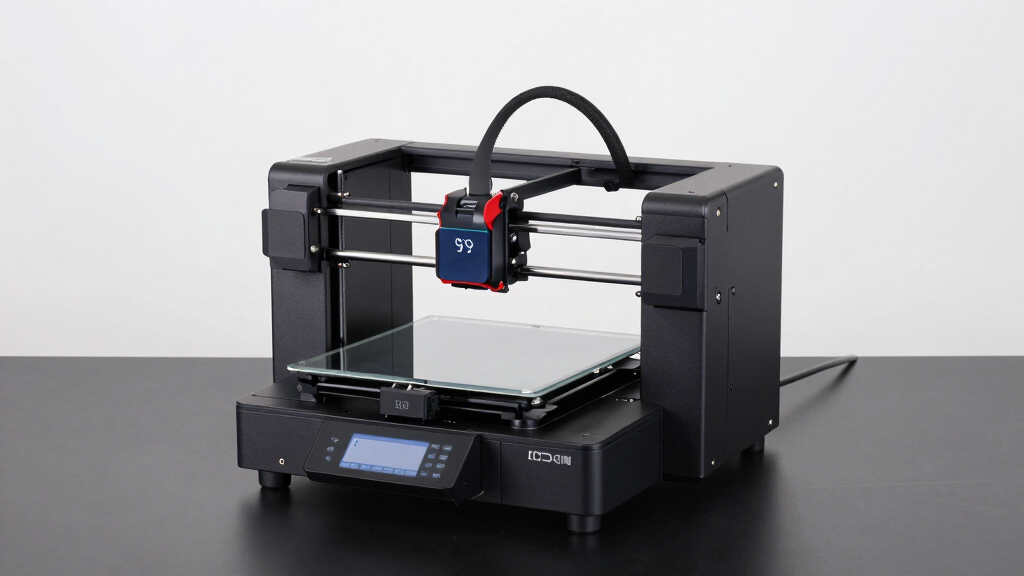
The FlashForge AD5M Pro stands out for its incredible printing speeds of up to 600mm/s, making it ideal for rapid prototyping and production environments. Its built-in camera enables remote monitoring, a feature that outshines many competitors like the Bambu Lab P2S, which lacks integrated camera options. While the AD5M Pro offers quiet operation at 50dB and a quick-swap hotend for easy filament changes, its detailed specifications are less emphasized, and some users report calibration challenges. The price not being specified makes it harder to gauge value, but its high-speed capability and precision support demanding workflows. Compared to the FLASHFORGE Creator 5 Pro with multi-material support, this model prioritizes speed and monitoring over multi-material versatility.
Pros:- High-speed printing up to 600mm/s for rapid production
- Built-in camera for remote monitoring and security
- Quiet operation at only 50dB
Cons:- Limited detailed technical specifications in the description
- Some calibration issues reported by users
Best for: Professionals and hobbyists needing fast, precise prints with remote monitoring capabilities
Not ideal for: Beginners or users with limited space, as setup and calibration may pose challenges
- Product Dimensions:15.75 x 17.83 x 14.96 inches
- Item Weight:33 pounds
- Build Volume:220 x 220 x 220mm
- Hotend Temperature:280℃
- Hotend Sizes:0.4mm & 0.6mm
- Speed:600mm/s
- Noise Level:50dB
Our verdict“This printer makes the most sense for users prioritizing speed, precision, and remote oversight over detailed setup simplicity.”
FLASHFORGE Creator 5 Pro 3D Printer with 4 Toolheads and Multi-Material Printing
The FLASHFORGE Creator 5 Pro excels with its four independent toolheads, enabling multi-material and multi-color printing, a feature that the Bambu Lab P2S Combo doesn’t fully replicate on the printer itself. Its active heated chamber up to 65°C and automated calibration promise consistent results, ideal for complex ABS or PC parts. While its high-speed printing at 600mm/s rivals the Snapmaker U1, its considerable size and weight demand substantial workspace, and its setup can be complex for newcomers. The inclusion of an air filtration system adds safety for indoor use, but the high price may be a barrier for hobbyists. Its multi-material capability makes it a versatile choice for advanced users, unlike simpler single-material models.
Pros:- Supports multi-material and multi-color printing with four independent toolheads
- Active heated chamber up to 65°C for advanced filament compatibility
- Effective air filtration system ensures a clean workspace
- Automated calibration and real-time monitoring
Cons:- Large and heavy, requiring significant space
- Setup complexity may challenge beginners
Best for: Advanced makers working on multi-color, multi-material projects requiring precision and safety features
Not ideal for: Individuals with limited space or those new to 3D printing who need a straightforward, plug-and-play device
- Product Dimensions:16 x 14 x 18 inches
- Item Weight:39 pounds
- Active Heated Chamber:65°C
- Number of Toolheads:4
- Maximum Printing Speed:600mm/s
- Filament Compatibility:ABS, PC, PA
- Filtration System:HEPA 13 and activated carbon
Our verdict“This pick makes the most sense for experienced users seeking multi-material versatility with professional-grade stability.”
Snapmaker U1 3D Printer, 4-Toolhead with 5s Toolchanger, Multi-Color Printing
The Snapmaker U1 offers rapid, multi-color, multi-material printing with its 5-second automatic tool changer, outpacing many competitors like the FLASHFORGE AD5M Pro in multi-material versatility. Its large build volume of 270 x 270 x 270mm suits larger projects and complex prototypes. While the speed of 500mm/s is impressive, its weight of 59 pounds and complex setup could be barriers for casual users. The smart calibration features and user-friendly interface appeal to those with some experience, but beginners may find initial setup daunting. Cost-wise, it’s geared toward serious hobbyists and professionals rather than casual users or beginners.
Pros:- Rapid 5-second tool change with reliable performance
- Supports multi-material and multi-color printing
- High-speed operation up to 500mm/s
- User-friendly with automatic calibration
Cons:- Heavy and requires ample space
- Complex initial setup for novices
Best for: Creative professionals needing fast multi-color, multi-material prototypes with large build capacity
Not ideal for: Beginners or those with limited workspace, due to its size and setup complexity
- Product Dimensions:22.6 x 13 x 14.2 inches
- Item Weight:59 pounds
- Build Volume:270 x 270 x 270 mm
- Warranty:1 year
Our verdict“This model suits experienced users seeking a large, fast, multi-material printer for complex projects.”
FLASHFORGE Adventurer 5M 3D Printer with Auto Leveling and High-Speed Printing
The FLASHFORGE Adventurer 5M emphasizes user convenience with features like automatic bed leveling and a max speed of 600mm/s, making it a strong choice for those valuing quick setup and fast production. Its direct drive extruder capable of 280°C broadens filament options, especially for flexible or specialty materials. While its suggests mixed reviews, the quick nozzle change and real-time remote monitoring appeal to busy makers. Its weight of 22 pounds keeps it portable relative to other high-end models, but limited detailed feedback may leave some questions unanswered. Compared with the FlashForge AD5M Pro, this model leans more toward ease and speed, sacrificing some advanced multi-material features.
Pros:- Automatic bed leveling simplifies setup
- High-speed printing up to 600mm/s
- Quick nozzle change and fast warm-up
- Real-time remote monitoring via app
Cons:- Relatively heavy at 22 pounds
Best for: Hobbyists and small teams seeking a fast, easy-to-use printer with reliable auto-leveling
Not ideal for: Users needing highly detailed, multi-material setups or advanced calibration features
- Print Size:220x220x220mm
- Max Speed:600mm/s
- Extruder Temperature:280°C
- Nozzle:3S Detachable
- Structure:CoreXY All Metal
- Item Weight:22 pounds
Our verdict“This printer is ideal for users prioritizing speed, ease, and quick setup over advanced multi-material capabilities.”
Bambu Lab P2S Combo, P2S 3D Printer & AMS 2 Pro
The Bambu Lab P2S Combo offers high-speed, precise printing with automatic calibration and the AMS 2 Pro for seamless multi-color and multi-material projects. Its ability to print at up to 600mm/s and setup in just 15 minutes makes it attractive for busy professionals and advanced hobbyists. Unlike the FlashForge Creator 5 Pro, which supports multi-materials but doesn’t integrate the AMS system, the P2S Combo emphasizes workflow efficiency. Its weight of 46.3 pounds requires a sturdy setup space, and the complex features might be overwhelming for beginners.
Pros:- High-speed printing up to 600mm/s with high accuracy
- Quick setup, ready in 15 minutes
- Supports multi-color and multi-material printing with AMS 2 Pro
- Automatic calibration and AI failure detection
Cons:- Does not support multi-color printing on the P2S alone
- Heavy, requiring a sturdy, spacious setup
Best for: Professionals and serious hobbyists needing quick, accurate, multi-material, multi-color printing
Not ideal for: Beginners or casual users who prefer simpler, less feature-rich machines
- Product Dimensions:18 x 22 x 18 inches
- Item Weight:46.3 pounds
- ASIN:B0FT818HCH
- Item model number:PF004-U+SA007-AU
Our verdict“This model is best suited for experienced users who need fast, multi-material, multi-color production in a professional setting.”
FlashForge AD5M Pro 3D Printer – High Speed & Precision, Auto Calibration, CoreXY Structure, Quiet Operation
The FlashForge AD5M Pro stands out for its impressive combination of high-speed printing—up to 600mm/s—and exceptional precision, making it ideal for demanding projects. Compared to the Bambu Lab P1S, which excels in multi-color capabilities, the AD5M Pro prioritizes speed and accuracy, appealing to users who need rapid prototyping or detailed models without sacrificing safety. Its enclosed design, air filtration, and quiet operation make it suitable for shared workspaces or classrooms. However, its larger size and complex feature set can be daunting for newcomers, and some users report durability concerns after extended use. This printer is best suited for professionals or experienced hobbyists who need fast, precise results in a safe environment.
Pros:- High-speed printing up to 600mm/s with maintained accuracy
- Auto-leveling simplifies setup and ensures flawless first layers
- Enclosed design with air filtration for safe indoor use
- Supports multiple filament types and nozzle sizes
Cons:- Relatively large and heavy, requiring ample space
- Complex features may have a steep learning curve for beginners
- Some reports of durability issues over time
Best for: Professionals or advanced hobbyists seeking high-speed, high-precision prints with a focus on safety and quiet operation
Not ideal for: Beginners or those with limited space, as the unit is bulky and the feature set may be overwhelming
- Product Dimensions:15.75 x 17.83 x 14.96 inches
- Item Weight:33 pounds
- Nozzle Sizes:0.25/0.4/0.6/0.8mm
- Max Extruder Temperature:280°C
- Noise Level:≤50 dB
Our verdict“This model is ideal for experienced users prioritizing speed and precision in a safe, enclosed environment.”
Bambu Lab P1S Combo 3D Printer with Multi-Color Printing and Auto Bed Leveling
The Bambu Lab P1S Combo makes a compelling case for multi-color and multi-material printing, supporting up to 16 colors for complex, vibrant projects. It offers fast speeds—up to 500mm/s—and features automatic bed leveling, which helps reduce setup time and improve print consistency. Compared to the FlashForge AD5M Pro, the P1S leans into creative versatility, making it well-suited for artists and designers. Nonetheless, its reliance on the Bambu Lab AMS system for multi-color printing adds extra cost and complexity, and its weight of 47.5 pounds can limit portability. Additionally, it’s not recommended for reinforced filaments like carbon fiber, which restricts some advanced material options. This pick makes the most sense for those who want rich, multi-color prints with ease and speed.
Pros:- Supports up to 16 colors for detailed, multi-color prints
- Automatic bed leveling ensures consistent quality and faster setup
- Enclosed design improves print stability with advanced filaments
- High-speed printing capabilities
Cons:- Requires connection to Bambu Lab AMS for multi-color features, adding complexity and cost
- Heavy at 47.5 pounds, less portable
- Not recommended for carbon or glass fiber reinforced filaments
Best for: Creative professionals or hobbyists who want vibrant multi-color, multi-material prints with quick setup
Not ideal for: Users who need to work with reinforced composites or prioritize portability, given the weight and material limitations
- Product Dimensions:15.31 x 18.03 x 15.31 inches
- Item Weight:47.5 pounds
- Maximum Printing Speed:500mm/s
- Acceleration:20000 mm/s²
- Supported Filaments:PLA, PETG, TPU, PVA, PET, ABS, ASA; Capable: PA, PC; Not recommended: Carbon/Glass Fiber
- Color Capabilities:Up to 16 colors
- Auto Bed Leveling:Yes
- Enclosed Design:Yes
- Setup Time:15 minutes
Our verdict“This model is best for users seeking vibrant multi-color prints and efficient setup, especially in creative or professional environments.”
How We Picked
The models in this roundup were selected based on their performance, build quality, feature set, and user reviews. Priority was given to printers that offer reliable high-speed operation, multi-material support, and advanced features suitable for professional or hobbyist use. We also considered ease of maintenance, software compatibility, and overall value for over $500. These criteria ensure the list highlights options that deliver both cutting-edge capabilities and practical usability, with a clear differentiation based on their target user profiles and feature tradeoffs.Factors to Consider When Choosing Top Rated 3D Printers Over $500
Choosing a top rated 3D printer over $500 requires balancing several key factors. While higher price points often bring enhanced speed, precision, and versatility, they can also introduce complexity and higher maintenance costs. Understanding your specific needs—whether for detailed prototyping, multi-material printing, or large builds—helps narrow your options. This guide explores critical considerations to help you make an informed decision beyond just the features listed.Performance and Speed
High-speed printing can drastically reduce your project turnaround time, especially for larger or more detailed models. However, faster speeds may sometimes compromise detail if the hardware isn’t optimized. Look for printers with robust motion systems and reliable calibration routines to maintain quality at high speeds. Consider whether your workflow benefits from rapid prototyping or if precision is more critical, as this influences the right balance between speed and accuracy.
Multi-Material and Toolhead Capabilities
Multi-material support opens up creative possibilities and complex project workflows, but it often comes with added costs and maintenance. Multi-toolhead systems enable switching between different print heads for various materials or functions, boosting versatility. Still, they can be more prone to alignment issues and require more frequent calibration. Buyers should evaluate whether multi-material features align with their project needs or if a simpler single-material machine suffices.
Build Size and Expandability
Large build volumes offer flexibility for bigger projects but can lead to longer print times and increased material costs. Consider your typical project size and whether the machine can grow with your needs. Some models allow upgrades or modular additions, which can extend their utility. Keep in mind that larger machines often demand more space and stability, so evaluate your workspace before choosing a bigger model.
Ease of Use and Maintenance
Features like auto-bed leveling, touchscreen interfaces, and straightforward software significantly reduce setup time and user frustration. Maintenance requirements vary; some printers include auto-calibration and simplified filament handling, which save time and effort. For beginners or busy professionals, these features can make the difference between a satisfying experience and ongoing headaches. Be aware that more sophisticated features can sometimes mean more complex repairs if issues arise.
Price-to-Feature Tradeoffs
Higher-priced models typically include advanced features like multi-material support, faster speeds, and larger build volumes. However, these benefits often come with increased complexity and costs for consumables and maintenance. Buyers should assess which features genuinely add value to their workflow and avoid overpaying for capabilities they don’t need. Sometimes, a slightly lower-priced model with essential features offers better overall value and easier operation for most users.
Frequently Asked Questions
Is a multi-material 3D printer worth it over $500?
Multi-material 3D printers provide significant advantages for complex projects, offering the ability to print with different filaments or colors in a single build. However, they often require more maintenance, calibration, and can be more prone to issues. If your work involves multi-material or multi-color prints regularly, investing in such a model makes sense. For occasional or simpler projects, a single-material printer may deliver better value with less hassle.
How important is auto-leveling in a high-end 3D printer?
Auto-leveling greatly simplifies the setup process and helps ensure consistent print quality. In higher-end models over $500, auto-leveling is often more accurate and reliable, reducing print failures and improving first-layer adhesion. If you plan to print frequently or need precise dimensional accuracy, this feature can save time and prevent a lot of frustration. However, auto-leveling systems vary in quality, so check reviews for their reliability before purchasing.
Should I prioritize speed or detail in a 3D printer over $500?
It depends on your primary use case. If rapid prototyping or large-volume printing is your goal, prioritize speed. For detailed miniatures, jewelry, or highly precise parts, focus on resolution and accuracy, even if it means sacrificing some speed. Many high-end models aim to balance both, but understanding your workflow helps determine which feature to emphasize. Keep in mind that faster speeds sometimes require more frequent calibration and maintenance.
Is a larger build volume always better?
While a bigger build volume offers more flexibility for large projects, it also involves longer print times and higher material costs. Larger printers tend to be bulkier and may require more stable placement to avoid vibrations that affect quality. For most users, a moderate build size matched to typical project dimensions offers a better balance of efficiency and practicality. Only select a larger model if your work regularly involves sizable prints or you have space for it.
How much should I expect to spend on maintenance for a $500+ 3D printer?
Maintenance costs depend on the complexity and features of the printer. High-end models often require regular cleaning, calibration, and occasional part replacements like nozzles or extruders. Auto-calibration and enclosed designs can reduce ongoing effort. Budgeting for consumables and occasional repairs is wise, but many models are designed for durability and straightforward upkeep. Setting aside a small annual budget for maintenance helps keep the printer running smoothly over time.
Conclusion
For those new to high-end 3D printing or with general hobbyist needs, the FLASHFORGE Adventurer 5M offers user-friendly features and reliable auto-leveling at a reasonable price. Professionals seeking maximum versatility and multi-material support will find the FLASHFORGE Creator 5 Pro a strong choice. Buyers prioritizing speed and precision should consider the FlashForge AD5M Pro for its high-speed capabilities, while those with larger projects might lean toward the Bambu Lab P2S Combo for its expandability. Ultimately, your specific requirements and budget determine the best fit—whether it’s a dependable all-rounder, a feature-rich powerhouse, or a straightforward beginner-friendly model.
As an affiliate, we earn on qualifying purchases.Halloween Picks
halloween