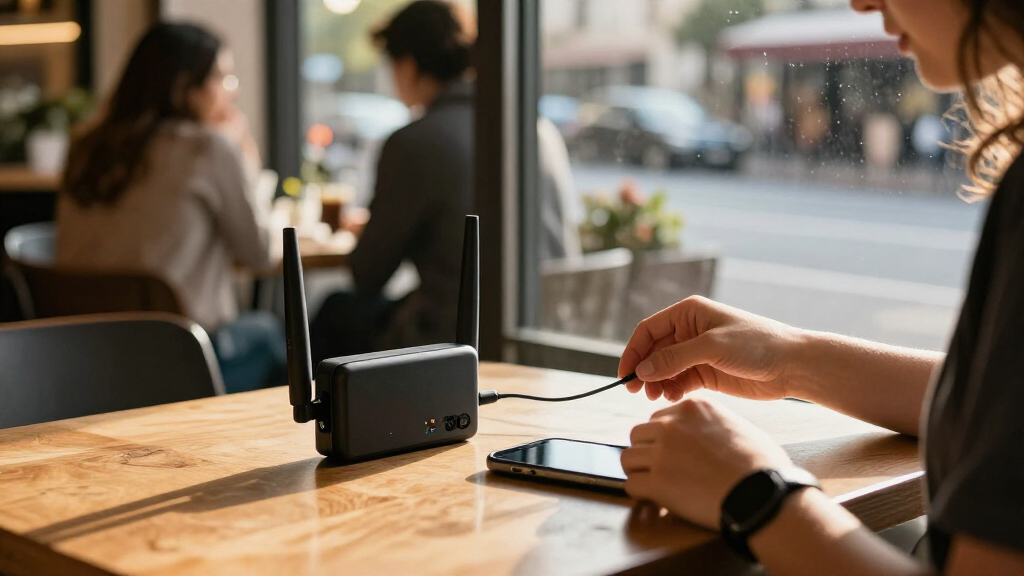
The best portable Wi-Fi security routers combine practical travel performance with tools that help protect your connections on public networks. My best overall pick is the GL.iNet Beryl AX, which balances Wi-Fi 6, travel-friendly size, and security-focused features. The GL.iNet GL-SFT1200 Opal is a more affordable choice for basic travel-router use, while the GL.iNet GL-BE3600 Slate 7 suits buyers who want newer Wi-Fi 7 hardware and more advanced networking options. The main tradeoff is between a router that secures an existing connection and a SIM-based hotspot that supplies mobile internet; each also brings different setup, coverage, and battery needs. Read on for the full comparison and guidance on choosing the right type.

Get privacy and security gear delivered free with Prime
- Fast, free delivery on millions of items
- Prime Video, Amazon Music and more included
- Member-only deals all year
Key Takeaways
- Security features separate travel routers from mobile hotspots: GL.iNet’s lineup is the stronger fit for buyers who want VPN and network-management options, while the four unlocked 4G LTE models focus on providing mobile connectivity through a SIM.
- The Beryl AX is the most balanced pick: it brings Wi-Fi 6 and a compact travel-router format without the larger feature set of the Slate 7 or Wi-Fi 7 models.
- Wi-Fi 7 is not automatically the best travel choice: the Slate 7 and TP-Link Roam 7 suit buyers who can benefit from newer wireless hardware, but many trips may not offer internet connections fast enough to make that upgrade matter.
- The Opal and SIM hotspots solve different budget needs: the Opal shares a hotel or public connection through a travel router, while SIM hotspots can provide internet where compatible cellular service is available.
- SIM compatibility is a separate buying decision: the LTE options vary by SIM format, battery capacity, and stated device support, so carrier compatibility and expected connected-device count need checking before choosing one.
| Unlocked 4G LTE Portable Wi-Fi Hotspot with Nano SIM Slot and 3000mAh Battery |  | Best for Sharing a Mobile Connection | Network: 4G LTE | SIM slot: Nano SIM; SIM card and data plan not included | Wi-Fi standard and band: 802.11ac, single-band | VIEW LATEST PRICE | See Our Full Breakdown |
| GL.iNet GL-SFT1200 Opal AC1200 Dual-Band Travel Router | 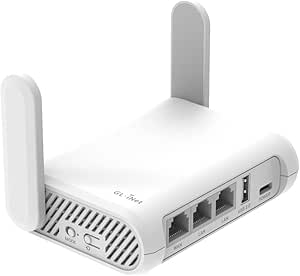 | Best Value VPN Travel Router | Wi-Fi standard: Wi-Fi 5 (802.11a/b/g/n/ac) | Wireless bands: 2.4 GHz and 5 GHz | Maximum wireless rate: AC1200: up to 300 Mbps on 2.4 GHz and 867 Mbps on 5 GHz | VIEW LATEST PRICE | See Our Full Breakdown |
| Unlocked 4G LTE Mobile WiFi Hotspot Router with 2,100 mAh Battery |  | Best Compact SIM Hotspot | Network: 4G LTE | Supported LTE bands: B2/B4/B5/B12/B13/B17/B66/B71 | Maximum connected devices: 10 | VIEW LATEST PRICE | See Our Full Breakdown |
| Unlocked 4G LTE Portable Wi-Fi Router with Micro SIM Slot |  | Best for Supported International Networks | Network: 4G LTE and 3G UMTS/WCDMA | LTE bands: B1, B3, B5, B40 | 3G band: B1 | VIEW LATEST PRICE | See Our Full Breakdown |
| TP-Link Roam 6 AX1500 Wi-Fi 6 Travel Router |  | Best for Wi-Fi 6 and Larger Groups | Wi-Fi standard: Wi-Fi 6 | Wireless bands: 2.4 GHz and 5 GHz | Maximum stated wireless rates: Up to 1201 Mbps on 5 GHz and 300 Mbps on 2.4 GHz | VIEW LATEST PRICE | See Our Full Breakdown |
| GL.iNet GL-BE3600 Slate 7 Wi-Fi 7 Travel Router with Touchscreen and Dual 2.5G Ethernet |  | Best for Advanced Security Controls | Wi-Fi: Wi-Fi 7, dual-band 2.4 GHz and 5 GHz | Maximum listed wireless speed: 688 Mbps (2.4 GHz) + 2882 Mbps (5 GHz) | Ethernet: 2 × 2.5G ports (1 WAN, 1 LAN) | VIEW LATEST PRICE | See Our Full Breakdown |
| Unlocked 4G LTE Mobile WiFi Hotspot with SIM Card Slot, 3000mAh Battery, and 28-Device Support |  | Best for SIM-Based Internet on the Go | Cellular connection: 4G LTE | SIM slot: Standard SIM | Wi-Fi: 802.11ac, single-band | VIEW LATEST PRICE | See Our Full Breakdown |
| GL.iNet Beryl AX (GL-MT3000) Wi-Fi 6 Travel Router | 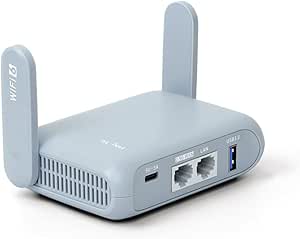 | Best Compact VPN Travel Router | Wireless standard: Wi-Fi 6 (802.11ax) | Bands and maximum speed: Dual-band; 574 Mbps (2.4 GHz) + 2402 Mbps (5 GHz) | Ethernet: 2.5G WAN and 1 Gbps LAN | VIEW LATEST PRICE | See Our Full Breakdown |
| TP-Link Roam 7 BE3600 Wi-Fi 7 Portable Dual-Band Travel Router |  | Best for Sharing Public Wi-Fi | Wi-Fi standard: Wi-Fi 7, dual-band 2.4 GHz and 5 GHz | Maximum listed wireless speed: 688 Mbps (2.4 GHz) + 2882 Mbps (5 GHz) | Maximum connected devices: 90 | VIEW LATEST PRICE | See Our Full Breakdown |
| portable Wi-Fi security router | Security | Wi-Fi standard |
|---|---|---|
| Unlocked 4G LTE Portable Wi-Fi | WPA2/WPA3 | — |
| GL.iNet GL-SFT1200 Opal AC1200 | — | Wi-Fi 5 (802.11a/b/g/n/ac) |
| Unlocked 4G LTE Mobile WiFi Ho | WPA2-PSK | 802.11n, single-band |
| Unlocked 4G LTE Portable Wi-Fi | — | 802.11 b/g/n |
| TP-Link Roam 6 AX1500 Wi-Fi 6 | — | Wi-Fi 6 |
| GL.iNet GL-BE3600 Slate 7 Wi-F | WPA3, DNS over HTTPS, DNS over TLS | — |
| Unlocked 4G LTE Mobile WiFi Ho | WPA2-PSK | — |
| GL.iNet Beryl AX | WPA2-PSK, WPA3, DNS over HTTPS, DNS over TLS | — |
| TP-Link Roam 7 BE3600 Wi-Fi 7 | — | Wi-Fi 7, dual-band 2.4 GHz and 5 GHz |
More Details on Our Top Picks
Unlocked 4G LTE Portable Wi-Fi Hotspot with Nano SIM Slot and 3000mAh Battery
This is the right kind of pick when you need internet from a SIM card, rather than a travel router that simply secures an existing hotel or café connection. It shares 4G LTE with up to 25 devices, giving it more stated capacity than the 10-device M5 hotspot in this list. The LCD status display makes signal and battery checks easier while moving between locations, and USB-C charging can simplify packing.
That convenience comes with important limits: you need a compatible activated Nano SIM and a separate data plan, and LTE performance depends on coverage and supported bands. Unlike the GL.iNet GL-SFT1200 Opal, it does not list VPN support or dual-band Wi-Fi. Battery capacity is also inconsistent across the supplied information: the title says 3000mAh, while the description says 2100mAh.
Pros:- Shares a 4G LTE connection with up to 25 devices.
- LCD shows signal strength and battery status.
- USB-C charging can work with compatible chargers and power banks.
- Lists WPA2/WPA3 Wi-Fi security.
Cons:- Requires a compatible activated Nano SIM and a separate data plan.
- Carrier support and performance depend on LTE bands, coverage, and usage.
- Battery capacity conflicts between the 3000mAh title and 2100mAh description.
Best for: Travelers who need a SIM-based connection shared with a larger group of up to 25 Wi-Fi devices.
Not ideal for: People who want VPN features for securing public Wi-Fi, or buyers who need confirmed battery capacity and carrier-band details before purchase.
- Network:4G LTE
- SIM slot:Nano SIM; SIM card and data plan not included
- Wi-Fi standard and band:802.11ac, single-band
- Maximum stated Wi-Fi rate:Up to 300 Mbps
- Maximum connected devices:Up to 25
- Security:WPA2/WPA3
- Charging:USB-C
- Battery capacity:3000mAh in title; 2100mAh in description
Our verdict“Choose this hotspot when SIM-based internet for many devices matters more than built-in VPN tools or verified battery capacity.”
GL.iNet GL-SFT1200 Opal AC1200 Dual-Band Travel Router
The Opal is a practical choice for travelers who want a private network with configurable VPN support without stepping up to a newer Wi-Fi 6 model. OpenVPN and WireGuard support, OpenWrt, and public Wi-Fi repeater mode let it take an existing connection and route devices through a setup you control. Compared with the SIM-based M5 hotspot, the Opal does not supply mobile data; it is designed to share a wired or existing Wi-Fi connection instead.
Its dual-band Wi-Fi 5 and three Gigabit Ethernet ports offer useful flexibility for older devices and wired gear, while its 145 g weight keeps it travel-friendly. The TP-Link Roam 6 adds Wi-Fi 6 and support for more connected devices, but the Opal’s retractable antennas and physical VPN toggle give it a distinct, straightforward travel-router appeal. Configure that toggle in the admin panel before relying on it; the 128 MB of RAM also makes this less suited to demanding networks.
Pros:- Supports OpenVPN and WireGuard through OpenWrt.
- Repeater mode can share public Wi-Fi through a private network.
- Two Gigabit LAN ports and one Gigabit WAN port support wired connections.
- Lightweight 145 g design with retractable antennas.
Cons:- Does not provide cellular internet; a separate wired or Wi-Fi connection is needed.
- The physical VPN toggle must be configured in the admin panel first.
- Wi-Fi 5 and 128 MB of RAM are less suited to newer, demanding networks.
Best for: Travelers who want OpenVPN or WireGuard support, public Wi-Fi repeater mode, and wired ports in a lightweight router.
Not ideal for: Buyers who need a built-in cellular modem, Wi-Fi 6, or a VPN toggle that works without prior setup.
- Wi-Fi standard:Wi-Fi 5 (802.11a/b/g/n/ac)
- Wireless bands:2.4 GHz and 5 GHz
- Maximum wireless rate:AC1200: up to 300 Mbps on 2.4 GHz and 867 Mbps on 5 GHz
- Ports:Two Gigabit LAN and one Gigabit WAN
- VPN protocols:OpenVPN and WireGuard
- Operating system:OpenWrt
- Weight:145 g
- RAM:128 MB
Our verdict“Pick the Opal for a light, configurable VPN travel router with wired ports, but choose the TP-Link Roam 6 if Wi-Fi 6 and higher device capacity matter more.”
Unlocked 4G LTE Mobile WiFi Hotspot Router with 2,100 mAh Battery
This pocket-sized hotspot is a simple fit for solo travelers or small groups who need mobile data shared across up to 10 devices. Its listed U.S. LTE bands include support for AT&T, T-Mobile, Verizon, and other compatible carriers, but buyers still need to check the exact carrier and local coverage before relying on it. A personal SIM is required; unlike the GL.iNet GL-SFT1200 Opal, this M5 can provide internet away from hotel or public Wi-Fi when its cellular service is available.
The stated 2100mAh battery life of up to 8–10 hours gives it a defined use case for day trips, though actual runtime can vary. Security is limited to WPA2-PSK, and the single-band 802.11n Wi-Fi is a simpler setup than the Opal’s dual-band network and VPN features. This is a cellular access point, not a VPN travel router, so it is a weaker fit for buyers prioritizing traffic protection on shared networks.
Pros:- Supports up to 10 simultaneous Wi-Fi devices.
- Lists LTE bands used by major U.S. carriers, subject to compatibility checks.
- Battery is rated for up to 8–10 hours of use.
- Compact form suits travel and camping.
Cons:- Requires a personal SIM and suitable data plan.
- Limited to 4G LTE and single-band 802.11n Wi-Fi.
- WPA2-PSK is listed, with no VPN support specified.
Best for: Solo travelers, campers, or small work groups who need a pocketable LTE connection for up to 10 devices and can provide their own SIM.
Not ideal for: Travelers who need Wi-Fi 6, dual-band performance, built-in VPN support, or reliable service outside compatible LTE coverage.
- Network:4G LTE
- Supported LTE bands:B2/B4/B5/B12/B13/B17/B66/B71
- Maximum connected devices:10
- Battery:2100 mAh; rated for up to 8–10 hours
- Wi-Fi standard:802.11n, single-band
- Maximum stated data rate:300 Mbps
- Security:WPA2-PSK
- Included items:Mobile Wi-Fi router, charging cable, instruction manual, original box
Our verdict“Choose this M5 for basic, compact LTE sharing with a compatible SIM; choose the Opal if your priority is VPN-secured hotel or public Wi-Fi.”
Unlocked 4G LTE Portable Wi-Fi Router with Micro SIM Slot
The MF800-2 is a narrow-use pick for travelers whose destination and carrier match its listed B1, B3, B5, and B40 LTE bands. It offers battery-powered 4G LTE or 3G sharing for up to 10 devices, but the product data explicitly rules out use in countries in the Americas. That restriction makes it a less flexible option than the U.S.-band M5 hotspot, which lists compatibility with several major U.S. carriers.
A micro SIM slot and included 2100mAh battery make the basic setup portable, though the SIM is not included and the network bands still need checking against the local carrier. Its 802.11b/g/n Wi-Fi is older than the dual-band Wi-Fi 5 on the GL.iNet GL-SFT1200 Opal, and no VPN capability is specified. Speed figures also conflict: the data lists up to 300 Mbps in one field and a 150 Mbps transfer rate elsewhere, so I would not use either figure as a firm expectation.
Pros:- Battery-powered design supports travel use.
- Connects up to 10 Wi-Fi users.
- Includes a 2100mAh battery and charging cable.
- Supports 4G LTE and 3G on its listed bands.
Cons:- Not compatible with countries in the Americas according to the product information.
- Requires a micro SIM, which is not included.
- Listed speed information conflicts, and supported bands may not match a destination carrier.
Best for: Travelers outside the Americas whose carrier supports the MF800-2’s listed bands and who already have access to a micro SIM.
Not ideal for: Travelers going to the Americas, buyers with Nano SIMs, or anyone needing confirmed carrier compatibility, VPN support, or modern dual-band Wi-Fi.
- Network:4G LTE and 3G UMTS/WCDMA
- LTE bands:B1, B3, B5, B40
- 3G band:B1
- SIM size:Micro SIM; not included
- Maximum Wi-Fi users:10
- Wi-Fi standard:802.11 b/g/n
- Battery:2100mAh lithium battery; standby time up to 10 hours
- Listed speed information:Up to 300 Mbps download; 150 Mbps data transfer rate; up to 50 Mbps upload
Our verdict“Consider the MF800-2 only when its bands and regional restriction fit your trip; the U.S.-band M5 hotspot is a safer direction for compatible American networks.”
TP-Link Roam 6 AX1500 Wi-Fi 6 Travel Router
The Roam 6 is the strongest fit here for travelers who want to turn hotel or public Wi-Fi into a private network with VPN options. It supports OpenVPN and WireGuard, multiple operating modes, and up to 60 devices—well beyond the 10-device SIM hotspots in this list. Its Wi-Fi 6 radios also give it a newer wireless foundation than the Wi-Fi 5 GL.iNet GL-SFT1200 Opal, while USB-C power makes a compatible power bank an option when an outlet is inconvenient.
This is still a travel router, not a cellular hotspot: it does not list a SIM slot or mobile data service, so an upstream Wi-Fi or wired connection is needed. The two Gigabit ports add flexibility, but this model does not support OpenWrt, unlike the Opal. Management is through the Tether app or web interface, and real-world speeds depend on the source connection, distance, and surroundings; the advertised wireless rates are not a guarantee of travel-internet throughput.
Pros:- Wi-Fi 6 dual-band connectivity with listed rates up to 1201 Mbps on 5 GHz and 300 Mbps on 2.4 GHz.
- Supports OpenVPN and WireGuard.
- Handles up to 60 devices and offers router, access point, repeater, and client modes.
- USB-C power and two Gigabit Ethernet ports suit flexible travel setups.
Cons:- Does not include a cellular modem or SIM slot.
- Does not support OpenWrt.
- Actual performance depends on the upstream connection, distance, and environment.
Best for: Families, small teams, and frequent travelers who want Wi-Fi 6, VPN support, and a private network for many devices on hotel or public Wi-Fi.
Not ideal for: Buyers who need SIM-based internet, OpenWrt customization, or a router that can be powered without a compatible USB-C source.
- Wi-Fi standard:Wi-Fi 6
- Wireless bands:2.4 GHz and 5 GHz
- Maximum stated wireless rates:Up to 1201 Mbps on 5 GHz and 300 Mbps on 2.4 GHz
- Maximum supported devices:Up to 60
- Ethernet ports:One 1 Gbps WAN/LAN port and one 1 Gbps LAN port
- Operating modes:Router, access point, repeater, client
- VPN protocols:OpenVPN and WireGuard
- Power and management:USB-C, 5V/3A; TP-Link Tether app or web interface
- OpenWrt support:Not supported
Our verdict“Choose the Roam 6 for a Wi-Fi 6 private network and VPN support across a larger group, but pick a SIM hotspot if you need mobile data without an existing connection.”
GL.iNet GL-BE3600 Slate 7 Wi-Fi 7 Travel Router with Touchscreen and Dual 2.5G Ethernet
I’d choose the Slate 7 when a travel router needs to do more than share a connection: it combines OpenWrt 23.05, VPN client and server support, WPA3, and encrypted DNS with a touchscreen for checking status and changing settings. Its two 2.5G Ethernet ports offer more wired flexibility than the GL.iNet Beryl AX, which has one 2.5G WAN port and a gigabit LAN port. Wi-Fi 7 and a stated capacity of 120+ devices also make the Slate a strong fit for a busier temporary network. The tradeoff is that its listed VPN throughput is 100 Mbps with OpenVPN or 540 Mbps with WireGuard, so the fastest wireless rates do not carry over to VPN use. It also needs an internet source, and the shortcut button must be configured to do anything.
Pros:- OpenWrt 23.05 supports customization and plugin installation.
- VPN client and server support works with OpenVPN and WireGuard.
- WPA3 and encrypted DNS add privacy protections beyond basic Wi-Fi password access.
- Two 2.5G Ethernet ports and USB 3.0 give it versatile wired and peripheral connections.
Cons:- Listed VPN speeds are lower than the router’s headline Wi-Fi speeds.
- Requires an external internet connection rather than providing cellular service itself.
- The touchscreen shortcut button has no default function and needs configuration.
Best for: Security-minded travelers and remote workers who want OpenWrt customization, VPN options, and two multi-gigabit wired connections.
Not ideal for: Buyers who need a self-contained cellular connection, or who want fast VPN performance without checking protocol limits.
- Wi-Fi:Wi-Fi 7, dual-band 2.4 GHz and 5 GHz
- Maximum listed wireless speed:688 Mbps (2.4 GHz) + 2882 Mbps (5 GHz)
- Ethernet:2 × 2.5G ports (1 WAN, 1 LAN)
- USB:USB 3.0
- Operating system:OpenWrt 23.05
- VPN support:OpenVPN and WireGuard client and server
- Listed maximum VPN speed:100 Mbps (OpenVPN); 540 Mbps (WireGuard)
- Security:WPA3, DNS over HTTPS, DNS over TLS
Our verdict“Pick the Slate 7 if you want a highly configurable travel network with advanced security controls and multi-gigabit wired ports.”
Unlocked 4G LTE Mobile WiFi Hotspot with SIM Card Slot, 3000mAh Battery, and 28-Device Support
Unlike the Slate 7 or TP-Link Roam 7, this hotspot can connect to the internet through a compatible SIM card, so it suits trips where Ethernet or public Wi-Fi is unavailable. Its 3000mAh rechargeable battery and USB charging make it a straightforward portable connection for phones, tablets, and laptops, with capacity for up to 28 devices. The tradeoff is that this is a basic cellular hotspot, not a configurable security router: the listed protection is WPA2-PSK, and there is no stated VPN or encrypted DNS support. Its single-band Wi-Fi also gives less flexibility than the dual-band travel routers in this roundup. Buyers need to confirm carrier compatibility and budget for a separate data plan.
Pros:- Unlocked design accepts standard SIM cards from compatible carriers.
- A 3000mAh rechargeable battery supports portable use without a constant power connection.
- Connects up to 28 devices.
- USB charging is convenient when traveling with common charging equipment.
Cons:- Requires a compatible SIM card and an active cellular data plan.
- Single-band Wi-Fi offers less flexibility than the dual-band Slate 7 and Beryl AX.
- Listed security is WPA2-PSK, with no stated VPN or encrypted DNS support.
Best for: Travelers or backup-internet users who need a battery-powered hotspot and already have access to a compatible standard SIM and data plan.
Not ideal for: Privacy-focused buyers seeking built-in VPN controls, dual-band Wi-Fi, or advanced router configuration.
- Cellular connection:4G LTE
- SIM slot:Standard SIM
- Wi-Fi:802.11ac, single-band
- Maximum data transfer rate:Up to 300 Mbps
- Maximum connected devices:28
- Battery:3000 mAh, rechargeable
- Security:WPA2-PSK
- Warranty:One year
Our verdict“Choose this hotspot when SIM-based internet and battery-powered portability matter more than advanced network-security controls.”
GL.iNet Beryl AX (GL-MT3000) Wi-Fi 6 Travel Router
The Beryl AX is the more compact, lower-complexity alternative to the Slate 7 for travelers who still want meaningful security controls. It supports OpenVPN and WireGuard as both a client and server, plus WPA3 and encrypted DNS; its physical toggle can be assigned to a chosen function. That makes it more privacy-focused than the SIM hotspot in this group, which lists WPA2-PSK but no VPN support. The Beryl AX has Wi-Fi 6 rather than the Slate 7’s Wi-Fi 7, and its wired setup is more modest: one 2.5G WAN port and one gigabit LAN port. Listed VPN throughput also tops out at 300 Mbps for WireGuard and 150 Mbps for OpenVPN. I’d favor it for a compact security toolkit, not for maximum wired capacity.
Pros:- Compact travel design pairs Wi-Fi 6 with dual-band operation.
- Supports OpenVPN and WireGuard in both client and server roles.
- WPA3 and DNS over HTTPS and TLS provide additional privacy protections.
- Includes a 2.5G WAN port, gigabit LAN port, and USB 3.0.
Cons:- Has Wi-Fi 6 rather than the newer Wi-Fi 7 offered by the Slate 7 and Roam 7.
- Only the WAN port is multi-gigabit; the LAN port is limited to 1 Gbps.
- The physical toggle needs to be configured, and listed VPN speeds may not match real-world performance.
Best for: Frequent travelers who want a small dual-band router with VPN client and server support, encrypted DNS, and a configurable physical control.
Not ideal for: Users who need Wi-Fi 7, two multi-gigabit Ethernet ports, or higher listed VPN throughput.
- Wireless standard:Wi-Fi 6 (802.11ax)
- Bands and maximum speed:Dual-band; 574 Mbps (2.4 GHz) + 2402 Mbps (5 GHz)
- Ethernet:2.5G WAN and 1 Gbps LAN
- USB:USB 3.0
- Firmware:OpenWrt 21.02
- VPN protocols:OpenVPN and WireGuard
- Listed maximum VPN speed:150 Mbps (OpenVPN); 300 Mbps (WireGuard)
- Security:WPA2-PSK, WPA3, DNS over HTTPS, DNS over TLS
Our verdict“Choose the Beryl AX for compact travel and strong VPN features, unless you need the Slate 7’s Wi-Fi 7 and dual 2.5G ports.”
TP-Link Roam 7 BE3600 Wi-Fi 7 Portable Dual-Band Travel Router
The Roam 7 is designed to turn an existing connection—such as public Wi-Fi, Ethernet, or USB tethering—into a private network for your devices. That makes it a practical fit for hotels and shared spaces, where its support for up to 90 devices is more generous than the SIM hotspot’s 28-device limit. It also offers Wi-Fi 7, several operating modes, VPN support, and a 2.5 Gbps WAN port. Unlike the GL.iNet Slate 7, though, it does not support OpenWrt, and its listed information does not include encrypted DNS or WPA3. It also has no SIM or eSIM support and no 6 GHz band. I’d choose it for flexible connection sharing, but not for self-contained cellular access or deep firmware customization.
Pros:- Creates a private network from public Wi-Fi, Ethernet, or USB tethering.
- Supports up to 90 connected devices and multiple operating modes.
- Wi-Fi 7 and a 2.5 Gbps WAN port provide modern wireless and wired connectivity.
- Supports OpenVPN and WireGuard client and server functions.
Cons:- Requires an external internet source and does not support SIM or eSIM.
- Does not support the 6 GHz band.
- Lacks OpenWrt support, limiting firmware customization compared with the Slate 7.
Best for: Traveling households, small teams, and device-heavy users who want to share hotel Wi-Fi, Ethernet, or USB-tethered internet through one private network.
Not ideal for: Travelers who need built-in cellular service, 6 GHz Wi-Fi, or OpenWrt-level configuration and customization.
- Wi-Fi standard:Wi-Fi 7, dual-band 2.4 GHz and 5 GHz
- Maximum listed wireless speed:688 Mbps (2.4 GHz) + 2882 Mbps (5 GHz)
- Maximum connected devices:90
- Ethernet:1 × 2.5 Gbps WAN and 1 × 1 Gbps LAN
- USB and power:USB 3.0; USB-C power input, 5V PD
- Operating modes:Router, Hotspot, Access Point, Range Extender, Client
- VPN protocols:OpenVPN, WireGuard, PPTP, L2TP
- Internet sources:Ethernet, public Wi-Fi, USB tethering, compatible USB modem
Our verdict“Pick the Roam 7 if you need to share public or wired internet with many devices, but choose a cellular hotspot when you need independent mobile data.”
How We Picked
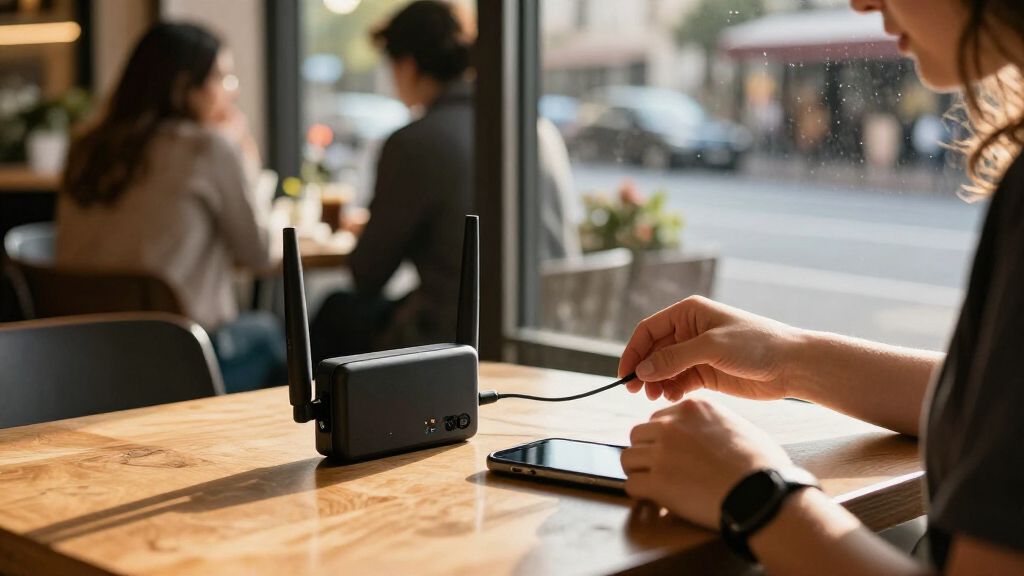
I judged these portable Wi-Fi security routers by how well each product fits a distinct travel need, rather than treating every device as interchangeable. The comparison weighs the connection source, wireless generation, portability, battery details for mobile hotspots, device capacity where stated, and the usability implications of features such as a touchscreen or multiple Ethernet ports. I also considered whether a model is designed to share an existing wired or wireless connection or to provide mobile data through a SIM, since that difference shapes both security use and trip planning.
The ranking favors versatility and practical security use for travelers who want to manage connections across trips. That puts the Beryl AX ahead as the most balanced travel-router option, with the Opal serving buyers who want a simpler entry point and the Slate 7 and Roam 7 appealing to buyers who specifically value newer Wi-Fi 7 hardware. LTE hotspots remain useful for independent mobile internet, but they rank lower for security-router duties because their primary role is connectivity and they require a compatible data plan. Product descriptions do not establish carrier support, VPN performance, or real-world battery life, so buyers should verify those details for their own use.
| portable Wi-Fi security router | Security |
|---|---|
| Unlocked 4G LTE Portable Wi-Fi | WPA2/WPA3 |
| GL.iNet GL-SFT1200 Opal AC1200 | — |
| Unlocked 4G LTE Mobile WiFi Ho | WPA2-PSK |
| Unlocked 4G LTE Portable Wi-Fi | — |
| TP-Link Roam 6 AX1500 Wi-Fi 6 | — |
| GL.iNet GL-BE3600 Slate 7 Wi-F | WPA3, DNS over HTTPS, DNS over TLS |
| Unlocked 4G LTE Mobile WiFi Ho | WPA2-PSK |
| GL.iNet Beryl AX | WPA2-PSK, WPA3, DNS over HTTPS, DNS over TLS |
| TP-Link Roam 7 BE3600 Wi-Fi 7 | — |
Factors to Consider When Choosing Portable Wi-Fi Security Routers
Before choosing a model, decide what problem you need the device to solve. A travel router can create a private network from a hotel or other connection, while a cellular hotspot brings its own internet access through mobile service. That distinction affects security, coverage, setup, and ongoing costs more than a Wi-Fi generation label alone.
Choose the Internet Source Before the Router
Start by asking whether you will usually have access to hotel, office, or wired internet, or whether you need a connection on the move. A travel router such as the Opal, Beryl AX, or Slate 7 can share an available connection, but it does not replace the internet service feeding it. An LTE hotspot can work away from fixed networks if it supports a carrier and plan that cover your destination. Do not assume that an unlocked label means every carrier or country will work; bands, SIM activation, and network rules can still limit service. For mixed trips, compare the router’s connection modes and the hotspot’s carrier compatibility before paying for features you may not use.
Separate Privacy Features From Internet Access
A router can help create a consistent network for your devices, but that alone does not make every connection private or anonymous. Look for clear details about VPN support, supported protocols, setup steps, and whether the feature applies to all connected devices or only selected traffic. A hotspot’s SIM connection may reduce dependence on public Wi-Fi, but cellular service is not a substitute for reviewing the device’s security controls and software support. Buyers often focus on the word “security” in a product listing without checking what protections are actually included. If you need a router-wide VPN, confirm the specific model and firmware support your chosen VPN service before buying.
Match Wi-Fi Generation to Your Real Networks
Wi-Fi 6 and Wi-Fi 7 can help with newer client devices and busy local networks, but they do not make a slow hotel connection faster by themselves. The practical benefit depends on the router, your phones and laptops, and the internet connection on the trip. A Wi-Fi 7 model may make sense for frequent travel with newer devices or for advanced home-and-travel use, while an older generation can be a better fit when simple sharing is the main task. Avoid choosing solely by the highest generation printed on the box. Put more weight on connection compatibility, setup, and the features you will actually use.
Treat SIM Format and Carrier Support as Separate Checks
SIM slot descriptions are not enough to confirm that a hotspot will connect on your trip. Check the carrier’s supported LTE bands, whether the device accepts the SIM type you plan to use, and any activation or network restrictions. This matters especially when buying an unlocked device for international travel, since local coverage and compatibility vary by country. A nano SIM and a micro SIM are not interchangeable without the right adapter, and an adapter does not solve unsupported network bands. Confirming these details before departure can prevent a portable hotspot from becoming a device with no usable service.
Plan Around Power, Not Just Portability
Small size does not tell you how long a hotspot will last under your travel routine. Battery capacity is one useful clue, but actual runtime also depends on signal strength, connected devices, usage, and settings. A larger stated battery may be helpful for a day away from outlets, yet it does not establish a guaranteed operating time. Travel routers that rely on external power may suit hotel-room use better than long periods of mobile use. Think through whether you can recharge during the day and whether you need internet while walking, commuting, or working in places without dependable power.
Buy for Your Typical Device Count and Setup Tolerance
Count the devices you expect to connect at once, including phones, tablets, laptops, and work equipment, rather than relying only on a maximum device-support claim. A stated capacity does not describe how well the router performs when many devices are active or sharing demanding tasks. Extra Ethernet ports and a touchscreen can make advanced setups easier, but they add little for someone who only wants to connect a phone and laptop. If you are new to travel routers, prioritize clear setup instructions and a simple connection workflow over advanced controls you may not use. Frequent travelers with several devices may value more management options even if setup takes longer.
Frequently Asked Questions
Should I buy a travel router or a SIM-based hotspot for international trips?
Choose a travel router if you expect to connect through hotel, rental, or wired internet and want your devices to share one managed network. Choose a SIM-based hotspot if you need mobile data away from those networks and can confirm that the device supports a local carrier or travel SIM. Some travelers may need both, but carrying both only makes sense if your trips regularly involve both connection types. Check data plans, roaming rules, supported LTE bands, and SIM format before relying on a hotspot abroad. Neither device removes the need to review its security features and keep its software current.
Does a portable travel router automatically protect me on public Wi-Fi?
No: connecting through a travel router does not automatically provide encryption for every part of your internet traffic. A router can make it easier to use one network across your devices, but the connection still depends on the upstream Wi-Fi or wired service. If you want VPN protection, verify that the specific router supports your VPN provider and that the VPN can be configured for the traffic you want covered. Keep device security practices in place, including updates and strong account authentication. Check setup requirements before travel, since configuring a VPN may take more steps than joining a standard Wi-Fi network.
Is Wi-Fi 7 worth choosing over Wi-Fi 6 for travel?
Wi-Fi 7 is most relevant if your devices support it and you expect to benefit from newer wireless hardware across your travel or work setups. It will not raise the speed of a hotel connection or mobile plan beyond what that internet service can provide. For many travelers, Wi-Fi 6 is already a capable fit, and the Beryl AX offers a more balanced option in this lineup. The Slate 7 and Roam 7 make more sense when their newer generation or additional hardware features match a specific need. Compare the complete feature set and setup requirements rather than treating the generation number as the deciding factor.
How can I tell whether an unlocked LTE hotspot will work with my carrier?
Check the exact model’s supported LTE bands against the carrier’s bands in the places where you plan to use it. Confirm that the carrier permits the device on its network and that your SIM and data plan are compatible; “unlocked” does not confirm either point. If you are traveling internationally, compare compatibility country by country rather than assuming one device will connect everywhere. Also verify whether the hotspot uses a nano SIM or micro SIM so you have the right card or adapter. When details are unclear, confirm them with the carrier or manufacturer before purchasing.
How many devices can I realistically connect to a portable router?
Use the listed device limit as a compatibility ceiling, not a promise of equally smooth service for every connected device. Performance depends on the internet connection, wireless conditions, and what those devices are doing; video calls and large downloads place more demand on a network than idle phones. Count the devices you will actively use at the same time, then leave room for guests or secondary equipment. The LTE hotspot in this lineup that states support for 28 devices may appeal to a larger group, but that figure does not describe speed under heavy use. For work trips, test your expected setup before relying on it for several simultaneous high-demand tasks.
Conclusion
For most travelers who want a capable security-focused travel router, I recommend the GL.iNet Beryl AX as best overall for its balance of Wi-Fi 6 and travel-oriented networking. The GL.iNet GL-SFT1200 Opal is my best value and beginner pick for a simpler route into sharing travel connections, while buyers who want a SIM-powered connection should compare the LTE models by carrier compatibility, SIM format, battery, and device needs. For a best premium choice, consider the GL.iNet GL-BE3600 Slate 7 if its Wi-Fi 7 hardware, touchscreen, and dual 2.5G Ethernet suit your setup; the TP-Link Roam 7 is another Wi-Fi 7 option for buyers drawn to that generation. If your specific need is mobile data rather than managing public Wi-Fi, choose a compatible LTE hotspot instead of a travel router. The right choice comes down to whether you need to secure and share an existing connection, create mobile internet, or do both.
Fall Picks

DJI Osmo Action 4 Essential Combo Waterproof 4K Action Camera
As an affiliate, we earn on qualifying purchases.