
TL;DR

Get privacy and security gear delivered free with Prime
- Fast, free delivery on millions of items
- Prime Video, Amazon Music and more included
- Member-only deals all year
The best way to quiet a noisy AI rig isn’t just acoustic foam — it’s about distance and ventilation. Moving your machine into another room or closet, with proper airflow, beats any soundproof panel. Proper placement and cooling make the difference between a roaring rig and a silent workhorse. For detailed placement strategies, see this article on acoustic setup.
Acoustic dampening
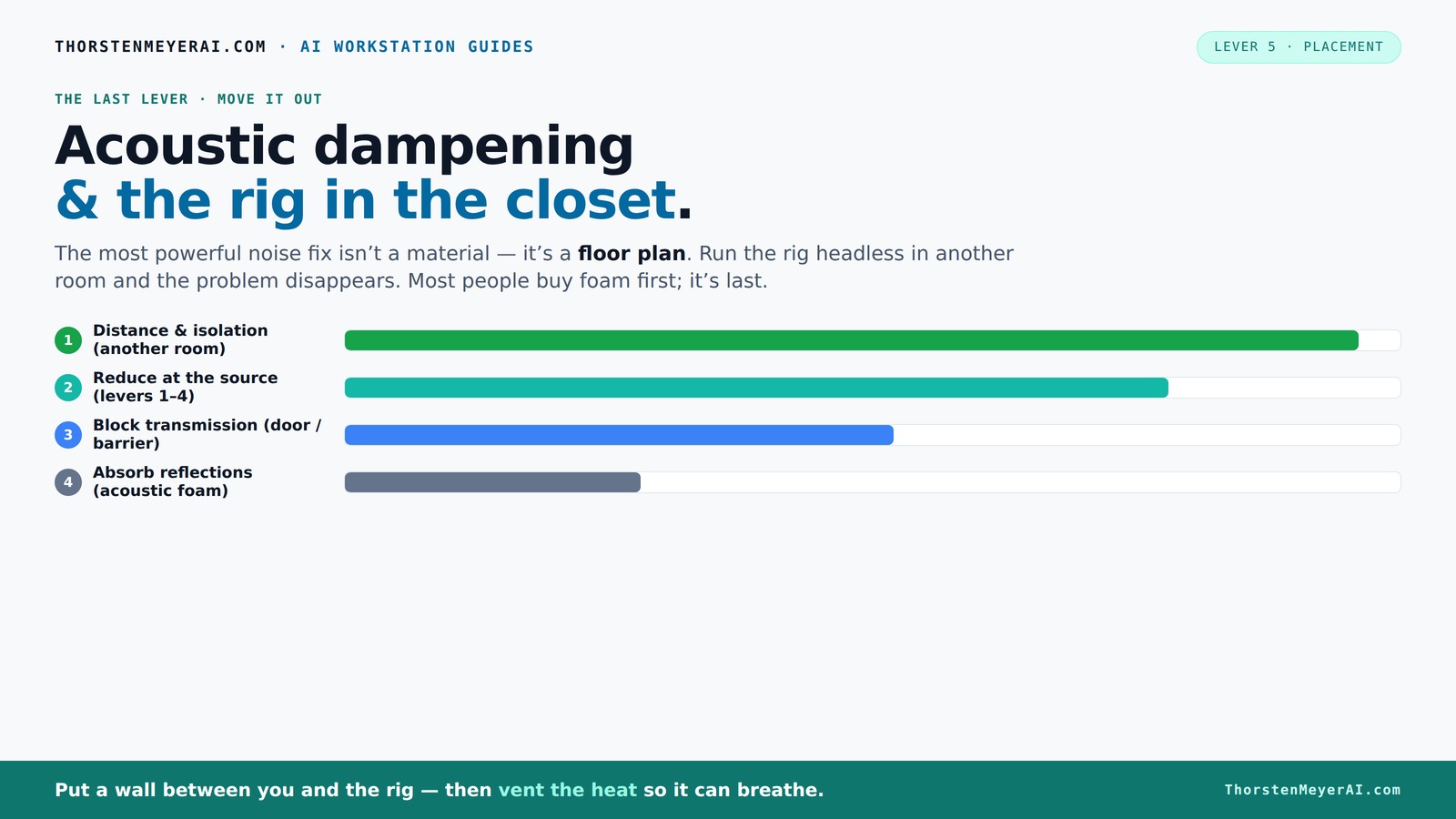
& the rig in the closet.
The most powerful noise fix isn’t a material — it’s a floor plan. A rig you can’t hear because it’s in another room beats any amount of foam. Tap the approaches in Part 1 to see what actually works.
(another room)
(levers 1–4)
(door / barrier)
(acoustic foam)
Contain the noise, not the heat
Key Takeaways
- Moving your AI workstation into another room or closet drastically reduces noise and allows better heat management.
- Proper ventilation is essential when enclosing a high-power rig; passive vents alone won’t cut it for heat dissipation.
- Vibration isolation pads and acoustic panels inside the enclosure help cut structure-borne hums that foam alone can't handle.
- Using network-based control means you don’t need your rig next to you — freeing up space and reducing noise pollution.
- Regular temperature checks and cooling upgrades prevent overheating and throttling in sealed setups.
Products Worth Considering

Jackery Solar Generator 1000 V2 with 200W Solar Panel

Jackery Explorer 2000 v2 Portable Power Station with Two 200W Solar Panels

Logitech MX Mechanical Wireless Illuminated Keyboard, Tactile Quiet, Graphite
As an affiliate, we earn on qualifying purchases.
Why Distance and Isolation Are Your Best Noise Fighters
When it comes to noise reduction, the biggest win is simply putting space between you and the machine. Think of it like talking in a crowded room — step into another room, and the noise drops dramatically. For AI workstations, this means setting up your rig in a different room, basement, or closet. You don’t need to be next to it to control the noise — especially since most work is done over a network. Just a wired connection and ventilation, and your workspace remains silent while the rig roars in peace.
For example, a friend moved his GPU server into an adjacent closet with a wired Ethernet and a small exhaust fan. You can find more about effective rig placement and cooling techniques here. His noise levels dropped from 80dB to near silence. The key? Distance cuts noise far more effectively than foam or barriers alone. This matters because reducing perceived noise isn't just about comfort — it can significantly lessen auditory fatigue, improve concentration, and create a more pleasant working environment. The tradeoff? Slightly increased setup complexity and the need for reliable network infrastructure, but these are often minimal compared to the comfort gained.
How the 'Rig in the Closet' Setup Works — And Its One Big Catch
Placing your rig inside a closet or cabinet can turn down the volume drastically. Learn more about acoustic dampening and enclosure options. It’s like hiding a loud car engine in a garage. But here’s the catch: heat. GPU rigs produce 600W or more, and sealing them inside without airflow leads to overheating. That’s like leaving a pot on the stove with the lid on — the temperature climbs, and performance drops. The implication is that while soundproofing and enclosure can be effective, they are only beneficial if paired with proper heat management. Otherwise, you risk thermal throttling, which reduces performance and can even damage components over time.
To avoid this, you need active ventilation: a quiet exhaust fan, vents, or ducted airflow. For detailed guidance, see this article on proper ventilation setup. Some custom soundproof cabinets combine acoustic foam with thermostatic fans and ducts, keeping noise down while dumping heat outside. For example, a DIY closet with a small exhaust fan and passive vents kept a 700W rig cool and quiet, but sealing it without airflow turned into disaster. The tradeoff involves balancing noise reduction with increased complexity in airflow management. Without it, you risk overheating, which negates the benefits of a silent setup and can lead to costly hardware failures.
Placement Tips: Making Your Noise-Reducing Setup Work Better
Where you put your rig makes a huge difference. If it’s in a corner, sound bounces off walls, amplifying noise. But in a closet or enclosed space, reflections are minimized, and sound is contained. Use acoustic panels or foam inside the closet to absorb any residual echoes, but don’t rely on foam alone for noise reduction. The effectiveness of placement also depends on understanding how sound waves interact with the environment. Proper placement reduces the amount of sound that escapes and minimizes internal reflections that can amplify noise. The tradeoff? Poor placement can lead to unintended noise amplification or inefficient cooling, so consider both acoustics and airflow when choosing a spot.
Here are some placement hacks: For more tips, visit this guide on optimal rig placement.
- Position the rig away from your main workspace.
- Use soft, absorbent materials inside the closet to dampen reflections.
- Ensure vents or fans are placed to draw cool air in and hot air out.
- Keep cables organized to avoid airflow blockages.
Comparison Table: Noise and Heat Management Methods
| Method | Noise Reduction | Heat Management | Ease of Setup |
|---|---|---|---|
| Distance & Isolation | High | Dependent on ventilation | Easy |
| Acoustic Foam | Low to Moderate | None | |
| Sealed Closet with Ventilation | High | Requires active airflow | Moderate to Difficult |
| Soundproof Cabinet | High | Designed for cooling |
Practical Steps to Make Your 'Rig in the Closet' Safe and Cool
- Choose a ventilated closet or build a custom enclosure with vents and fans.
- Install a quiet exhaust fan and passive intake vents to circulate air.
- Add acoustic foam or panels inside to absorb sound reflections.
- Place rubber feet or anti-vibration pads under the rig to reduce structure-borne noise.
- Monitor temperatures regularly — aim for under 85°C on GPUs and CPUs.
- If needed, upgrade to liquid cooling or use exhaust systems that move heat outside.
Key Takeaways for Quieter, Cooler AI Rigs
- Distance is the most effective noise reduction — put your rig in another room or closet.
- Proper ventilation prevents overheating in sealed spaces, avoiding throttling and noise spikes.
- Active airflow and soundproofing work better together than foam alone.
- Vibration isolation pads cut down on structure-borne hums that foam can’t touch.
- Network setup and cable management are critical for a remote, silent rig.
What Should You Do Now? Make Your Rig Silent and Cool
Start by imagining your ideal workspace — quiet, cool, and free of distracting hums. If your rig is loud and hot, consider relocating it into a closet or another room with good airflow. Combine that with vibration pads and acoustic panels inside the space. Your goal: a rig that roars in a closet, not in your face.
Remember, noise and heat are solved best by distance and proper airflow. Making these small but smart adjustments will turn your noisy beast into a silent powerhouse. Your workspace, your peace, and your hardware will thank you.