
For buyers seeking the best 4K monitors over $500, this category offers high-end features, stunning visuals, and premium build quality. The Samsung Odyssey G7 stands out for its curved design and gaming focus, while the LG UltraGear OLEDs excel in vibrant color and fast response times for gaming enthusiasts. On the professional side, the ASUS ProArt PA329CRV provides exceptional color accuracy for creative work. The main tradeoffs involve balancing price, performance, and specific use cases like gaming or professional editing. Continue reading to explore detailed reviews and help determine which monitor fits your needs best.

Get privacy and security gear delivered free with Prime
- Fast, free delivery on millions of items
- Prime Video, Amazon Music and more included
- Member-only deals all year
Key Takeaways
- The top-tier OLED monitors deliver superior contrast and vibrant color but come at a premium price and may have limited availability.
- Gaming-focused models feature high refresh rates and fast response times, but often have curved screens that may not suit all professional workflows.
- Professional monitors prioritize color accuracy and connectivity options, usually at a higher cost and with less emphasis on gaming specs.
- Size matters: larger screens like 32-40 inches enhance immersion but may require more desk space and higher GPU performance.
- Price differences within this category often reflect build quality, screen technology (OLED vs LCD), and targeted use cases, making it vital to match your priorities with the right features.
| Samsung 40” Odyssey G7 Series WUHD Curved Gaming Monitor |  | Best for Immersive Ultrawide Gaming | Display Size: 40 inches | Display Aspect Ratio: 21:9 | Display Type: LED | VIEW LATEST PRICE | See Our Full Breakdown |
| ASUS ROG XG32UCWG 32-Inch 4K OLED Gaming Monitor |  | Best for Visual Fidelity and Versatility | Display Size: 32 inches | Resolution: 3840 x 2160 (4K) | Panel Type: OLED TrueBlack Glossy | VIEW LATEST PRICE | See Our Full Breakdown |
| LG 37G800A-B 37-Inch Ultragear 4K UHD Curved Gaming Monitor | 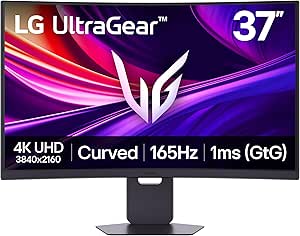 | Best for Large, Curved Gaming with Versatile Connectivity | Display Size: 37 inches | Resolution: 3840 x 2160 (4K UHD) | Refresh Rate: 165Hz | VIEW LATEST PRICE | See Our Full Breakdown |
| ASUS ProArt PA329CRV 32-Inch 4K HDR Professional Monitor for Mac |  | Best for Color Accuracy and Creative Work | Display Size: 32 inches | Resolution: 3840 x 2160 (4K) | Color Coverage: 98% DCI-P3 | VIEW LATEST PRICE | See Our Full Breakdown |
| Dell UltraSharp 32 Thunderbolt Hub Monitor – U3226QER |  | Best for Professional Multi-Device Users | Display Size: 32 inches | Resolution: 4K UHD | Contrast Ratio: 3000:1 | VIEW LATEST PRICE | See Our Full Breakdown |
| LG 32GX870A-B 32-inch Ultragear 4K UHD OLED Gaming Monitor |  | Best Premium OLED for Gaming and Multitasking | Display Size: 32 inches | Resolution: 3840 x 2160 (4K UHD) | Refresh Rate: 240Hz / 480Hz (dual mode) | VIEW LATEST PRICE | See Our Full Breakdown |
| Dell UltraSharp U2725QE 27-Inch 4K UHD IPS Monitor |  | Best for Professional and Creative Workflows | Display Size: 27 inches | Resolution: 3840×2160 (4K UHD) | Display Technology: IPS LCD | VIEW LATEST PRICE | See Our Full Breakdown |
| LG 32GX850A-B 32-Inch UltraGear 4K UHD OLED Gaming Monitor |  | Best for Gaming with Vibrant OLED Display | Display Size: 32 inches | Resolution: 3840 x 2160 (4K UHD) | Panel Type: OLED | VIEW LATEST PRICE | See Our Full Breakdown |
| Dell 32 Plus 4K QD-OLED Monitor S3225QC – 31.6-inch, 4K UHD, 120Hz |  | Best All-in-One 4K QD-OLED with Sound and Flexibility | Display Size: 31.6 inches | Resolution: 3840 x 2160 (4K UHD) | Display Technology: QD-OLED | VIEW LATEST PRICE | See Our Full Breakdown |
| 4K monitors over $500 | Display Size | Resolution | Refresh Rate | Contrast Ratio |
|---|---|---|---|---|
| Samsung 40” Odyssey G7 Series | 40 inches | — | 180Hz | 3000:1 |
| ASUS ROG XG32UCWG 32-Inch 4K O | 32 inches | 3840 x 2160 (4K) | 165Hz (4K), 330Hz (FHD) | 1,500,000:1 |
| LG 37G800A-B 37-Inch Ultragear | 37 inches | 3840 x 2160 (4K UHD) | 165Hz | — |
| ASUS ProArt PA329CRV 32-Inch 4 | 32 inches | 3840 x 2160 (4K) | — | — |
| Dell UltraSharp 32 Thunderbolt | 32 inches | 4K UHD | — | 3000:1 |
| LG 32GX870A-B 32-inch Ultragea | 32 inches | 3840 x 2160 (4K UHD) | 240Hz / 480Hz (dual mode) | — |
| Dell UltraSharp U2725QE 27-Inc | 27 inches | 3840×2160 (4K UHD) | 120Hz | 1000:1 |
| LG 32GX850A-B 32-Inch UltraGea | 32 inches | 3840 x 2160 (4K UHD) | 165Hz / 330Hz (dual mode) | 1.5M:1 |
| Dell 32 Plus 4K QD-OLED Monito | 31.6 inches | 3840 x 2160 (4K UHD) | 120Hz | 1,500,000:1 |
More Details on Our Top Picks
Samsung 40” Odyssey G7 Series WUHD Curved Gaming Monitor
The Samsung Odyssey G7 40” stands out for its expansive 40-inch curved WUHD display with a 21:9 aspect ratio, delivering an immersive experience that surpasses the more conventional 32-inch options like the LG 37G800A-B. Its high 180Hz refresh rate and 1ms response time make it ideal for fast-paced gaming, while HDR600 support enhances visual depth. The ergonomic stand offers tilt and height adjustments for comfort during extended play. Compared to smaller monitors, this model sacrifices desk space but provides a panoramic view that elevates gaming and multitasking. The premium price reflects its size and feature set, which may be overkill for casual users. This pick makes the most sense for gamers seeking a large, immersive curved display with high refresh rates and HDR support, willing to invest in premium features.
Pros:- Massive 40-inch curved ultrawide display for immersive gaming
- High 180Hz refresh rate and 1ms response time ensure smooth gameplay
- Supports HDR600 and FreeSync Premium Pro for enhanced visuals
Cons:- Very large size may not fit in smaller or cluttered setups
- Premium price reflects high-end features, not suited for casual users
Best for: Dedicated gamers who want an ultra-immersive, expansive display for high-intensity gameplay
Not ideal for: Users with limited desk space or those preferring a traditional flat screen for productivity
- Display Size:40 inches
- Display Aspect Ratio:21:9
- Display Type:LED
- Panel Technology:VA
- Contrast Ratio:3000:1
- Refresh Rate:180Hz
- Response Time:1ms (GtG)
- HDR:DisplayHDR 600
Our verdict“This monitor is perfect for gamers who prioritize an expansive, immersive experience and have ample space to accommodate its size.”
ASUS ROG XG32UCWG 32-Inch 4K OLED Gaming Monitor
The ASUS ROG XG32UCWG distinguishes itself with a stunning 32-inch OLED panel offering exceptional contrast and vibrant colors, making it ideal for both gaming and creative work. Its dual-mode refresh rate—165Hz at 4K and 330Hz at FHD—provides flexibility that surpasses traditional 4K monitors like the Dell U3226QER. The 0.03ms response time and 1,500,000:1 contrast ratio deliver stunning visuals with deep blacks and bright highlights. Its Neo Proximity Sensor helps prevent burn-in, increasing longevity for OLED. Connectivity options like USB-C with 15W Power Delivery and HDMI 2.1 make it versatile for modern setups. On the downside, the premium price might be prohibitive, and reflections from the glossy panel can be distracting in bright rooms. This monitor is best suited for users who prioritize top-tier image quality and versatile performance in a smaller form factor.
Pros:- Vivid OLED display with high contrast and color accuracy
- Dual-mode refresh rates support gaming and creative work
- Advanced burn-in prevention features included
Cons:- High price point may be inaccessible for some users
- Glossy panel can cause reflections in bright environments
Best for: Creative professionals and serious gamers who want cutting-edge OLED display quality with dual-mode flexibility
Not ideal for: Budget-conscious buyers or those needing a more matte finish for bright environments
- Display Size:32 inches
- Resolution:3840 x 2160 (4K)
- Panel Type:OLED TrueBlack Glossy
- Refresh Rate:165Hz (4K), 330Hz (FHD)
- Response Time:0.03ms
- Contrast Ratio:1,500,000:1
- Connectivity:USB-C, HDMI 2.1, DisplayPort 1.4
Our verdict“This monitor is ideal for those seeking the pinnacle of image quality with versatile gaming and creative capabilities, despite its premium cost.”
LG 37G800A-B 37-Inch Ultragear 4K UHD Curved Gaming Monitor
The LG 37G800A-B Ultragear offers a sizable 37-inch curved 4K display, making it a compelling choice for gamers who want an expansive view without the complexity of OLEDs. Its 165Hz refresh rate and 1ms response time ensure smooth, responsive gameplay, while support for DisplayHDR 600 adds visual depth. The stand’s tilt, height, and swivel adjustments provide personalized comfort, comparable to the ergonomic features of the Samsung Odyssey G7. While the curved design might not appeal to everyone, it enhances immersion in fast-paced titles. The large footprint requires ample desk space, and the premium features come at a higher price. This monitor suits gamers who want a balance of size, performance, and flexibility in a curved format.
Pros:- Large 37-inch curved display for immersive gaming
- Fast 165Hz refresh rate and 1ms response time
- Adjustable stand with tilt, height, and swivel
Cons:- Large size requires significant desk space
- Curved design may not suit all preferences
Best for: Gamers seeking a large, curved display with high refresh rate and HDR support for immersive play
Not ideal for: Desk setups with limited space or users preferring flat screens for productivity
- Display Size:37 inches
- Resolution:3840 x 2160 (4K UHD)
- Refresh Rate:165Hz
- Response Time:1ms
- HDR:DisplayHDR 600
- Connectivity:HDMI 2.1, DisplayPort 1.4, USB Type-C (65W PD)
Our verdict“This monitor is best for gamers craving a sizable, curved panel with high refresh rates and HDR, provided they have enough space to accommodate it.”
ASUS ProArt PA329CRV 32-Inch 4K HDR Professional Monitor for Mac
The ASUS ProArt PA329CRV is tailored for professionals demanding precise color accuracy, with 98% DCI-P3 coverage and factory calibration. Its 32-inch 4K HDR display delivers consistent, accurate visuals ideal for photo editing, video production, and design. Unlike gaming-focused models, this monitor emphasizes color fidelity over high refresh rates, which it handles with a 60Hz baseline, but still offers HDR support and extensive connectivity, including USB-C with 96W Power Delivery. The 5-year warranty underscores its professional-grade reliability. The size and cost may be excessive for casual users or those primarily interested in gaming. This monitor fits creatives needing a reliable, accurate display with versatile connectivity, especially for Mac workflows.
Pros:- Exceptional color accuracy with 98% DCI-P3 coverage
- Factory calibrated for consistent professional-grade colors
- USB-C with 96W Power Delivery supports modern workflows
Cons:- Lower refresh rate limits gaming performance
- High price and large size may be overkill for casual use
Best for: Creative professionals and designers requiring color precision and calibration for demanding projects
Not ideal for: Gamers or users seeking high refresh rates and fast response times for gaming
- Display Size:32 inches
- Resolution:3840 x 2160 (4K)
- Color Coverage:98% DCI-P3
- Color Accuracy:Delta E < 2
- HDR:VESA DisplayHDR 400
- Connectivity:USB-C 96W, HDMI, DisplayPort
Our verdict“This monitor is ideal for creative professionals who need color accuracy and reliable calibration over gaming performance.”
Dell UltraSharp 32 Thunderbolt Hub Monitor – U3226QER
The Dell UltraSharp U3226QER combines a 32-inch 4K UHD IPS Black panel with a 120Hz refresh rate, offering vibrant colors and deep blacks that rival OLEDs in contrast. Its factory calibration and 99% DCI-P3 coverage make it highly suitable for creators and developers who need accurate visuals. The built-in Thunderbolt hub and Ethernet port add significant convenience for multi-device workflows, setting it apart from more standard monitors like the LG 32GX870A-B. Its sleek, refined design fits well in professional settings, though it requires the Dell app for full customization, which could be inconvenient. This monitor is best for users who need high color fidelity combined with seamless connectivity and multi-device support.
Pros:- High color accuracy with 99% P3 coverage and factory calibration
- Deep blacks and vibrant colors from IPS Black panel
- Built-in Thunderbolt hub and Ethernet for seamless multi-device use
Cons:- Requires additional software for full customization
- Higher price due to advanced features
Best for: Professionals and creatives needing accurate color, high connectivity, and multi-device integration
Not ideal for: Casual users or gamers who prioritize high refresh rates and gaming-specific features
- Display Size:32 inches
- Resolution:4K UHD
- Contrast Ratio:3000:1
- Color Coverage:99% P3
- Panel Type:IPS Black
- Connectivity:Thunderbolt, Ethernet
Our verdict“This monitor is suited for professionals who need precise visuals and integrated connectivity for multi-device workflows, with less emphasis on gaming features.”
LG 32GX870A-B 32-inch Ultragear 4K UHD OLED Gaming Monitor
The LG 32GX870A-B stands out for its stunning OLED display, offering deep blacks and vibrant colors that surpass traditional LCDs like the Dell UltraSharp U2725QE in visual quality. Its dual-mode refresh rate of 240Hz or 480Hz, combined with an ultra-fast 0.03ms response time, makes it ideal for fast-paced gaming sessions, especially compared to the U2725QE’s 120Hz, which is less suited for competitive gaming. The VESA DisplayHDR True Black 400 enhances contrast and color richness, but the OLED panel necessitates careful use to avoid burn-in, a concern absent with LCDs. While the premium price might be a barrier, this monitor excels for gamers who demand both outstanding image quality and ultra-smooth gameplay. It’s best for high-end gamers and multitaskers craving immersive visuals with fluid motion, though not ideal for users on a tight budget or those worried about OLED longevity.
Pros:- Exceptional contrast and vibrant colors with OLED technology
- Ultra-fast response time of 0.03ms for minimal ghosting
- Dual refresh rate options up to 480Hz for smooth gameplay
- Customizable multitasking via Switch app
Cons:- Premium price may be prohibitive for many buyers
- OLED panels require careful use to prevent burn-in
- Limited to 32-inch size, which may not suit all setups
Best for: High-end gamers and multimedia enthusiasts seeking top-tier visual quality and fast refresh rates.
Not ideal for: Budget-conscious users or those with prolonged static displays who are concerned about OLED burn-in risk.
- Display Size:32 inches
- Resolution:3840 x 2160 (4K UHD)
- Refresh Rate:240Hz / 480Hz (dual mode)
- Response Time:0.03ms
- HDR:VESA DisplayHDR True Black 400
- Panel Type:OLED
Our verdict“This monitor is perfect for serious gamers and professionals who prioritize stunning visuals and rapid response times, despite its high cost and burn-in considerations.”
Dell UltraSharp U2725QE 27-Inch 4K UHD IPS Monitor
The Dell UltraSharp U2725QE excels in delivering precise, factory-calibrated color accuracy and versatile connectivity, making it a prime choice for creative professionals. Its 27-inch IPS panel offers wide viewing angles and consistent color, which is a step up from the more gaming-focused LG 32GX850A-B’s OLED panel, especially in terms of color stability and longevity. The 120Hz refresh rate, while lower than gaming-centric models, still provides a smooth experience suitable for editing and productivity. Its ergonomic stand and extensive port options—including Thunderbolt 4—support long hours of comfortable work, though its higher power consumption and premium price might deter casual users. This monitor makes the most sense for content creators and professionals who value color fidelity and flexible connectivity over ultra-high gaming refresh rates.
Pros:- Excellent factory-calibrated color accuracy for professional use
- Versatile connectivity including Thunderbolt 4 and USB-C
- Ergonomic adjustments for comfort during long work sessions
- VESA DisplayHDR 600 support for enhanced contrast
Cons:- Relatively high power consumption
- Large size may not fit smaller desks
- Higher price point compared to standard 4K monitors
Best for: Creative professionals and workflow-focused users needing accurate colors and versatile connectivity.
Not ideal for: Competitive gamers seeking ultra-high refresh rates or users with limited desk space due to its large size and high power draw.
- Display Size:27 inches
- Resolution:3840×2160 (4K UHD)
- Display Technology:IPS LCD
- Contrast Ratio:1000:1
- Brightness:450 cd/m²
- Refresh Rate:120Hz
Our verdict“This monitor is best suited for professionals who prioritize color accuracy and flexible connectivity over gaming performance.”
LG 32GX850A-B 32-Inch UltraGear 4K UHD OLED Gaming Monitor
The LG 32GX850A-B is tailored for gamers seeking vibrant visuals and high refresh rates, with a 32-inch OLED panel that delivers deep blacks and lively colors. Its 165Hz in full HD mode and up to 330Hz in dual mode make it stand out against LCD competitors like the Dell UltraSharp, especially in fast-paced titles. The 0.03ms response time minimizes motion blur, and support for G-SYNC and FreeSync Premium Pro ensures tear-free gameplay. The adjustable stand and eye safety features add comfort for extended sessions. However, OLED’s susceptibility to burn-in, along with its premium price, makes it less appealing for static or prolonged use. This monitor makes the most sense for competitive gamers who want vivid visuals and ultra-smooth motion, but not for those who prefer static displays or are concerned about OLED lifespan.
Pros:- Vivid 4K OLED display with deep blacks and bright colors
- High refresh rates up to 330Hz in dual mode for smooth gameplay
- Supports G-SYNC and FreeSync Premium Pro for tear-free gaming
- Adjustable stand for ergonomic comfort
Cons:- OLED panels can be prone to burn-in over time
- Premium price may be high for casual users
- Glossy finish may cause reflections in bright environments
Best for: Fast-paced gamers and esports enthusiasts craving vibrant visuals and ultra-fast response times.
Not ideal for: Users concerned about OLED burn-in or seeking a more budget-friendly, static-use monitor.
- Display Size:32 inches
- Resolution:3840 x 2160 (4K UHD)
- Panel Type:OLED
- Brightness:275 nits
- Contrast Ratio:1.5M:1
- Refresh Rate:165Hz / 330Hz (dual mode)
Our verdict“This monitor is ideal for competitive gamers who prioritize vivid visuals and ultra-fast response times, accepting the risks of OLED technology.”
Dell 32 Plus 4K QD-OLED Monitor S3225QC – 31.6-inch, 4K UHD, 120Hz
The Dell 32 Plus S3225QC combines stunning QD-OLED visuals with immersive 3D spatial audio and a flexible design, making it ideal for entertainment and creative work. Its 31.6-inch screen offers vibrant colors and deep blacks, rivaling the LG OLED models but with the added benefit of Dolby Vision and HDR True Black 400. The 120Hz refresh rate is slightly lower than some gaming-focused models, but it still provides smooth playback for multimedia and light gaming. The built-in five 5W speakers with AI-enhanced spatial audio elevate the experience, and the adjustable stand supports ergonomic setups. Connectivity options include a USB-C port with up to 90W power delivery, making it suitable for a variety of devices. This model shines for users who want a versatile, high-quality monitor with impressive audio, though its price and size may deter budget-conscious or space-limited buyers.
Pros:- Stunning 4K QD-OLED visuals with deep blacks and vibrant colors
- Immersive AI-enhanced spatial audio with five speakers
- Flexible stand with height, tilt, swivel, and slant adjustments
- Multiple connectivity options including USB-C with PD
Cons:- Premium price may be high for some users
- Large size requires ample desk space
- 120Hz refresh rate may be less appealing for high-end gaming
Best for: Entertainment-focused users and content creators seeking vibrant visuals with integrated audio and versatile connectivity.
Not ideal for: Gamers seeking ultra-high refresh rates or users with limited desk space due to its large footprint and premium price.
- Display Size:31.6 inches
- Resolution:3840 x 2160 (4K UHD)
- Display Technology:QD-OLED
- Brightness:250 nits
- Contrast Ratio:1,500,000:1
- Refresh Rate:120Hz
Our verdict“This monitor offers a compelling mix of superb visuals, integrated sound, and ergonomic flexibility, suited for entertainment and creative use despite its cost and size.”

How We Picked
The monitors included in this roundup were selected based on a combination of performance metrics, build quality, feature set, and value for over $500. Priority was given to models that excel in key areas like color accuracy, refresh rate, connectivity, and ergonomic adjustments. We also considered user reviews and expert insights to ensure reliability and real-world performance. The ranking reflects a balance between cutting-edge features and practical usability, ensuring each option appeals to different types of buyers—from gamers to professionals. Overall, these picks represent the best mix of quality and value within the high-end 4K monitor market in 2026.Factors to Consider When Choosing Best 4K Monitors Over $500
Choosing a 4K monitor over $500 involves several critical considerations. While higher price often means better performance, it can also mean a narrower focus on specific features. To maximize your investment, focus on factors like display technology, refresh rate, color accuracy, connectivity options, and ergonomics. Being aware of common pitfalls—such as prioritizing size over resolution or ignoring color calibration—can help you avoid costly mistakes. This guide highlights key aspects to consider before making your purchase, ensuring you select a monitor tailored to your precise needs.Display Technology and Image Quality
High-end 4K monitors use either IPS, OLED, or VA panels. IPS panels offer excellent color accuracy and wide viewing angles, making them ideal for creative work. OLED screens provide unmatched contrast and vibrant colors, especially beneficial for media consumption and gaming. VA panels typically deliver better contrast ratios but may sacrifice some color precision. Your choice depends on whether your priority is color fidelity, contrast, or viewing angles—each technology has its strengths and limitations, which can significantly impact your experience.
Refresh Rate and Response Time
For gaming, a high refresh rate (120Hz or higher) significantly improves motion smoothness, reducing blur and input lag. Most professional monitors over $500 target 60Hz or 120Hz, with some reaching 144Hz or even 240Hz in specialized models. Response time also matters; lower response times (1ms to 3ms) minimize ghosting artifacts in fast-paced scenes. For non-gaming tasks, these specs are less critical, but they still influence overall fluidity and responsiveness, especially in video editing or fast-paced workflows.
Color Accuracy and Calibration
Color precision is vital for creative professionals. Look for monitors with high Delta E ratings, factory calibration, and support for wide color gamuts like AdobeRGB or DCI-P3. OLED displays excel here, providing deep blacks and vibrant colors out of the box. Calibration tools and hardware calibration support can help maintain accuracy over time. Avoid monitors with poor color coverage or inconsistent calibration, as these issues can compromise professional work quality.
Connectivity and Ergonomics
Ensure the monitor offers modern connectivity options such as HDMI 2.1, DisplayPort, USB-C, and Thunderbolt, especially if you plan to connect multiple devices or use a laptop dock. Ergonomic features like height adjustment, tilt, swivel, and pivot are important for comfortable long-term use. Some models include built-in USB hubs or KVM switches, adding convenience. A well-designed stand and flexible port options can enhance usability and reduce clutter in your workspace.
Size and Desk Space
Monitor size influences immersion and productivity. Larger screens (32-40 inches) are ideal for multitasking, immersive gaming, or detailed editing but demand more desk space and a powerful GPU. Smaller 27-inch models may fit tighter spaces while still offering 4K clarity. Consider your workspace dimensions and whether a curved or flat panel suits your workflow. Remember, higher resolution benefits are most noticeable on larger screens where pixel density remains high.
Frequently Asked Questions
Is OLED worth the extra cost over LED for a 4K monitor?
OLED displays generally deliver superior contrast ratios, deeper blacks, and more vibrant colors compared to traditional LED or LCD panels. For creative professionals or media enthusiasts, this difference can be significant, especially in dark-room viewing. However, OLED monitors tend to be more expensive, can suffer from burn-in issues with static images, and may have a shorter lifespan. Weighing these factors against your usage habits will help determine if an OLED monitor justifies the premium for your specific needs.
Should I prioritize refresh rate or color accuracy in a professional 4K monitor?
For professional work such as photo editing, video production, or graphic design, color accuracy should come first, with support for wide color gamuts and calibration capabilities. A high refresh rate is less critical unless you also plan to use the monitor for gaming or fast-paced content creation. Conversely, gamers should prioritize refresh rate and response time over absolute color precision. Balancing these needs depends on your primary use case, but for most creative tasks, accurate color reproduction takes precedence.
Are curved screens better for productivity or gaming?
Curved monitors can enhance immersion and reduce eye strain, especially on larger screens, making them appealing for gaming and multitasking. They can also improve viewing angles and make viewing more comfortable during extended use. However, for professional tasks like precise editing or CAD work, flat screens often provide more accurate geometry and less distortion. Your choice should reflect your typical activities—curved screens generally suit immersive experiences but may be less ideal for detailed, precision work.
How important is HDMI 2.1 support on a high-end 4K monitor?
HDMI 2.1 enables higher bandwidth, supporting 4K at 120Hz or even 144Hz, making it valuable for gaming and high-frame-rate video playback. It also allows for features like variable refresh rate (VRR) and auto low latency mode (ALLM), enhancing gaming responsiveness. For professional use, HDMI 2.1 may be less critical unless you rely on external devices or consoles that utilize these features. Overall, if you want future-proofing and smooth gaming performance, HDMI 2.1 support is a significant plus.
What’s more important: size or resolution in a high-end 4K monitor?
Resolution determines image sharpness, but screen size influences immersion and workspace. Larger screens (32 inches and above) allow for more detailed editing and more comfortable multitasking at 4K resolution, thanks to high pixel density. Smaller monitors might not fully showcase 4K benefits unless you sit very close. Balancing size with your workspace constraints and intended usage will help you choose the right monitor. Ultimately, larger screens with 4K resolution tend to deliver a more impactful visual experience.
Conclusion
For general users who want a reliable all-rounder, the Dell UltraSharp U3226QER offers balanced performance and premium build at a reasonable price. Creative professionals seeking top-tier color accuracy should consider the ASUS ProArt PA329CRV or OLED options for the deepest blacks and vibrant colors. Gaming enthusiasts will find the LG UltraGear OLEDs or the Samsung Odyssey G7 best suited to their needs, emphasizing high refresh rates and immersive screens. Budget-conscious buyers should focus on features that align with their primary tasks, ensuring they don’t overpay for unnecessary extras. This roundup aims to help each buyer find the perfect high-end 4K monitor that delivers value and performance in 2026.
As an affiliate, we earn on qualifying purchases.Halloween Picks
halloween