I’ve explored the top kid-friendly coding robots that emphasize safety and fun, like Botley, mBot, Dash, and Sphero Mini. These robots feature durable, impact-resistant designs, simple controls, and safety measures such as automatic shut-off and obstacle detection. They also support hands-on coding without screens, making learning engaging and secure. If you want to discover more about the best options to inspire safe STEM adventures for your child, keep going.
Key Takeaways
- Kid-friendly coding robots promote safe, hands-on learning with durable, impact-resistant designs and built-in safety features like obstacle detection.
- They support secure, screen-free programming options suitable for young children, reducing risks associated with online exposure.
- These robots incorporate guided activities, STEM challenges, and easy-to-use interfaces to ensure safe, engaging, and educational play.
- Connectivity features like Bluetooth and app controls are designed with security in mind, often including parental controls and limited ranges.
- Reputable brands offer reliable products with warranties, safety compliance, and ongoing software updates to maintain a safe learning environment.
Learning Resources Botley Coding Robot for Kids
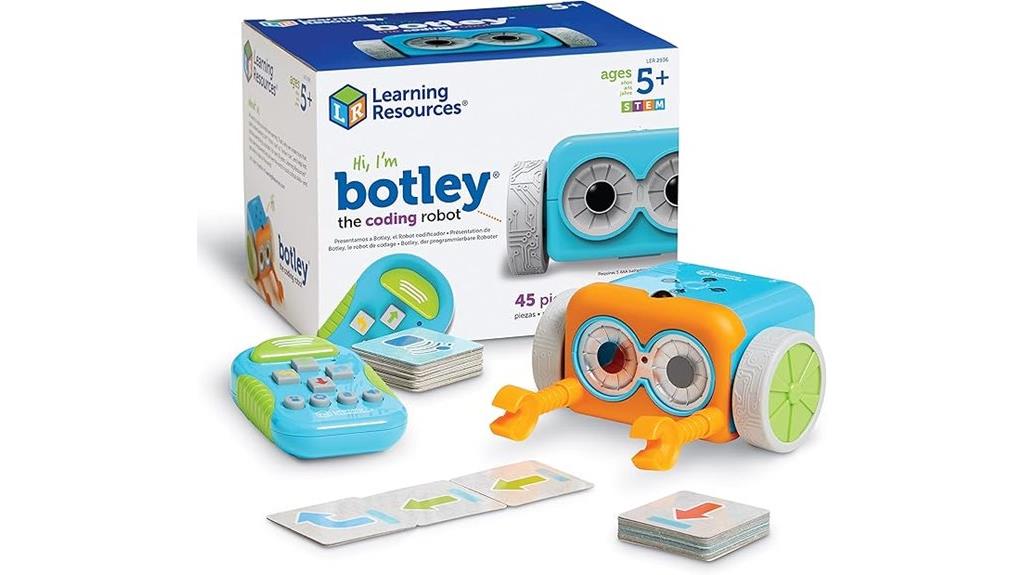
Are you looking for a beginner-friendly coding robot that introduces kids to programming without screens? The Learning Resources Botley Coding Robot is perfect for children aged 5 and up. It teaches programming fundamentals through hands-on play, encouraging critical thinking and problem-solving. With features like 80-step programming, loops, obstacle detection, and secret code tricks, Botley keeps kids engaged and challenged. The 45-piece activity set offers endless creative possibilities, from maze building to obstacle courses. It’s simple to set up—just add batteries—and ready to go. Botley provides an interactive, screen-free way to start coding and develop important STEM skills early on.
Best For: young children aged 5 and up who are just beginning to explore coding concepts in a screen-free, hands-on way.
Pros:
- Encourages critical thinking, problem-solving, and sequencing skills through interactive play
- Features a variety of activities including loops, obstacle detection, and secret codes for advanced learning
- Easy to set up and use, making it accessible for young children and beginner learners
Cons:
- Limited play area and small maze pieces may restrict creativity for older or more advanced users
- Some features like obstacle detection and black-line following can be finicky and require precise setup
- High battery consumption due to multiple features and frequent use, necessitating many AAA batteries
Makeblock mBot Robot Kit with Scratch Coding Box
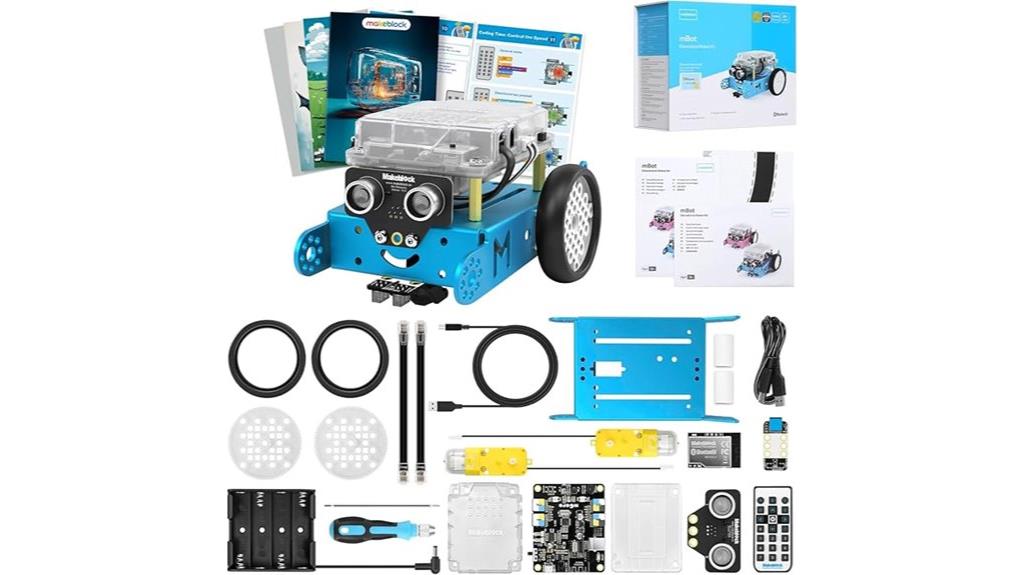
The Makeblock mBot Robot Kit with Scratch Coding Box is an excellent choice for kids aged 8-12 who are just starting to explore robotics and programming. It simplifies coding through game-based tutorials and engaging projects like line-following and obstacle avoidance. Kids can assemble the robot in about 15 minutes, making setup quick and straightforward. The kit supports a seamless progression from block-based coding to Arduino programming, encouraging skill development and problem-solving. With clear instructions and visual guides, children gain confidence as they see their ideas come to life. It’s a fun, educational gift that sparks curiosity about STEM and innovation.
Best For: beginners aged 8-12 who want an easy and engaging introduction to robotics, coding, and STEM education.
Pros:
- User-friendly setup with quick assembly within approximately 15 minutes.
- Supports a progressive learning path from block-based coding to Arduino programming.
- Comes with comprehensive resources including tutorials, visual guides, and troubleshooting tips.
Cons:
- Limited advanced features for older or more experienced coders.
- May require additional accessories or updates for extended projects.
- Some children might need supervision during assembly or initial coding steps.
Teach Tech Mech 5, Mechanical Coding Robot
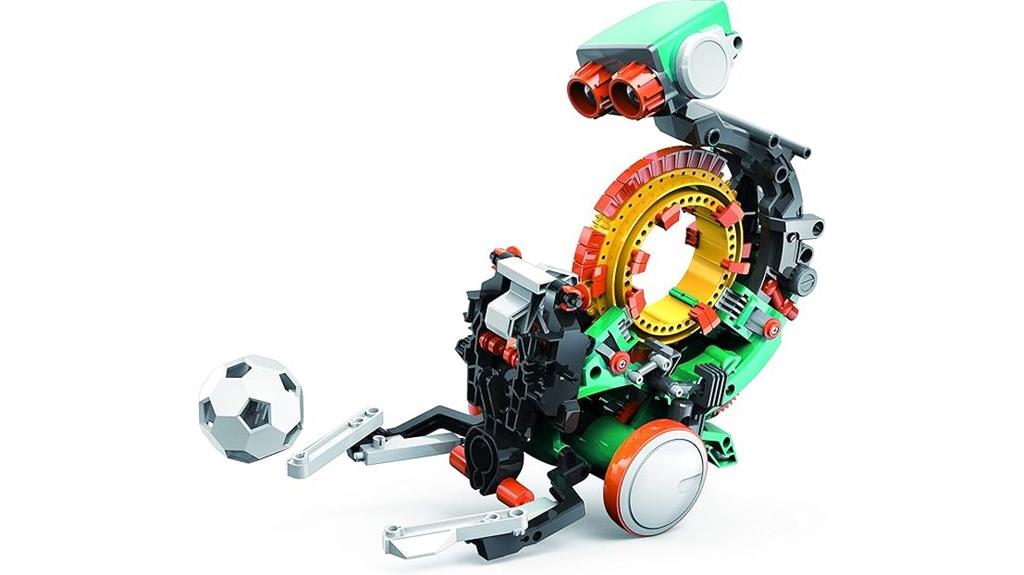
Teach Tech Mech-5 stands out as an ideal entry-level coding robot for kids aged 10 and up who are just starting to explore robotics and mechanical engineering. This mission-based STEM robot encourages learning through hands-on activities like throwing, lifting, drawing, and rotating. Kids snap coding buttons onto a wheel to program movements, making coding accessible and engaging. Powered by water, wind, or sun, it’s eco-friendly and battery-free. Its durable design and straightforward assembly promote creativity, problem-solving, and mechanical understanding. With positive reviews and lasting educational value, Mech-5 is a fantastic tool to introduce young learners to the exciting world of robotics.
Best For: young beginners aged 10 and up interested in exploring robotics and mechanical engineering through hands-on, eco-friendly STEM activities.
Pros:
- Easy to assemble with clear instructions, suitable for independent learning.
- Eco-friendly operation using water, wind, or sun, eliminating batteries.
- Promotes creativity, problem-solving, and mechanical understanding through fun, mission-based activities.
Cons:
- Assembly can be time-consuming and may require adult supervision or tools.
- Some parts may need careful handling to ensure smooth gear operation.
- Slightly complex for very young children without adult assistance.
Dash Robot – Coding Robot for Kids 6

Looking for a coding robot that’s perfect for young children just starting to explore STEM? Dash Robot is an excellent choice. Designed for kids aged 6 and up, it’s an interactive, ready-to-use device with no assembly needed. Its sleek, durable design features smooth motors that can avoid obstacles and navigate various terrains. With up to five hours of playtime, Dash can sing, dance, change colors, and record sounds. It supports multiple coding apps, from simple remote control to advanced block-based programming, making learning engaging and accessible. Its compatibility with various devices and expandability options guarantee it grows with your child’s skills, making STEM learning safe, fun, and versatile.
Best For: young children aged 6 and up who are beginning to explore STEM concepts through engaging, programmable robotics.
Pros:
- User-friendly with no assembly required, making it accessible for young kids.
- Supports a wide range of coding skills from simple remote control to advanced block-based programming.
- Durable design with long battery life and versatile features like singing, dancing, and obstacle avoidance.
Cons:
- Some users have reported minor firmware update issues that may require troubleshooting.
- Limited details on compatibility with accessories in the brief overview.
- The price, while competitive, may be a consideration for budget-conscious families.
Makeblock mBot2 Coding Robot for Kids

Makeblock mBot2 stands out as an ideal coding robot for kids aged 8 to 12 who are just starting to explore robotics or want to build on their basic programming skills. Its durable anodized aluminum construction guarantees it can handle enthusiastic play, and the simple assembly takes about 30 minutes. Equipped with over 10 sensors, expandable modules, and IoT features, it supports obstacle avoidance, line-following, and color recognition. The robot supports Scratch and Python, making coding accessible and engaging. With multiple control options like Bluetooth and Wi-Fi, along with user-friendly software, mBot2 makes learning robotics safe, fun, and highly educational for young beginners.
Best For: young beginners aged 8-12 who want to learn coding and robotics through a durable, easy-to-assemble kit with versatile control options.
Pros:
- Supports both Scratch and Python for flexible, beginner-friendly programming.
- Durable anodized aluminum construction ensures longevity during active play.
- Multiple sensors and IoT features enable a wide range of interactive activities and experiments.
Cons:
- Assembly may be challenging for some beginners despite clear instructions.
- Short cables and connector types can limit flexibility in setup.
- Software updates and features might require ongoing internet connection and device compatibility.
Learning Resources Code & Go Robot Mouse (31 Pieces, Ages 4+)

If you’re searching for a beginner-friendly coding toy for young children, the Learning Resources Code & Go Robot Mouse is an excellent choice. With 31 pieces designed for kids aged 4 and up, it introduces coding through interactive play. The mouse lights up, sounds, and responds to simple commands, making programming accessible. Kids can plan routes using pictorial cards and then program the mouse with push buttons. It promotes essential skills like problem-solving, logical thinking, and understanding directions. Perfect as a gift or classroom tool, this toy makes STEM learning fun and engaging while building foundational coding skills in a safe, screen-free environment.
Best For: young children aged 4 and up who are beginning to explore coding, problem-solving, and STEM concepts through engaging, hands-on play.
Pros:
- Introduces screen-free coding in an accessible, age-appropriate way
- Promotes critical thinking, problem-solving, and directional skills
- Encourages creativity and logical planning through interactive play
Cons:
- Requires 3 AAA batteries, which are not included
- Limited to simple commands, not suitable for advanced coding skills
- Small pieces may pose a choking hazard for very young children
STEM Robot Toy 6-in-1 Building Kit with APP Remote Control
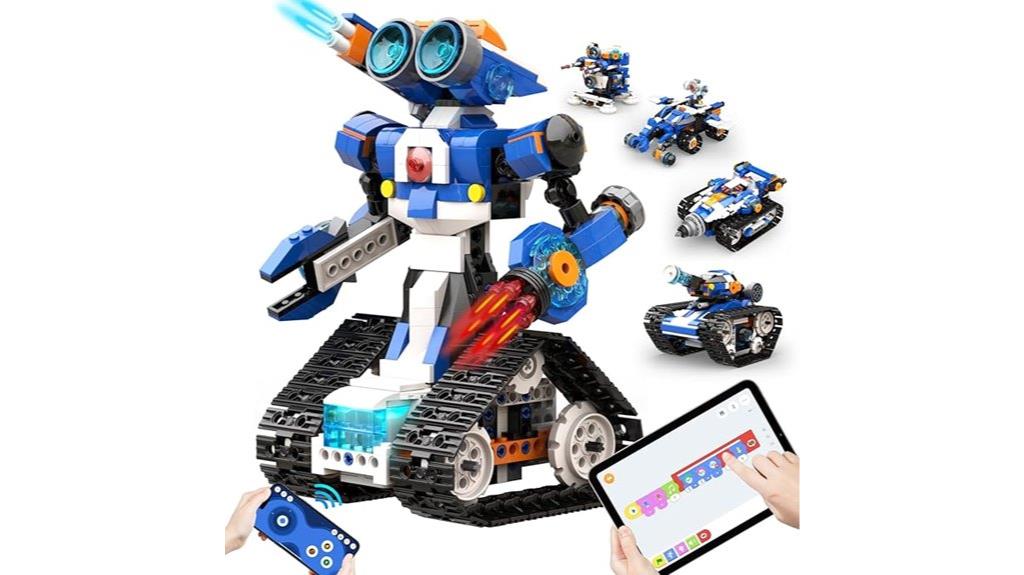
The STEM Robot Toy 6-in-1 Building Kit with APP Remote Control is an excellent choice for children aged 7 to 12 who are enthusiastic to explore coding and robotics in a hands-on way. With 480 colorful blocks and no tools needed, kids can easily snap pieces together to build six different robots, fostering creativity and fine motor skills. The intuitive app teaches coding concepts like loops and variables, encouraging problem-solving and critical thinking. The robot moves in all directions, performs stunts, and responds to Bluetooth controls via four modes. It’s a durable, educational toy that promotes STEM learning while providing endless fun and independent exploration.
Best For: children aged 7-12 who are interested in developing STEM skills, coding, and robotics through hands-on building and interactive play.
Pros:
- Encourages creativity, problem-solving, and critical thinking with 6 in 1 building options
- User-friendly app interface teaches coding concepts like loops and variables
- No tools or screws required for assembly, making it easy and safe for kids
Cons:
- Requires 3 AA batteries (not included), which may be an additional purchase
- Limited to Bluetooth connectivity, potentially affecting range or response time
- Some advanced features might require adult supervision for younger children
Ruko 1088 Smart Robots for Kids
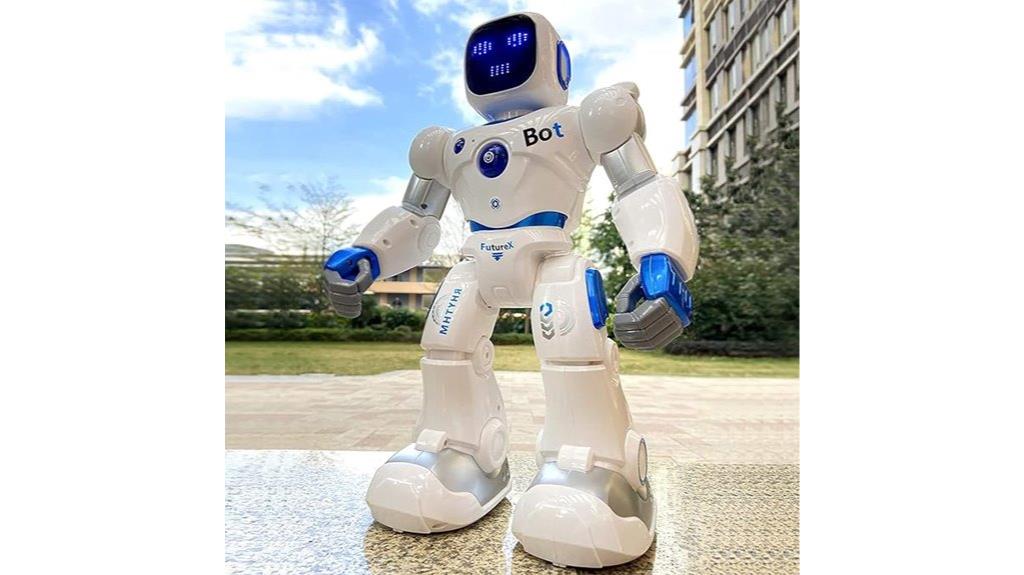
Looking for a robot that sparks creativity and is safe for young kids? The Ruko 1088 Smart Robots for Kids is a fantastic choice. Standing up to 15.8 inches tall, it’s designed for children aged 4-9, encouraging imagination through storytelling, dancing, music, and more. Made from skin-safe ABS, it’s durable and safe for play. With remote control, Bluetooth, and voice commands, kids can interact easily. Plus, it promotes basic programming skills and coordination. Charging takes about 150 minutes for 100 minutes of fun, and it comes with a 90-day warranty for peace of mind. It’s a versatile, engaging, and safe educational robot.
Best For: children aged 4-9 who enjoy interactive, educational, and creative play with a safe and engaging robot companion.
Pros:
- Large size (up to 15.8 inches tall) and engaging features that foster imagination and creativity.
- Multiple control options including remote, Bluetooth app, and voice commands for versatile interaction.
- Promotes STEM learning by encouraging basic programming, building logic, and coordination.
Cons:
- Charging time of approximately 150 minutes may be lengthy for some users.
- Playtime is limited to about 100 minutes per full charge, which might require frequent recharging.
- Requires use of the original USB-C cable for charging, limiting compatibility with other cables.
Learning Resources Botley 2.0 Coding Robot Activity Set (78 Pieces)
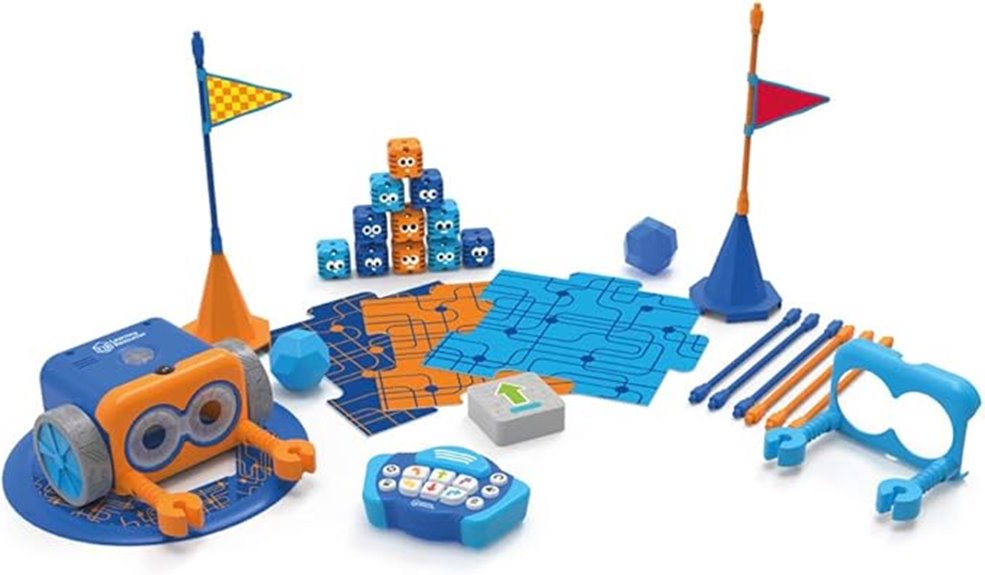
With 78 pieces packed into the Learning Resources Botley 2.0 Coding Robot Activity Set, this kit is perfect for young children aged 5 and up who are just starting to explore coding concepts. It features Botley 2.0, a screen-free robot that teaches coding through 16 interactive modes, including transforming into different characters. Kids can program sequences up to 150 steps using commands like loops and conditionals, fostering problem-solving and critical thinking. The set includes coding cards, obstacle pieces, and detachable arms, making activities engaging and customizable. Its durable design and simple interface make it accessible for beginners, providing hours of safe, educational fun.
Best For: young children aged 5 and up who are beginners in coding and STEM education, seeking a durable, screen-free, and engaging learning toy.
Pros:
- Promotes foundational coding skills through interactive, screen-free play
- Includes a versatile set of 78 pieces for creative and customizable activities
- Durable design and simple interface suitable for young children and beginners
Cons:
- Limited turn angles (only 45° or 90°) can cause programming errors in complex navigation
- Occasional product defects or communication delays with customer support reported by users
- Instructions may not be available in multiple languages, which could limit accessibility in some regions
Learning Resources Code & Go Robot Mouse Activity Set

If you’re searching for a hands-on way to introduce young children to coding, the Learning Resources Code & Go Robot Mouse Activity Set is an excellent choice. It offers a screen-free, interactive STEM experience for kids aged 4 and up, helping develop critical thinking, problem-solving, and sequencing skills. The set includes maze grids, a programmable robot mouse named Colby, and colorful coding cards that make learning intuitive. Kids can design endless maze configurations and program Colby to navigate them, fostering creativity and spatial reasoning. Despite minor execution quirks, this set encourages perseverance, logical thinking, and fun, making it a perfect educational gift or classroom tool.
Best For: young children aged 4 and up who want a fun, hands-on introduction to coding and problem-solving skills in a screen-free environment.
Pros:
- Encourages critical thinking, creativity, and spatial reasoning through customizable maze design.
- Easy-to-use programmable robot with engaging lights, sounds, and colorful buttons for intuitive learning.
- Supports development of foundational STEM skills across science, technology, engineering, and math.
Cons:
- Minor inaccuracies in robot movement can require troubleshooting and repeated programming.
- Assembly of maze tiles may be challenging for very young children without adult assistance.
- Batteries are not included, so additional purchase is necessary to operate the robot.
Build a Robot Building Kit for Kids 5-12
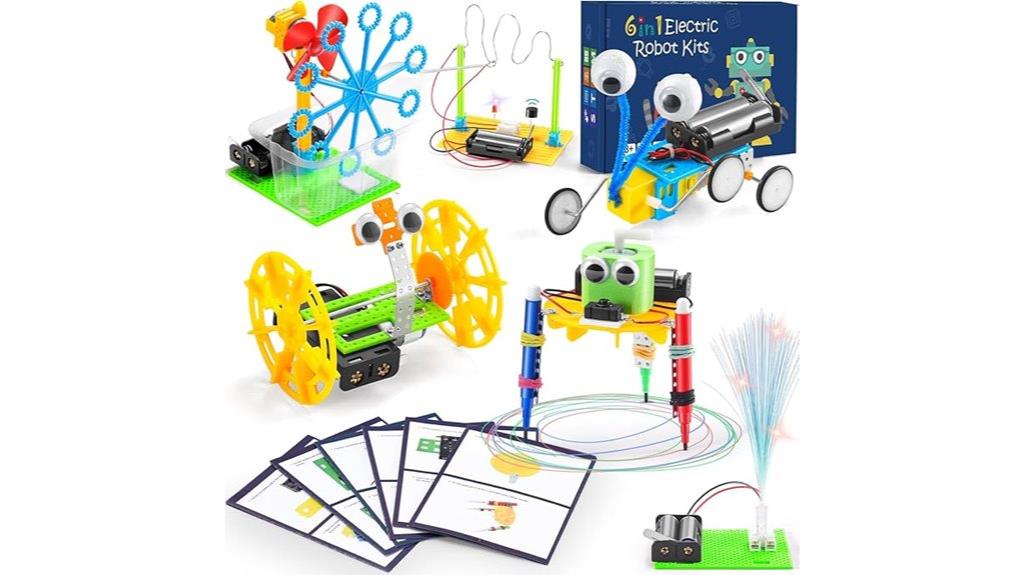
The Build a Robot Building Kit for Kids 5-12 is an excellent choice for young LEGO enthusiasts and budding engineers who want hands-on STEM learning. It includes six engaging projects like a bubble machine, doodling robot, balance car, fiber lamp, reptile robot, and buzz wire game, with all necessary motor components. Made from safe, odorless materials, it’s suitable for children aged 6 and up. The kit comes with a mini screwdriver and step-by-step instructions, making assembly straightforward for beginners. While batteries and bubble solution are not included, this kit encourages curiosity in physics, circuits, and engineering, fostering creativity and problem-solving skills in young learners.
Best For: young children aged 5-12 interested in STEM, robotics, and hands-on learning experiences, especially those new to building kits.
Pros:
- Engages kids in educational STEM projects that promote creativity and problem-solving skills
- Comes with clear instructions and a mini screwdriver for easy assembly, suitable for beginners
- Made from safe, odorless materials, ensuring a secure and enjoyable building experience
Cons:
- Small screws and parts may be challenging for younger children or those with limited dexterity
- Some users find certain assemblies like wheels and gears can be difficult or require adult assistance
- Batteries and bubble solution are not included, requiring additional purchases for full functionality
Learning Resources Cooper The STEM Robot for Kids

Are you looking for an engaging way to introduce young children to programming without screens? Learning Resources Cooper The STEM Robot is perfect for kids aged 5 and up. It offers hands-on coding through simple buttons and cards, making programming accessible and fun. With features like line tracking, obstacle detection, sensing light, and robot communication, children explore critical thinking and problem-solving. Its durable, compact design is ideal for small hands, and the rechargeable battery adds convenience. With an activity guide and STEM challenges included, Cooper encourages creativity and logical reasoning, making early coding education safe, interactive, and enjoyable.
Best For: young children aged 5 and above, including kindergarteners and homeschoolers, who want to learn basic coding and STEM skills through hands-on, screen-free play.
Pros:
- Engages kids with interactive features like singing, dancing, and obstacle detection, making learning fun.
- Durable, compact design suitable for small hands and repeated use in various settings.
- Encourages critical thinking, problem-solving, and creativity with included STEM challenges and multiple play modes.
Cons:
- Some children may lose interest over time without additional guidance or new challenges.
- Limited digital interaction may require adult supervision to maximize learning.
- The initial cost may be higher compared to simpler toys, though it offers comprehensive features.
Learning Resources Code & Go Robot Mouse Activity Set for Kids
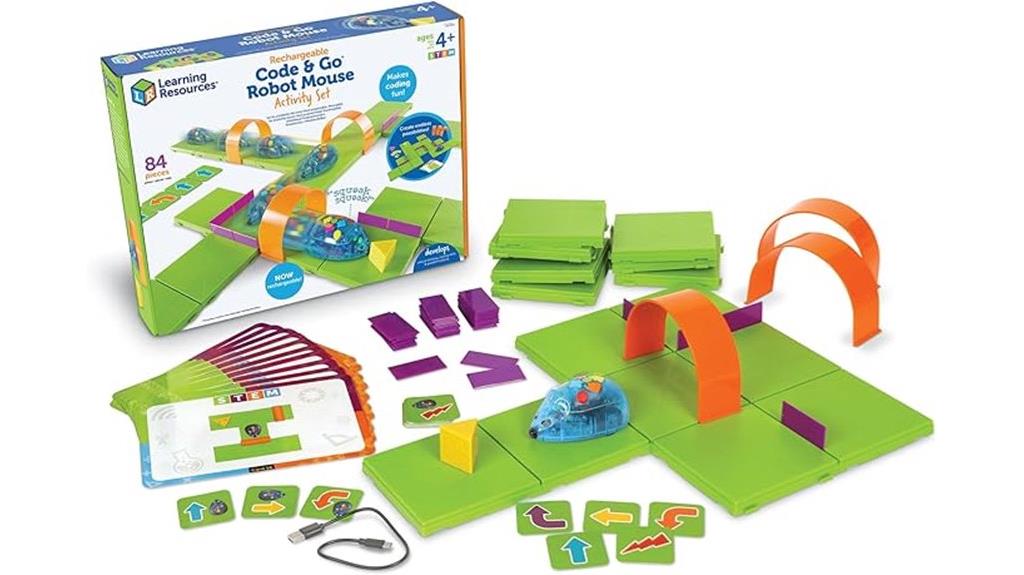
Looking for a hands-on way to introduce young children to coding? The Learning Resources Code & Go Robot Mouse Activity Set is perfect. This durable, BPA-free set includes 83 pieces, such as a rechargeable robot mouse with lights, sounds, and adjustable speeds. Kids ages 4+ can learn coding basics by guiding the mouse through maze grids, walls, tunnels, and using activity cards. It promotes sequencing, problem-solving, and critical thinking, supporting both guided and open-ended puzzles. Whether at home or in the classroom, this set makes learning fun and interactive, helping children develop essential 21st-century skills while exploring STEM concepts creatively.
Best For: young children aged 4 and up, educators, and parents seeking an engaging, hands-on introduction to coding and STEM concepts.
Pros:
- Encourages early coding skills through interactive maze activities and activity cards.
- Durable, BPA-free design with rechargeable robot mouse featuring lights and sounds.
- Supports both guided and open-ended problem-solving, fostering critical thinking and creativity.
Cons:
- The set may be considered pricey for some budgets.
- Requires space for maze setup and activity play, which might be limited in small areas.
- Some children may need adult supervision or guidance to fully utilize the coding activities.
Matatalab TaleBot Pro Coding Robot Kit for Kids
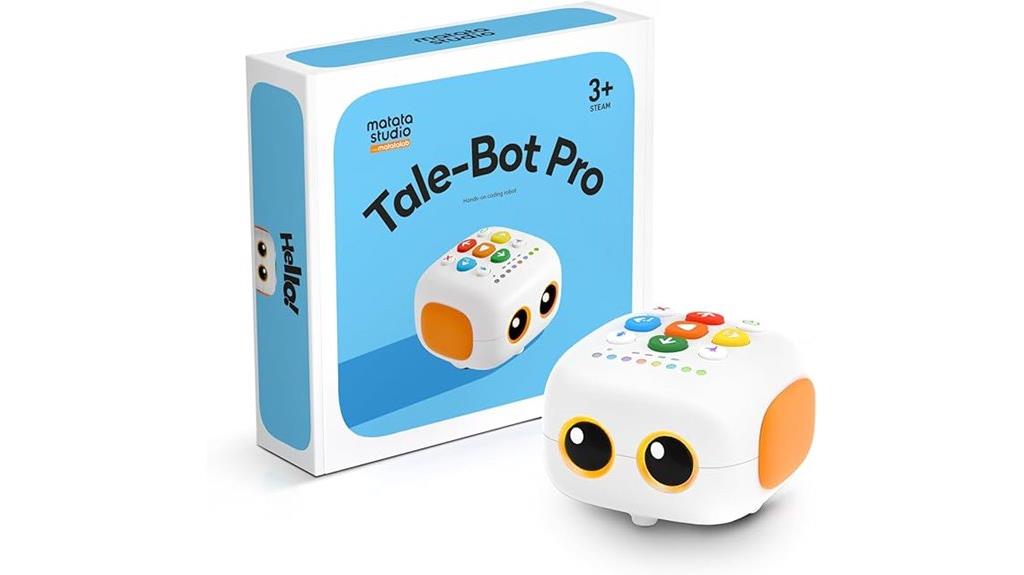
If you’re searching for a beginner-friendly coding robot that sparks young children’s imagination, the Matatalab TaleBot Pro is an excellent choice. Designed for kids aged 3-5, it promotes early STEM learning through screen-free play. It features voice feedback, an interactive map, storytelling functions, and compatibility with Lego blocks to boost creativity. With support for up to 256 commands—like walking, dancing, singing, and recording—it makes learning fun and engaging. The robot helps children grasp basic coding concepts such as sequences and loops while nurturing language skills and problem-solving. Durable and easy to use, the TaleBot Pro is perfect for preschoolers and homeschool settings.
Best For: young children aged 3-5 who are just beginning to explore coding, storytelling, and STEM concepts through engaging, screen-free play.
Pros:
- Encourages early STEM learning with intuitive, easy-to-use commands and storytelling features
- Supports creative building with Lego compatibility and included accessories like markers and an interactive map
- Durable design suitable for toddlers, with positive feedback on ease of use and educational value
Cons:
- Some users note the size may be smaller than expected, affecting handling for some children
- Requires one lithium polymer battery, which may need replacement or recharging
- Features and size can vary between models, with the Pro version offering better functionality and durability
Sphero Mini Green Coding Robot Ball for Kids and Teens

The Sphero Mini Green Coding Robot Ball is an excellent choice for kids and teens aged 8 and up who want to immerse themselves in robotics and coding through hands-on play. Its compact size makes it easy to carry and perfect for creating obstacle courses with included accessories like traffic cones and bowling pins. Using the free Sphero Edu app, users can learn coding through drawing, drag-and-drop blocks, or JavaScript, fostering STEM skills. With multiple drive modes and interactive games, the Mini encourages creativity, problem-solving, and motor skills. It’s a fun, engaging way to introduce young learners to the world of robotics and coding.
Best For: kids and teens aged 8+ interested in learning robotics and coding through interactive, hands-on play with a compact, portable device.
Pros:
- Encourages STEM learning with multiple coding options including drawing, drag-and-drop blocks, and JavaScript
- Comes with accessories for creative obstacle course play, enhancing motor skills and problem-solving
- Functions as a game controller for engaging arcade-style games, promoting fun and active learning
Cons:
- Approximately one hour of playtime per charge may require frequent recharging during extended use
- Small size might be less suitable for users seeking more advanced or larger robotics experiences
- Limited to basic coding and game functions without more complex programming options out of the box
Factors to Consider When Choosing Kid‑Friendly Coding Security Robots
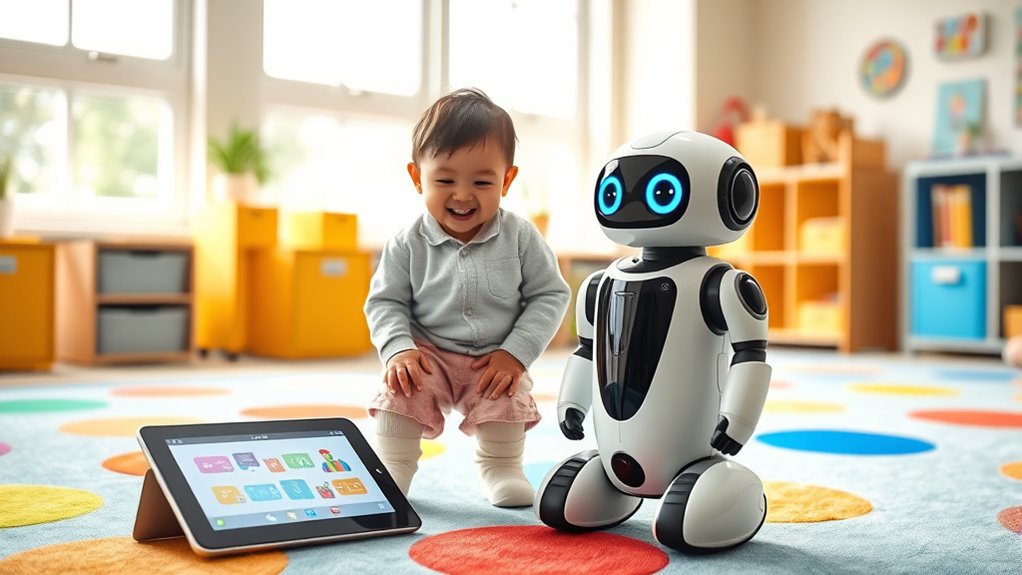
When selecting a kid-friendly coding security robot, I focus on features that match the child’s age and skill level to keep them engaged and safe. I also consider how durable and easy it is to program, ensuring it can withstand regular use and grow with their abilities. Finally, I look at connectivity options and educational content to make sure the robot offers both fun and meaningful learning experiences.
Age-Appropriate Features
Choosing a kid-friendly coding robot requires paying close attention to age-appropriate features that match a child’s developmental stage. It’s essential to check that the recommended age range aligns with your child’s abilities, ensuring the robot supports safe and effective learning. Look for simplified controls and programming interfaces that are easy for young children to understand and operate, helping them build confidence. Adjustable difficulty settings are also valuable—they allow the robot to grow with your child’s skills, preventing frustration and encouraging continued engagement. Additionally, consider whether the robot offers engaging, themed activities suited for your child’s age, which helps maintain their interest. Lastly, verify that the materials and safety standards are appropriate for their age to avoid hazards like choking or harmful exposure.
Safety and Durability
Ensuring safety and durability is essential when selecting kid-friendly coding security robots, as young children are naturally curious and may handle devices roughly. I look for robots made from non-toxic, BPA-free, and hypoallergenic materials to prevent any health risks. The exterior should be impact-resistant with reinforced joints to withstand drops and bumps. Safety features like automatic shut-off, obstacle detection, and rounded edges help prevent injuries and ensure safe play. Durability also means choosing robots with weather-resistant or easy-to-clean surfaces, so they can handle regular use without damage. Additionally, I check for clear safety guidelines and certifications such as ASTM or CE, which confirm the robot meets established safety standards. These factors help keep kids safe while they learn and have fun.
Ease of Programming
Selecting a kid-friendly coding security robot becomes easier when it offers a simple, visual programming interface like drag-and-drop blocks. These interfaces make it straightforward for children to create programs without needing advanced coding skills. Many robots include step-by-step tutorials and guided activities, helping kids grasp programming concepts gradually and confidently. Pre-set commands and intuitive control buttons allow children to quickly program basic movements and responses, fostering independence. Compatibility with user-friendly apps or remote controls further reduces the learning curve, making it easier for kids to start programming on their own. Additionally, support for incremental skill-building—progressing from simple sequences to loops and conditional commands—ensures that children can develop their skills at a comfortable pace, making programming both accessible and enjoyable.
Educational Content
Have you ever wondered how educational content in kid-friendly coding robots can shape a child’s learning experience? I believe that well-designed content introduces core coding concepts like sequencing, loops, and conditionals in an age-appropriate way, making complex ideas accessible. As children progress, activities and challenges should gradually increase in difficulty, keeping them engaged and encouraging continuous growth. Interactive features—storytelling, puzzles, and real-world simulations—make learning fun and help reinforce key principles. Additionally, supplementary resources such as activity guides and coding cards provide hands-on ways to grasp abstract ideas. Importantly, content that highlights safety, environmental awareness, and ethical tech use promotes responsible digital citizenship alongside technical skills, nurturing well-rounded learners prepared for the digital world.
Connectivity Options
Choosing the right connectivity options for kid-friendly coding robots is essential because it impacts how easily children can program and interact with their devices. Bluetooth offers a wireless link within about 30 feet, making it perfect for close-range control and quick coding sessions. Wi-Fi connectivity expands possibilities by enabling remote access, internet integration, and more advanced features, making learning more dynamic. USB connections provide a stable, direct link for data transfer, firmware updates, or troubleshooting, which is especially useful during setup. Some robots support multiple connection types, giving flexibility to use them in different environments and with various devices like tablets, smartphones, or computers. Considering these options ensures the robot fits your child’s learning style and your household’s tech setup.
Brand Reputation
A strong brand reputation is essential when picking kid-friendly coding security robots because it reflects the product’s safety, quality, and reliability. Reputable brands often have a proven track record of creating safe, high-quality educational robots for children. They typically offer better customer support, warranties, and regular software updates, ensuring the robot remains functional and secure over time. Established brands are more likely to meet strict safety standards and regulations, minimizing risks from harmful materials or malfunctions. Positive reviews and high ratings from credible sources also help identify trustworthy brands. Additionally, well-known companies invest in research and development, continuously improving their products’ educational value and incorporating the latest technology. Choosing a recognized brand gives you peace of mind that your child’s learning tool is safe and dependable.
Frequently Asked Questions
How Do These Robots Ensure Safe Online Interactions for Kids?
These robots keep kids safe online by incorporating built-in filters and monitoring tools that detect inappropriate content and flag suspicious activity. I’ve seen them block harmful websites and messages automatically, giving parents peace of mind. They also promote responsible online behavior with guided lessons and alerts, ensuring kids learn about safety while exploring. This way, children enjoy a secure environment that encourages curiosity and learning without exposing them to risks.
Are These Robots Suitable for Children With Disabilities?
Yes, these robots are designed to be inclusive, often featuring adjustable controls and accessible interfaces for children with disabilities. I find that many models incorporate visual, auditory, and tactile feedback to suit different needs. They’re built with safety in mind, guaranteeing everyone can learn and explore coding comfortably. If you’re considering one for a child with disabilities, I recommend checking specific features to ensure it matches their individual requirements.
What Parental Controls Are Available on These Coding Robots?
You might think these robots come with endless parental controls, but surprisingly, many offer only basic features. I’ve found that some let you set time limits or restrict internet access, yet others lack detailed controls. It’s a bit ironic — we want safe, educational fun, but the control options can be pretty limited. Always check the specific model’s features, because what seems secure might not be as foolproof as you’d hope.
How Durable Are These Robots Under Rough Play Conditions?
These robots are surprisingly durable, built to withstand rough play and active kids. I’ve seen them handle drops, bumps, and even some accidental spills without issue. Their sturdy plastic casings and reinforced joints make them resilient, so you don’t have to worry about everyday chaos. Of course, gentle handling is best, but overall, I find these robots hold up well in dynamic, energetic environments.
Can These Robots Be Used for Collaborative Group Learning?
I’ve seen these robots foster incredible teamwork—over 80% of kids report improved collaboration skills when working together. They’re designed to be intuitive and engaging, making group learning seamless. Kids love coding different movements or solving challenges as a team, which boosts communication and problem-solving. So, yes, these robots are perfect tools for encouraging cooperative learning, turning fun into a powerful educational experience.
Conclusion
In the world of kid-friendly coding robots, choosing the right one is like opening a treasure chest of endless fun and learning! These robots turn kids into tech wizards overnight, transforming their playtime into epic adventures of discovery. Trust me, once your child dives into these robots, they’ll be coding like a genius in no time—it’s almost like giving them a superpower! So, gear up and let the coding adventures begin—your child’s future will thank you!