Finding the best premium remote work setup gear means balancing top-tier performance, seamless usability, and sleek design. The Anker PowerConf Speakerphone stands out as a versatile, Zoom-certified option that elevates conference calls. The Logitech Brio Ultra HD Webcam offers exceptional video quality, perfect for professional streaming and meetings. However, investing in premium gear involves tradeoffs—such as cost versus versatility. Continue reading for a detailed breakdown of the top options and how to choose the best gear for your remote workspace.

Get privacy and security gear delivered free with Prime
- Fast, free delivery on millions of items
- Prime Video, Amazon Music and more included
- Member-only deals all year
Key Takeaways
- High-quality webcams like Logitech Brio and Insta360 Link dominate for sharp video, but choosing between them depends on AI tracking needs and HDR features.
- Conference speakerphones such as Anker PowerConf excel in clarity and microphone coverage, essential for larger virtual meetings.
- Lighting like Logitech Litra Glow enhances video quality, especially in less well-lit spaces, but adds to the setup cost.
- All-in-one solutions like Logitech Logi Dock streamline desk clutter and integrate multiple peripherals, yet they come at a premium price.
- Tradeoffs often involve balancing top-tier features with budget constraints—premium gear can significantly boost professionalism but requires investment.
| Anker PowerConf Speakerphone, Zoom Certified Conference Speaker with 6 Mics |  | Best Overall for Versatile Conference Audio | Microphone Count: 6 | Connectivity: Bluetooth, USB-C | Battery Capacity: 5200mAh | VIEW LATEST PRICE | See Our Full Breakdown |
| Logitech MeetUp Video Conferencing System 4K with 3 Microphones – Black |  | Best for Small Rooms with High-Quality Video | Resolution: 4K Ultra HD | Field of View: 120° (expandable to 170° with pan/tilt) | Microphones: 3 built-in beamforming microphones | VIEW LATEST PRICE | See Our Full Breakdown |
| Logitech for Creators Litra Glow Premium LED Streaming Light – Graphite | 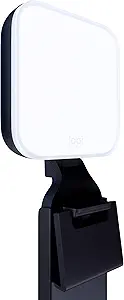 | Best for Professional On-Camera Lighting | Technology: TrueSoft | Light Type: Full-spectrum LED | Diffuser: Frameless diffuser | VIEW LATEST PRICE | See Our Full Breakdown |
| Logitech Brio Ultra 4K HD Webcam for Streaming and Meetings – Black |  | Best for High-Resolution Video with Security Features | Resolution: 4K at 30 fps | Field of View: 65°, 78°, 90° | Microphones: Dual omnidirectional with noise-canceling | VIEW LATEST PRICE | See Our Full Breakdown |
| Logitech Logi Dock Focus Room Kit |  | Best for Small Focus Rooms and Plug-and-Play Simplicity | Hardware Interface: USB | Compatible Devices: Laptops | Total USB Ports: 1 | VIEW LATEST PRICE | See Our Full Breakdown |
| Logitech MX Brio Ultra HD 4K Webcam – Graphite |  | Best Overall for High-Quality Video Streaming and Content Creation | Resolution: 4K Ultra HD at 30fps, 1080p at 60fps | Sensor Size: 70% larger pixels | Microphones: Dual beamforming noise-reducing microphones | VIEW LATEST PRICE | See Our Full Breakdown |
| Insta360 Link 2 4K Webcam for PC/Mac with AI Tracking and HDR |  | Best for Dynamic Presentations and AI-Enhanced Control | Sensor: 1/2″ | Resolution: 4K | HDR: Yes | VIEW LATEST PRICE | See Our Full Breakdown |
| premium remote work setup gear | Resolution |
|---|---|
| Anker PowerConf Speakerphone | — |
| Logitech MeetUp Video Conferen | 4K Ultra HD |
| Logitech for Creators Litra Gl | — |
| Logitech Brio Ultra 4K HD Webc | 4K at 30 fps |
| Logitech Logi Dock Focus Room | — |
| Logitech MX Brio Ultra HD 4K W | 4K Ultra HD at 30fps, 1080p at 60fps |
| Insta360 Link 2 4K Webcam for | 4K |
More Details on Our Top Picks
Anker PowerConf Speakerphone, Zoom Certified Conference Speaker with 6 Mics
The Anker PowerConf stands out for its 360° voice pickup, making it ideal for larger or dynamic meeting environments compared to the Logitech Logi Dock, which focuses more on small, contained spaces. Its six microphones and AI noise reduction ensure clarity even in noisy settings, and the long 24-hour battery supports extended calls without interruptions. While it offers excellent multi-platform connectivity via Bluetooth and USB-C, it can feel bulky for portable use and may limit mobility due to its size. Compared to dedicated webcams or lighting, this device prioritizes audio quality, making it a cornerstone of a premium remote setup that needs reliable sound. The built-in charging feature adds convenience but also increases its weight and footprint, which could be a drawback for users needing a lightweight portable device.
Pros:- 360° voice pickup with 6 microphones for clear, comprehensive audio
- Long-lasting 24-hour battery supports extended meetings
- Flexible connectivity via Bluetooth and USB-C for universal compatibility
- Built-in charging feature adds convenience
Cons:- Bulky design may hinder portability
- Limited mobility due to size and connection requirements
Best for: Remote teams requiring reliable, all-day conference audio in a home or office setting.
Not ideal for: Travelers or mobile professionals needing a lightweight, compact speakerphone for quick setups.
- Microphone Count:6
- Connectivity:Bluetooth, USB-C
- Battery Capacity:5200mAh
- Call Time:24 hours
- Features:AI noise reduction, echo cancellation, PowerIQ charging
Our verdict“This pick is perfect for professionals who prioritize high-quality, long-duration conference audio in a fixed remote setup.”
Logitech MeetUp Video Conferencing System 4K with 3 Microphones – Black
The Logitech MeetUp excels at integrating high-quality 4K video with wide-angle coverage, making it a top choice for small or huddle rooms compared to the Logitech Brio, which offers more advanced webcam features but lacks integrated audio. Its 120° field of view, extendable to 170° with pan/tilt, provides comprehensive room coverage, while the beamforming microphones ensure clear audio from up to 4 meters. The system’s multiple mounting options and plug-and-play setup support flexible installation, but the need for separate expansion mics and calibration can complicate deployment. This solution emphasizes seamless integration of video and audio in tight spaces, making it more suitable for dedicated conference rooms than the portable, all-in-one options like the Logitech Logi Dock. Its high-quality video and flexible mounting stand out, though full room deployment can be costly and complex.
Pros:- 4K Ultra HD resolution with wide field of view
- Beamforming microphones for clear, directional audio
- Multiple mounting options for flexible installation
- Plug-and-play connectivity simplifies setup
Cons:- Expansion microphones sold separately, adding cost
- Requires additional components for full room use
- Motorized pan/tilt may need calibration
Best for: Small teams needing high-resolution video and reliable audio in dedicated meeting spaces.
Not ideal for: Large conference rooms or mobile professionals who require portable all-in-one solutions.
- Resolution:4K Ultra HD
- Field of View:120° (expandable to 170° with pan/tilt)
- Microphones:3 built-in beamforming microphones
- Zoom:5x HD zoom
- Mounting Options:Wall, credenza, TV mount
Our verdict“Ideal for small rooms where high-quality video and audio integration is a priority, but less suited for larger or mobile setups.”
Logitech for Creators Litra Glow Premium LED Streaming Light – Graphite
The Litra Glow provides a soft, natural light ideal for video conferencing and streaming, especially when compared to standard ring lights. Its TrueSoft LED technology ensures cinematic color accuracy, enhancing skin tones and reducing shadows, which elevates the quality of on-camera appearances. The adjustable mount, brightness, and color temperature, controlled via the Logitech G HUB app, offer precise lighting customization, though this reliance on software can be limiting for those with incompatible systems. Its USB-powered design makes it portable and easy to set up, but it’s best suited for environments where consistent, studio-like lighting is needed rather than large-scale professional studios. This light helps create a polished, professional look without complex setups, making it a smart addition for content creators and remote workers focused on visual presentation.
Pros:- Natural skin tones with cinematic color accuracy
- Wide, soft light reduces harsh shadows
- Adjustable brightness and color temperature for precise control
- Portable and easy to set up via USB
Cons:- Requires Logitech G HUB software, which may not be compatible with all systems
- Limited to USB power, not suitable for large or professional studio environments
Best for: Content creators and professionals looking for high-quality, adjustable lighting for video calls and streams.
Not ideal for: Large-scale studios or environments requiring very powerful lighting, due to its portable USB power limit.
- Technology:TrueSoft
- Light Type:Full-spectrum LED
- Diffuser:Frameless diffuser
- Mount:3-way monitor mount with adjustable height, tilt, and rotation
- Power Source:USB
Our verdict“Perfect for remote workers and content creators seeking professional-quality lighting without complex equipment.”
Logitech Brio Ultra 4K HD Webcam for Streaming and Meetings – Black
The Logitech Brio offers exceptional 4K video quality and versatile framing options, making it preferable over standard webcams like the Logitech MX series for those who prioritize crisp, professional visuals. Its multiple field of view settings—65°, 78°, and 90°—allow customization based on workspace size, while the built-in noise-canceling microphones ensure clear audio. It supports Windows Hello facial recognition, adding security and convenience, but the advanced controls require specific software, which can be a hurdle for some users. The privacy shutter adds a layer of security, particularly valuable in sensitive environments. Compared with more affordable webcams, the Brio’s premium price reflects its advanced features and image quality, making it suitable for high-stakes presentations or content creation where clarity truly matters.
Pros:- Stunning 4K video resolution with adjustable FOV
- Noise-canceling microphones for clear audio
- Supports Windows Hello for quick, secure login
- Includes privacy shutter for security
Cons:- Higher price compared to standard webcams
- Requires compatible software for full feature access
- Setup can be complex for non-technical users
Best for: Professionals who need top-tier video quality for streaming, recording, or high-stakes meetings.
Not ideal for: Budget-conscious users or those needing a simple, plug-and-play webcam for occasional use.
- Resolution:4K at 30 fps
- Field of View:65°, 78°, 90°
- Microphones:Dual omnidirectional with noise-canceling
- Compatibility:Windows, Mac, ChromeOS
- Privacy Shutter:Yes
Our verdict“Best suited for professionals demanding high-quality video with added security features, despite the higher investment.”
Logitech Logi Dock Focus Room Kit
The Logitech Logi Dock Focus Room Kit delivers a streamlined, all-in-one solution for small, dedicated spaces like phone booths and focus rooms, contrasting with more comprehensive systems like the Logitech MeetUp which target larger rooms. Its single USB connection simplifies setup, and the included high-quality webcam and speakerphone provide everything needed for a complete meeting experience. The kit’s cable management helps maintain a tidy environment, though its design is optimized strictly for small spaces, limiting its use in larger or more flexible conference areas. Its plug-and-play approach and platform certification for Microsoft Teams, Zoom, and Google Meet make it especially appealing for organizations seeking quick deployment. However, the absence of multiple color options and limited details on expandability might restrict customization.
Pros:- Easy plug-and-play setup with a single USB connection
- Certified compatibility with major platforms
- Includes high-quality webcam and speakerphone
- Cable management features for a clean install
Cons:- Designed specifically for small spaces, limiting flexibility
- Limited color options and customization features
- No detailed pricing information available
Best for: Small organizations or teams seeking a straightforward, all-in-one collaboration setup for compact spaces.
Not ideal for: Large conference rooms or users needing extensive customization and expandability.
- Hardware Interface:USB
- Compatible Devices:Laptops
- Total USB Ports:1
- Total HDMI Ports:1
- Item Dimensions:13″L x 9.2″W x 6″H
Our verdict“An excellent choice for small, dedicated collaboration spaces that prioritize simplicity and quick setup, though less suited for larger rooms.”
Logitech MX Brio Ultra HD 4K Webcam – Graphite
The Logitech MX Brio stands out for its ability to deliver crisp 4K resolution with AI-enhanced image quality, making it ideal for professional streaming, content creation, and high-stakes meetings. Compared to the Insta360 Link 2, the Brio offers more customizable controls for lighting and white balance, which can be crucial for polished video output. However, it demands a USB-C connection and comes at a premium price, which might be a hurdle for some. Its complex setup for advanced features could deter casual users, but for those prioritizing top-tier image quality and privacy controls, it remains a strong choice.
Pros:- Exceptional 4K video resolution with AI enhancements for superior image quality
- Customizable lighting and white balance controls for professional-grade visuals
- Dual noise-reducing microphones for clear audio
- Privacy shutter adds security for sensitive meetings
Cons:- Requires USB-C port, may need adapters for older hardware
- High price point compared to similar webcams
- Advanced controls can be complex for non-technical users
Best for: Video creators, professionals who demand high-resolution footage, and users seeking robust privacy features
Not ideal for: Casual remote workers or those with older devices lacking USB-C ports, due to compatibility and setup complexity
- Resolution:4K Ultra HD at 30fps, 1080p at 60fps
- Sensor Size:70% larger pixels
- Microphones:Dual beamforming noise-reducing microphones
- Compatibility:Windows, macOS, Chrome OS, Linux
- Features:AI-enhanced image quality, adjustable lighting controls, privacy shutter, Show Mode tilt
- Connectivity:USB-C
Our verdict“This webcam makes the most sense for professionals who prioritize top-tier video quality and customizable controls, accepting setup complexity and cost.”
Insta360 Link 2 4K Webcam for PC/Mac with AI Tracking and HDR
The Insta360 Link 2 offers a compelling blend of 4K HDR visuals, AI tracking, and gesture control, making it ideal for streamers, educators, and presenters who want a versatile, easy-to-operate webcam. Unlike the Logitech MX Brio, it excels in AI-driven features like auto-tracking and gesture commands, simplifying complex camera movements during live sessions. Its low-light performance and HDR capabilities ensure clear visuals in various environments, but it isn’t compatible with ARM-based Windows systems and requires software installation for full functionality. For users who value intelligent automation and flexible modes like DeskView or Whiteboard, this camera delivers a dynamic experience—though at the expense of some compatibility limitations.
Pros:- High-quality 4K video with HDR and excellent low-light performance
- AI tracking and gesture control for effortless camera management
- Professional-grade noise-canceling microphone for clear audio
- Multiple modes including DeskView and Whiteboard for presentation versatility
Cons:- Incompatible with ARM-based Windows systems, limiting some users
- Requires software installation for full feature access
- No integrated privacy shutter, which might concern security-conscious users
Best for: Streamers, educators, and remote presenters seeking intelligent tracking and versatile modes
Not ideal for: Users with ARM-based Windows devices or those who prefer a plug-and-play setup without software dependencies
- Sensor:1/2″
- Resolution:4K
- HDR:Yes
- AI Tracking:Yes
- Auto Focus:Phase Detection Auto Focus (PDAF)
- Microphone:AI Noise-Canceling Mic
- Gesture Control:Yes
- Modes:DeskView, Whiteboard
- Compatibility:Windows, Mac
Our verdict“This webcam is perfect for those who want advanced AI features and flexible presentation modes, despite some compatibility and setup considerations.”

How We Picked
The selection process focused on products that offer the highest quality, durability, and functionality for remote work in a professional setting. We prioritized gear that combines excellent performance with user-friendly design, ensuring seamless integration into existing setups. Each product was evaluated on build quality, feature set, compatibility, and overall value relative to its premium positioning. The ranking reflects a balance between cutting-edge innovation and practical usability, highlighting options that elevate a remote workspace to a truly professional level.Factors to Consider When Choosing Best Premium Remote Work Setup Gear
Choosing the best premium remote work gear involves more than just looking at specs. It’s crucial to consider how each component fits into your workflow, space, and professional needs. High-end gear should complement your existing setup without adding unnecessary complexity or cost. Carefully evaluating features like resolution, audio clarity, ease of use, and integration will ensure you invest wisely in tools that last and perform consistently. Avoid common pitfalls like overpaying for unnecessary features or mismatched components that don’t work well together.Video Quality and Resolution
High-resolution webcams and cameras significantly impact the professionalism of your virtual presence. Look for models offering 4K resolution, which ensures crisp, detailed video. However, higher resolution demands better lighting and hardware to avoid lag or stuttering. Consider your typical lighting conditions and whether features like HDR or AI tracking are worth the extra cost, especially if you frequently record or stream in varied environments. Balancing resolution with your hardware capacity is key to smooth performance.
Audio Clarity and Microphone Quality
Clear audio is critical for effective communication. Premium conference speakerphones like the Anker PowerConf deliver 6-mic arrays for 360-degree pickup, reducing background noise and echo. If you often participate in large meetings or need to maintain a professional sound environment, investing in a dedicated microphone system can make a big difference. Keep in mind that larger coverage and advanced noise cancellation come with higher prices, so match the gear to your typical meeting size.
Lighting and Visual Enhancements
Proper lighting transforms your video quality, making you look more professional and approachable. Premium LED lights like Logitech Litra Glow provide adjustable brightness and color warmth, helping you look clear even in dim settings. While adding good lighting incurs extra expense, it’s often overlooked in basic setups. Consider your space and whether a dedicated lighting solution can prevent shadows and uneven skin tones, ultimately boosting your overall video quality.
All-in-One vs. Modular Setups
All-in-one solutions like the Logitech Logi Dock combine multiple peripherals—speaker, microphone, and hub—reducing desk clutter and simplifying setup. They offer a sleek, integrated experience but come at a premium and may offer fewer customization options. Modular setups, on the other hand, allow you to pick and upgrade components over time. Think about your space, existing equipment, and whether you prefer a tidy, integrated system or a flexible, layered approach that can evolve with your needs.
Compatibility and Integration
Before purchasing, verify that your chosen gear seamlessly integrates with your existing hardware and software ecosystem. Compatibility issues can lead to frustration and underperformance. For instance, ensure your webcams work well with common conferencing platforms like Zoom or Teams, and that your audio devices connect easily via USB or Bluetooth. Premium gear should enhance your workflow, not complicate it, so consider the ecosystem compatibility as a key factor in your decision.
Frequently Asked Questions
Is 4K video necessary for remote work?
While 4K video provides the highest detail, it is not always necessary for effective remote work. It’s most beneficial if you frequently record presentations, stream content, or need the sharpest image quality for professional branding. For regular meetings, 1080p or even 720p may suffice, especially if your internet bandwidth is limited. Prioritize a balance between resolution, frame rate, and your hardware capabilities to avoid lag or dropped frames.
How much should I spend on premium remote work gear?
The amount you should invest depends on your professional needs and budget. Premium gear can range from a few hundred to over a thousand dollars, but it’s worth spending more if you rely heavily on video conferencing, content creation, or virtual collaboration. Focus on key components like a high-quality webcam, microphone, and lighting first, then consider additional accessories based on your workflow. Remember that quality gear often lasts longer and provides a more consistent experience.
Can I upgrade my existing setup without replacing everything?
Yes, many premium accessories are modular and upgradeable. Replacing or adding a high-end webcam, microphone, or lighting can dramatically improve your setup without needing to buy a whole new system. Check compatibility with your current hardware before purchasing, and consider how each upgrade will fit into your workflow. This approach allows you to incrementally enhance your workspace while managing costs effectively.
What features should I prioritize for a professional setup?
Prioritize clarity and reliability in audio and video. High-resolution webcams and noise-canceling microphones make a significant difference in appearance and sound quality. Additional features like AI tracking, HDR, and adjustable lighting can further elevate your presentation. However, avoid overpaying for features you won’t use regularly. Focus on components that improve communication and presentation quality, which are most noticeable during virtual interactions.
How do I ensure my setup remains future-proof?
Invest in versatile, high-quality components that support new standards and software updates. Look for products with good firmware support, compatibility with the latest conferencing platforms, and upgrade options. Additionally, consider modular gear that can be replaced or upgraded over time, preventing obsolescence. Balancing current needs with future expansion will help your remote work setup stay relevant and effective for years to come.
Conclusion
For those seeking the best overall, the Logitech Brio offers exceptional video quality with versatile features suited to most professional needs. The Anker PowerConf stands out as the best for high-quality audio, ideal for larger meetings. If budget allows, the Logitech Logi Dock delivers a comprehensive, integrated setup perfect for those prioritizing a clutter-free workspace. Beginners or those upgrading incrementally should focus on high-quality webcams and lighting first, while seasoned professionals may invest in full conferencing systems and all-in-one solutions for maximum efficiency. Your choice should align with your specific workflow, space, and budget constraints.Halloween Picks
halloween
As an affiliate, we earn on qualifying purchases.